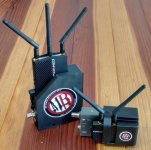
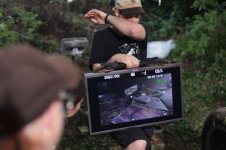
Indy feature christmas tree

morgan_moore

Major Contributor
For the amusement of folk.

im setting up for an indy feature. Using my kit and the kit of a chum.

We desire to send an image to the scripty and then to a handheld unit for the director.


Some facts..
Animom is HDMI
Holyland is HDMI
Parralax is SDI
Atem switcher is HDMI
Parrlax overheats when in portabrace monitor box
Decimater takes SDI to hdmi

So..
Parallax arrives, into decimator, delivering hdmi into atem
Animom delivers HDMI into atem
Atem feeds A B or A and B into the Atomos
Atomos feeds out to Holyland
Holy land receives and feeds to tvlogic

Everyone smiles!

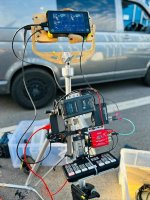
Its sitting on a manfrotto stills tripod which will be lighter/more stable/more adjustable for shooting in the woods.
If we were on a hard floo id use a wheeled stand.
 

Attachments

  • 8356b51a-1c21-4027-8f47-593f352640bd.JPG
    8356b51a-1c21-4027-8f47-593f352640bd.JPG
    76.6 KB · Views: 0
Well, once I manage to parse out what all these items are (Parralax/Parrlax/Parallax = huh?? Oh yeah, Paralinx), it all makes sense. This is essentially the same signal flow I've used for years, which basically boils down to:

camera --> transmitter --> receiver --> quad device --> 2nd transmitter --> receiver --> director's monitor displaying quad split (2, 3, or 4 cameras).

The main difference is that while I have also ATEM switchers in my systems (currently the 1 M/E Constellation HD), I use those for switching for my reference monitor, plus bringing up frame grabs and sometimes live comps. I don't care for the lack of configuration options with the ATEM Multiview (I recognize that busy jumble on the Atomos monitor above), so I use a Decimator DMON or MD-Quad for the quad split itself.

The smaller of my two carts packs the switcher, quad, and a variety of other boxes into a flight case with patch panel, which then acts as ballast for the cart to offset the top weight of the monitor. If I have to go more portable, such as a command center in a follow van, I take the case out and stash it under the seat with a USB control stick to change sources and a laptop for more intricate controls.

Click image for larger version  Name:	newcart Large.jpeg Views:	0 Size:	45.5 KB ID:	5705496

Using a Connex transmitter for the secondary quad transmission, on most jobs I am generally broadcasting that signal to:
1) Director's on-set monitor (Atomos Sumo 19)
2) Director's handheld monitor (Feelworld 10")
3) Crew monitor (55" LG TV)
I also have a 32" TV with the fourth receiver on larger jobs as an overflow monitor.

If with a small crew traipsing through the forest like you are doing, I'd be stripping back to a smaller version of this, of course. I think my version of your all-in-one would have the receivers at the top on a mast (the higher they are, the less likely to have signal interference) and I'd probably be trying to give the script supervisor a larger monitor because a quad on a 7" is a tough image for them to work from (hard to see details), but I understand the need for portability so there is a tradeoff there.
 
paralytic sender is the new official title.

'are we using the paralytic or the terrible deck' ?
 
Last edited:
Its a good hint on high receivers.

in terms of atem quad view being sh_it for two cams you are correct.

i see it more being flicked between A and B with the quad view rarely used. thats better than no vision on B cam.

B (the a7s) will come to the fore with the vehicle INTs.. where A will not be playing.

I do have a bigger monitor than the atomos - but its a consumer tv or a 2008 tvlogic 27in

both larger monitors have battery power problems but can be used on mains if available

Best maybe have that on seperate combo ready to show if the producers stroll in with a latte.

The DP doesnt want producers seeing non lut images - which is fair.. but alittle beyond the scope of this setup.
 
So ive spent 2 weeks in the woods.

The grown ups wanted to add a big telly when mains was avaialbable.

This involved two more boxes from redbyte

the first consumer telly crapped out on 24p (23.98)

another consumer telly arrived and it is cool sitting on my mega apple box (ppe waterproofs box)

Production are too stupid to switch between A and B so really have not seen the pure gold im squeezing out on the bcam.

As we are levaing the mains Im gonna strip it back and try and make something more nice for A only.
 
As a side note the shogun/a7s HDMI world has been a worse world of sh_t than the world of shi_t that I thought it woud be. Folks like bloom/undone who suggest these toy cams can go on a professional set need a dose of how it actually is.

But 12,000,000 iso (what the director and I call it) is pretty foooking cool - better than the antique FX9 by a stop or two.
 
So ive spent 2 weeks in the woods.

The grown ups wanted to add a big telly when mains was avaialbable.

This involved two more boxes from redbyte

the first consumer telly crapped out on 24p (23.98)

another consumer telly arrived and it is cool sitting on my mega apple box (ppe waterproofs box)

Production are too stupid to switch between A and B so really have not seen the pure gold im squeezing out on the bcam.

As we are levaing the mains Im gonna strip it back and try and make something more nice for A only.

Redbyte?! Are you using 1st Gen Decimators? They haven't used that company name for close to 15 years!

Surprising to hear you were having issues with 23.98p, most TV's can handle that since that is within spec for Blu-Ray and streaming sticks depending on settings and source material. Any chance it was 23.98psf? That godforsaken format is still a thing. I find the most helpful box to have in the kit is the Decimator MD-HX which can deftly convert a psf signal to normal progressive, as well as any other kind of standard conversion to make consumer TV's happy.

Not suprising to hear that your switcher isn't being actively used. Producers don't think about pushing buttons. Some directors do. I either provide a separate monitor for each camera in use or the quad split, and will switch the quad to single camera mode if only one is playing at a time.

For the MD or DMON Quad boxes, which again are much preferable to the ATEM quad because of their flexibility, a completely customizable presentation of each source in terms of positioning, borders, size, etc...a two-up display can be centered, stacked vertically or side by side. UMD's allow for the operator and AC's names to be added below each source. I use a hardware switcher to change between sources and the quad output:
Click image for larger version  Name:	decimatorremote Large.jpeg Views:	0 Size:	54.5 KB ID:	5706268
 
As a side note the shogun/a7s HDMI world has been a worse world of sh_t than the world of shi_t that I thought it woud be. Folks like bloom/undone who suggest these toy cams can go on a professional set need a dose of how it actually is.

Because of the HDMI, or other reasons?
 
The DP doesnt want producers seeing non lut images - which is fair.. but alittle beyond the scope of this setup.

In case you weren't familiar with them, the Blackmagic SDI to HDMI converters have the ability to add a LUT on output, which is handy when using consumer TV's. The fullsize converter can do 33 point LUT's, the micro version 17 point which is perfectly fine for monitoring. Requires a laptop to load onto the converter, so really only practical if one isn't expecting to change LUT's regularly throughout a show.

I have Micros on all of the consumer TV's I use on set and with my Amimon Connex receivers, although have never needed to use the LUT function. I used to use Amazon cheapie converters but after experiencing enough failure, I spent the extra money (it's not much) on the BM's. For bidirectional converters I use the Decimator MD-LX, although the BM one is fine too.
 
I use my sdi to hdmi 'decimator' bought in years of old in front of my animon where required. this is probably an actual 'redbyte decimator' - and the language ive applied to all further red boxes seen on set.

Genius Joe (and google) had to wongle some micro switches to get sound.

When the TV1 didnt work and TV 2 turned up one of the producers turned up with two more red boxes.. much newer.. I dont know the official title of them.

===

Yes I did suggest that the fx9 might be pumping Psf. and that was the problem not 24/23.98

It also might be one of the other boxes in the chain that would not buy psf not the telly.

The spec had grown by that point to to telly for the easy up and handheld for the director by this point.

Of course using a TV also involved me getting a vesa plate on amazon having 'Hugh' drill it to match my baby plate and make the tv 'set ready' and eat a combo stand. (I boycotted this and tv2 went on a random box)

----

toy camera HDMI.
You lose signal.
Is the camera connector bust.. or the south end of the lead or the north end or the input to atomos? Or are some settings wonk?

On a live set there is no chance to answer that. My theory is that bigger cable just fall out with thier own weight (i did build a cable jam thing but it clashes with the ronin)

It seems that onboard screen and HDMI functioning at the same time are not to be assumed on the a7s. a menu dig from Joe of the digital age is needed.. and if you are rolling you lose a couple more modes.

Oh ? during playback ? Of course not. Whoever would have wanted the HDMI to work in playback.

Maybe you get playback in 5.5k but not 4k or 6k. or 60p or maybe you never get playback or maybe you get playbck on Thursdays. Or Hanuka, or like B+H playback stops for Hanuka. Ask Gerald or Phil who should put this stuff in red letters at the start of any review.

Sony how do you change focus mode? Or overrid it mide shot ?

To be fair with my c200/r6 its taken mea year to know this stuff.

Sony a7s.. Its just a world of sh_t

--

Indeed I did expect the true value of hitting 2 and seeing B would be when A was not in play. B did many car INTs that fx9/vlock would not fit into.

Ulitmately one technical prep day, without 'the TV' and without 'the soundie' were not enough

--

my c200 on the jib I build with SDI into my SDI feelworld monitor.. frucking perfection
 
Last edited:
HDMI is indeed a shizzleshow. My preferred way of dealing with it is to convert to SDI as early in the chain as possible (I have an A7 myself that comes out for the odd thingie on set). I'm assuming the Shogun is doing the primary recording from the camera, not internal? So you are stuck with that.

As we are now well over a decade dealing with this awkward paradigm, I think back to early conversations I had with the Convergent Design folks when they were coming out with their ultimately revered Odyssey recorder. I had one of their old Nanoflashes and I thought it was a bad idea to combine the recording with the monitor in this way, because it would leave the critical cabling vulnerable to getting knocked around as the monitor is adjusted and swung about on the camera during the shooting day. To me the recorder should be in a fixed position behind the camera, with the cabling protected, to ensure nothing can interrupt the recording, and the onboard monitor should be separate. Of course I was completely wrong about this as far as what became standard (are there even any highly capable onboard recorders that aren't recording monitors these days?!), but the problem still persists, especially with HDMI.

Another idea I had that I pitched initially to Canon reps (when I was immersed in the 5DMKII and 1DMKIV) and later their Sony counterparts with the A7 series: if you are going to make a camera that is intended to be used for serious video acquisition, how about designing it so that it has an optional snap-on SDI converter module that powers off the camera body. Once again, deaf ears.

The best thing to do with HDMI is to bury the HDMI port and connector inside a housing that converts it to SDI. Sam I think you've seen my old Connex rehouses I had made years ago--they are fairly bulletproof.

connexmini.jpeg
 
Joe handholding the TV on one setup. Those with eagle eyes will note..

-he is flipping the TV to get the image the right way up
-in the background is my militarty grade ipad to cstand setup.

We are at 12 billion ISO which is pretty handy with the F64 probe lens which is on my dolly
 

Attachments

  • joe.JPG
    joe.JPG
    90.7 KB · Views: 0
Last edited:
THe plan was to record on the atomos V. - as bigged up by Gerald and the pixel peepers.

I said that was too sketchy and some (not enough) cards were bought.

The sony was used for bonnet mount work and moutning the atomos would be too much.

Apparently the Sony needs sxxgxxpl cards to record in 6.7k at 14p and they are $900 each for 8 mins of record time. They are out of stock everywhere apart from B+H which is shut for Hanuka and on the wrong side of the world.

--

I have alyways had a theroy that 'pro' dslrs should have a screw on box (like a battery grip) with mini XLR and sdi and maybe raw recording (beating the red patent)

deaf ears indeed.

--

Yes getting SDI early in the chain is ideal.. but both my animon and atem are HDMI, the atem was bought for doing zoom in lockdown,, not flinging around a forest.

--
My own animon has a metal box and the HDMI is good

I love your boxes and now I own a 3d printer am in the position to copy them :)

Apart from shooting features keeps getting in the way.
 
Last edited:
Redbyte?! Are you using 1st Gen Decimators? They haven't used that company name for close to 15 years!

Surprising to hear you were having issues with 23.98p, most TV's can handle that since that is within spec for Blu-Ray and streaming sticks depending on settings and source material. Any chance it was 23.98psf? That godforsaken format is still a thing. I find the most helpful box to have in the kit is the Decimator MD-HX which can deftly convert a psf signal to normal progressive, as well as any other kind of standard conversion to make consumer TV's happy.]

So…. I just received my Alexa 35 Thursday. Before I went out of town for a shoot this weekend I got to play around with it for a few hours before I left. Believe it or not, in the SDI menu(in a cam introduced in 2022) you can choose to output PsF(!).
 
For sure. You can take your arri and feed into some show that has some workflow from a decade ago or hook into some virtual stage from next year.

My minimal arri experience is that it works as one would expect.

Everything is supported in all frame rates and modes.


With arri there is no 'the monitor goes off if you are in S+Q but comes back on if you move to 3.9k'
 
On the Connex SDI thing...for my Phonemitter product I went a cheaper route with the receiver, using all stock bits off Amazon, no machining or printing required. Receiver and BM converter are dual-locked to a cheese plate with gold mount on back and baby receiver for mounting on a stand. Click image for larger version  Name:	phonemitter rxblack master.jpeg Views:	0 Size:	39.2 KB ID:	5706299

Which "metal box" did you get for the transmitter, was it the Camera Motion Research one? I had a couple of housings made for HDMI applications and wanted to go a different route than theirs, instead of a bigger flatter footprint I went smaller but chunkier.

Click image for larger version  Name:	connexrehousecomplete.jpg Views:	0 Size:	62.8 KB ID:	5706300

I have so many Connex sets at this point, I've sort of lost track. Something like 5 transmitters and 14 receivers!
 
My metal box is homebuild by me and the chap who left me after being poached by Boeing.

Hdmi in to HDMI splitter powered by 14.4 to 5v buck converter, to hdmi ribbon which feeds animom and regular hdmi out for make operator monitor.
bpu battery plate and Dtap input.

all in a milled down metal box design to be robust and light on a steadi/gimbal.

female arca means it is ready to move between devices.
 
The best thing to do with HDMI is to bury the HDMI port and connector inside a housing that converts it to SDI. Sam I think you've seen my old Connex rehouses I had made years ago--they are fairly bulletproof.

Do you not like using HDMI with the rx/off camera monitors for the same reasons you don't like using it with the tx i.e. SDI is the superior connection for what you're doing?

If you convert the tx to SDI do you have to also convert the rx to SDI or is it possible for the tx to be HDMI while the rx is SDI?

I just saw the CMR accent line. Re transmitters, the on/off and lemo switches are nice but it's a shame there's no SDI modification. I agree that your smaller/slightly deeper footprint is more in line with keeping the tx feel tiny.

My bare bones CMR kit leaves the HDMI at a right angle, which is one of the reasons why I mounted it at the front of the top handle - to let the HDMI cable require fewer changes in direction.
 
Last edited:
For sure. You can take your arri and feed into some show that has some workflow from a decade ago or hook into some virtual stage from next year.

My minimal arri experience is that it works as one would expect.

Everything is supported in all frame rates and modes.


With arri there is no 'the monitor goes off if you are in S+Q but comes back on if you move to 3.9k'

Yeah, it's just an output option, not it's only format, so that it can work in a multitude of workflows/monitoring situations. You can change the SDI outputs from 1.5G all the way up to 12G and there are multiple permutations of each of those. It even has looks and CLOG 4 monitoring options that are optimized for wireless video.

I just thought it was ironic as Charles had just mentioned PsF, which we can thank Sony and the technical limitations of the day for (late 90's/early 00's). And like other workarounds for limitations and to make things work with existing standards and equipment (like fractional frame rates were), we may be stuck with PsF for far too long, as well.
 
Do you not like using HDMI with the rx/off camera monitors for the same reasons you don't like using it with the tx i.e. SDI is the superior connection for what you're doing?

If you convert the tx to SDI do you have to also convert the rx to SDI or is it possible for the tx to be HDMI while the rx is SDI?

SDI is just better in all directions--stronger, more reliable, more resistant to taking a bump and it locks. It's been an industry standard for decades for a reason!

I mix and match the conversions depending on which configuration I'm using. The signal going into and out of the Connex is always HDMI one way or another, regardless of what conversions occur surrounding it. In the case of the Phonemitter, it's Lightning port out of the phone into the Apple AV adaptor which puts out HDMI, then into the transmitter. On the receiver side, converted to SDI as seen in the pic on previous thread just to dovetail with typical signal flow, but it's easy enough to unplug the HDMI from the converter and run that direct into a consumer TV if desired.

I just saw the CMR accent line. Re transmitters, the on/off and lemo switches are nice but it's a shame there's no SDI modification. I agree that your smaller/slightly deeper footprint is more in line with keeping the tx feel tiny.

My bare bones CMR kit leaves the HDMI at a right angle, which is one of the reasons why I mounted it at the front of the top handle - to let the HDMI cable require fewer changes in direction.

The CMR folks did a decent job with their kits and parts, I use a bunch of it and we have kept in communication throughout. They do have (or used to) a conversion kit that does something similar to my Phonemitter receiver--Blackmagic converter mounted atop the Connex units with an inline voltage stepdown cable for the converter, using their proprietary batteries.

The Connex is discontinued at this point, new units are floating around here and there but not for long. It was surely part of the plan when they were swallowed up by Vivendum. Teradek was never happy about that product line.
 
Back
Top