Improved speed on new Mac Pro?

blando3

Well-known member
I do regular videos for a client that are about 40 minutes long and involve lots of JPEGs as well as 1080 video. On my current 2008 Mac, every time I move a JPEG around in my timeline, it gets the progress bar for about 5 seconds as it prepares the video for display. It's incredibly tedious and very time consuming over the course of a day.

Will the new Mac Pros still do this? I know they're quite expensive, but I'm willing to pay extra for the convenience of speed and real time rendering.
 
I've worked with Jpegs on my late 2009 quad core iMac and I don't have rendering waits so any new imac or MacBook Pro should be able to handle it!
 
I have 8GB RAM, and the NVIDIA GeForce 8800 GT.
If I were to add more RAM, what's the max that will be of use in this machine?
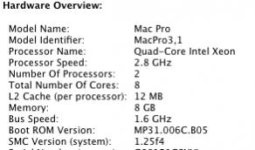
I've attached a screengrab of the tech specs...
 

Attachments

  • Screen shot 2014-02-23 at 6.04.35 AM.jpg
    Screen shot 2014-02-23 at 6.04.35 AM.jpg
    11.4 KB · Views: 0
Yeah, that's what I've been reading. 7 is being phased out slowly, isn't it? Any point in buying a system based on the fact that I have 7, or should I look forward and buy something optimized for X, which everyone will be switching to eventually anyway?
 
Will the rest of Final Cut Studio still work if I switch to X? I use DVD Studio Pro, LiveType and Motion on a regular basis.
 
A new iMac might outperform your current Mac pro. The new Mac tube will certainly outperform it.
 
I just upgraded a 2008 Mac Tower for a client. Go to ebay and buy 16gigs of RAM for your 2008 3.1 computer. ( 4 sticks of 4gigs). Did you upgrade to the lastest OS, Mountain Lion? DON"T upgrade to Maverick yet, it still has some bugs. After the lastest Mountain Lion, you can use ANY Gforce Graphics card. Go to NewEgg, and buy a GFX760 or 770. They have a lot of sales. Getting pretty cheap. You won't see the 1st bootup on your screen, but the computer will open your workng screen. Clone your main Mac drive with the OS to a SSD. You'll see plenty of speed.
 
Back
Top