Importing .mts files into fcp 7? Log & transfer won't work

GRENCH

Well-known member
I am having major trouble importing .MTS files into FCP 7.

Here are the instructions I followed below.
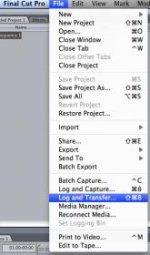
"The best method of doing this is to use the Log and Transfer window found in the File menu of Final Cut Pro."
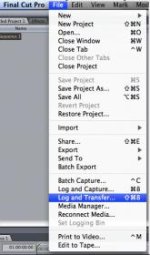
Screen shot 2011-07-03 at 8.07.36 PM.jpgattachment-1.jpg

"In the settings menu ensure that Final Cut will convert AVCHD footage to ProRes."
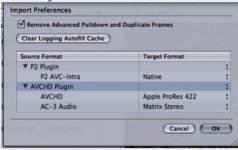
Screen shot 2011-07-03 at 8.05.36 PM.jpg
"Apple have designed the ProRes codec to work quickly and easily with Final Cut.

When your camera or card is connected you select it in the Log and Transfer window and it will display the files present. You can then select and transfer the shots you want to use. This method is pretty quick and also allows for renaming clips, adding meta data and placing In and Out points to select ranges for import.

FCP even remembers the footage that you have transferred for reference later."

When ever I go to import my folder it reads my files are unsupported. Screen shot 2011-07-03 at 7.34.13 PM.jpg
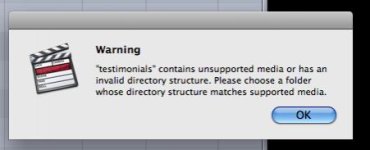
I'm sure there is something I'm missing here. Your help with this matter will be most appreciated
 

Attachments
  • attachment.jpg
    attachment.jpg
    10.2 KB · Views: 0
Last edited:
Make sure you copy the entire contents in the folder and not just try to select the actual files. Sucks the way Apple wrote this but hey at least were not stuck with Fcp x.
 
Sorry. Maybe I need to explain. I have a client who sent me the footage on a flash drive. The flash drive contained 17 .MTS files (footage). I took the flash drive and copied all 17 files to a folder on my desktop. I then opened FCP 7 and attempted to log and transfer the .MTS files.
 
Won't work. You need all the files created. Use a 3rd party app like stream clip to transcode your mts files.
 
Wow! I was affraid of that. I tried MPEG Stream clip and it didn't work. Is there a program that I can download that someone has used to convert .MTS files?
 
Thanks Kevin. I checked out the link. It didn't seem to list the .MTS format that I am converting from. All these different codecs and file types comfused the hell out me at times.
Here is the supported cameras it supports.

http://www.shedworx.com/supported-devices


Maybe I'm missing something.
 
Hmmmm it's been a while. When I first purchased my NX5U I put it through some tests and I thought that was one of the apps that allowed solo mts files. I know on the pc you can do this all day.
 
What camera are you shooting with?

I can L& T footage from AF100 and GH2 with FCP7.

You need to transcode the footage in L&T.

You do not import the .MTS files.
 
What camera are you shooting with?

I can L& T footage from AF100 and GH2 with FCP7.

You need to transcode the footage in L&T.

You do not import the .MTS files.

That's just it. I own an AF100 and for that I use log and transfer to convert and import my footage. But the footage I'm trying to import didn't come from my camera. It came from a client who had it shot else where. The files were then delivered to me on a flash drive. All that was on the flash drive was the .MTS footage files and nothing more. Based on what Abu told me and I quote
Won't work. You need all the files created. Use a 3rd party app like stream clip to transcode your mts files.
I will need a 3rd party converter to convert this footage, but MPEG STREAM didn't work. Now my question is what 3rd party program could I get that would definitely solve this problem?

Thanks
 
That's just it. I own an AF100 and for that I use log and transfer to convert and import my footage. But the footage I'm trying to import didn't come from my camera. It came from a client who had it shot else where. The files were then delivered to me on a flash drive. All that was on the flash drive was the .MTS footage files and nothing more. Based on what Abu told me and I quote I will need a 3rd party converter to convert this footage, but MPEG STREAM didn't work. Now my question is what 3rd party program could I get that would definitely solve this problem?

Thanks

Ah Ha - OK I understand.....What kind of camera shot the footage?
Premiere CS5 can take raw .MTS files.
If you don't have maybe you can find a post house
that does?
 
I do have access to premiere CS5. I have never used it but I'm sure it's not rocket science. Thanks HVXguy! Will let you know how it goes tomorrow.
 
I had the same problem with both NX5U and HMC150. I had to purchase Clipwrap online. It's simple to use and no loss of detail. Hope this helps.
 
Back
Top