I'm so confused and Resolve is kinda pissing me off.

I run Resolve 16.2 current release update on an I7 6750M processor with 16GB ram and a 3GB Nvidia 970m GPU.
Runs most HD/2kDCI formats fine, though grading nodes with noise reduction won't play real time. NR can be turned off after dialing in the settings you want until final export. It will run 4k-6k Redcode in realtime at 1/4 to 1/8 resolution. Runs Braw up to HD/2k fine. Runs CDNG HD/2K real time up to 24fps. Adequate for what I use it for. Highly compressed AVC or HEVC formats are much more CPU and ram intensive to decode than DI formats. I-frame codecs like XAVC run better than interframe compressed versions.
I only use Resolve for raw processing and color grading to produce DI masters for editing. Don't edit with it or do any audio except for exporting original media imbedded audio tracks. Cineform and Prores HD/2K at HQ level run quite well, even make 4k editing possible, but mostly with this level of hardware you would use proxies for 4k and up editing anyway.
My preferred editor has been Lightworks since 2010 first release. Switched from Premiere, never looked back. Only editor that doesn't lock you into the traditional two window preview/program layout that is a relic of broadcast linear tape editing days. Lets me work the way I think with a flexible multi-window film editorial paradigm created by feature film editors.
 
Well to be fair, I said your statement was naive, not you are naive. I don't know you, other than your posts and you seem to be a pretty knowledgable DP. My point was, you cannot edit in FCP X because you choose to not learn it. I co-founded the Los Angeles Final Cut ProUser Group with Michael Horton, the largest FCP user group in the world. I have been on FCP since it was beta from it's PC originated MacroMedia design. I sort of switch around from not editing for months to lately under Quarantine, where I have been editing a lot more than shooting, so while I wouldn't consider myself a pro video editor who only edits for a living, I get pretty deep with it and I've used AVID, FCP, lately Resolve and Premiere for decades so I've been down the road with all four. FCP X, when it came out, I felt the same way, it was uninutitive, the trackless editing and magnetic timeline were frustrating. Like many here, I stayed on FCP 7.1 for waaaaay too long, when it had been EOL for years. To be fair, the early versions of FCP X were a mess. That's where incorrect perception many editors express came from, they tried it back when it first came out and I will concede, it wasn't very good. But the FCP X of today versus five years ago are basically two different programs. Apple really listened and invested in updating the heck out of it with most, not every feature that pro editors were demanding.

The issue for most editors today in trying it or switching to it is, they think FCP X should function the exact same way all other editing system have since the dawn of the NLE and it simply doesn't. It uses a new paradigm. Pro editors HATE change. Embrace it and you'll go back to any of the other three and almost laugh out loud at how "linear" they are because of the inherent limitations of their three window, outmoded interface and workflow. It's not that AVID, Resolve and Premiere are bad, they are all great tools, but they are outdated while FCP X is literally the future. The other three just slow you down to a crawl with all of the different things you have to click on, how many mouse strokes it takes to achieve an operation you do often and the limitations of their outdated overall workflows.

I still contend that any person can sit down with an instructor or good tutorials for anywhere from a day to three days and they can FLY on FCP X. People just refuse to invest the time to do so, then say it sucks. IMHO, that viewpoint is naive. It's no different than going from an Arri BL4 to an C300 MKII. They just work in radically different ways to accomplish a similar end result.
And if you had only operated or AC'd film cameras, you could probably learn to operate the C300 MKII really quite well in less than three days. Then you would marvel at the ease of use, speed, size, weight and sophistication that the C300 MKII offers that simply is impossible with the BL4.

It's weird, I'm one of the few editors I know who basically can edit on anything, I don't really care which tool I have to use to edit a project and I can use all of them, at least to a certain level, some faster/better than others. Most people seem to get very religious about their choice of editing program,
it's my way or the highway and all other choices suck. To me, especially if you are a pro editor, is costing you money because you only know one or two of the top four software. Every person who edits should watch Off The Tracks https://www.youtube.com/watch?v=bfII0EcbCsg If you do, it will all begin to
make a lot more sense of why FCP X is the way it is and how it is one of the most brilliant strategic moves in modern software history. Rnady Ubillos is a genius and the reasoning behind it is quite brilliant. You may not like it, but you'll at least understand the long term strategy behind it.

It's actually easier for newbs to learn FCP X than experienced editors because experienced editors try to make it function like AVID or FCP 7.1 and it simply won't. The standard put down when FCP X first came out was that it was iMovie Pro. And that's funny, because FCP X IS iMovie Pro, Apple and Randy Ubillos (The guy who invented Adobe Premiere, who also conceived the FCP and then FCP X interface design) designed FCP X to be super easy for new editors to learn. And it is much, much easier to learn than Premiere or AVID.

There are things that make each tool great:

FCP X - speed, metadata implementation, data driven workflow
AVID - ultra reliable, simple, best shared workflow of any of the four
Premiere - Seamless, effortless, integration with AE, Illustrator and Photoshop
Resolve - Only system that let's you choose between two editing paradigms, Color page, Fairlight Audio, Fusion, constant updates

And there are plenty of drawbacks to each too, of course.
I feel I should reply, since you quoted me, but I'm not sure you are talking to me.
 
My preferred editor has been Lightworks since 2010 first release. Switched from Premiere, never looked back. Only editor that doesn't lock you into the traditional two window preview/program layout that is a relic of broadcast linear tape editing days. Lets me work the way I think with a flexible multi-window film editorial paradigm created by feature film editors.

Wow I don't think I've even heard of Lightworks before. Interesting. Looks like they charge you monthly though. Not for me, having finally unshackled myself from Adobe extortion.
 
Light works has been around about the same amount of time that Media Composer has been around, lots of big movies and awards.
 
Just for a lark I decided to install the 90 day FCPX trial I've had on my hard drive since April. Just to give it a more recent demo.
Wanted to see if I could import one of my Premiere Pro timelines into it. Turns out you can't just export the XML from Premiere, you have to either run it through some $10 convertor I wasn't going to buy since I'm just trialing FCPX right now. The other option, funny enough, is to run it through Resolve and convert it. Which I decided to see if it would even install on my Mac Mini, even just to do that XML conversion, and surprisingly, it did. I'm not sure why it never did before, I could have swore it stopped me at some point saying I didn't have a proper GPU, but maybe I had just stopped myself. Not entirely sure, it's been a few years since I last tried.

That said it was crashing a lot. But I also had FCPX and Premiere Pro running at the same time. Though neither of those were crashing.
Also this whole cross importing thing is a nightmare and just not worth it I don't think. So much missing stuff.

Still, at least I have all three on my machine now and can give them a good run through.

Initial Impressions:

FCPX
Still fast
Still can burn Blu-rays. Yay! Though it would be nice if I could burn 4K Blu-rays.
I like all the built in FX, but it does make it feel kind of iMovie Pro. Like a $99 program instead of $299. But I kind of like it for that. I could see myself picking up a copy of this just to edit home videos and burn Blu-rays of them while still using Premiere for my pro work. It's an idea.
Very confusing to figure out simple things like just dragging the audio down from clips or zooming in and out on the timeline.
There are no adjustment layers?!!! What!! I found an outside app for that but that seems like a pretty big missing feature. In fact it feels like there are a lot of little things missing.

Resolve
Haven't messed with it too much yet. I'm going to have to try it more. Running solo.
Crashed a lot on this system. That doesn't make me feel great. Although I'm shocked it's even running at all on this machine. Still it worries me that it's going to bog down any system I run it on, even a fresh new PC build.
Seems fairly intuitive on the timeline but I was having trouble trying to figure out how to resize a clip that ended up shrunk on import. Everything else is still alien to me.
 
Your GPU was indeed too old to work at that time in that version, but the hardware requirements changed as they continued to develop the software.

If you choose FCPX, spend an entire year with it day-in and day-out before you make any conclusions about it.
 
Forgot to address your notes...

(1) The built-in effects, generators and titles are for fun; some are better than others. Many choices. You will learn how they all can work together. 3rd party plugins and Motion unlock greatness.

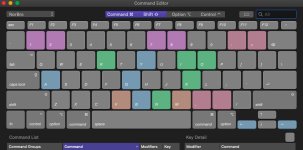
(2) Easiest way to "drag" the audio from clips is to program a shortcut command in the command editor for "Connect Audio Only To Primary Storyline".

In my workflow, this task is assigned to: Shift + Q (the modifier and the key). You don't drag anything. You select a clip in the browser and press the command (in this case shift + q) and it will appear in the timeline. How and where can also be arranged.

(3) Timeline. Again, command editor. You can press letters, numbers, characters, whatever to zoom in & out of the timeline. There is also a film strip icon above the VU meters to change the appearance of the timeline. (Familiarize yourself with all of these icons.)

(4) Of course there are adjustment layers. What would you like to adjust?

(5) Almost anything you think is missing is probably not missing. Just different.

___

You're going to have to spend years to master this software. Apple was ahead of its time. FCP X was very misunderstood because most digital editing brains in 2011 didn't work how they eventually would years later (with other advanced software, hardware, devices, social media, everything).

Anyone who thinks they know everything about FCP X doesn't.

Once you understand Apple's thought-process with it, there are thousands of things you can do to make your overall editing experience easier.

It's only when you're typing to edit your videos and never have to take your hands off the keyboard is when you've obtained a grasp of the potential of FCP X.

Command Editor.jpg
 
Forgot to address your notes...

(1) The built-in effects, generators and titles are for fun; some are better than others. Many choices. You will learn how they all can work together. 3rd party plugins and Motion unlock greatness.

(2) Easiest way to "drag" the audio from clips is to program a shortcut command in the command editor for "Connect Audio Only To Primary Storyline".

In my workflow, this task is assigned to: Shift + Q (the modifier and the key). You don't drag anything. You select a clip in the browser and press the command (in this case shift + q) and it will appear in the timeline. How and where can also be arranged.

(3) Timeline. Again, command editor. You can press letters, numbers, characters, whatever to zoom in & out of the timeline. There is also a film strip icon above the VU meters to change the appearance of the timeline. (Familiarize yourself with all of these icons.)

(4) Of course there are adjustment layers. What would you like to adjust?

(5) Almost anything you think is missing is probably not missing. Just different.

___

You're going to have to spend years to master this software. Apple was ahead of its time. FCP X was very misunderstood because most digital editing brains in 2011 didn't work how they eventually would years later (with other advanced software, hardware, devices, social media, everything).

Anyone who thinks they know everything about FCP X doesn't.

Once you understand Apple's thought-process with it, there are thousands of things you can do to make your overall editing experience easier.

It's only when you're typing to edit your videos and never have to take your hands off the keyboard is when you've obtained a grasp of the potential of FCP X.

View attachment 139529

What NorBro said, especially number 5. I couldn't agree more about keyboard commands, it should be the goal of every
editor to use the mouse as little as possible, regardless of the platform/editing software, as it just slows down your editing.

Standard mapping to Magnify timeline is Command plus or minus key to zoom in or out. JKL is standard mapping from every other program. I/O is I and O like every other program.
Nudge is simply the arrow left or right key, which is actually much better than FCP 7.1 which took two keys. And of course you can custom map any of the keys to whatever you want
if you want to go off industry standard. I don't because I jump around different editing programs and it's easier to just keep things standard.

You might want to take a look at two articles/reviews I've written about Resolve
an overview here https://www.hdvideopro.com/workflow/software-and-plugins/blackmagic-design-davinci-resolve-15-1/
and HD Video Pro will be publishing my in-depth hands-on review soon called "Editing with DaVinci Resolve 16"
but they haven't yet posted it to the website.

I really like editing with Resolve. It's slower and clunkier than FCP X, but the new Cut page levels that playing field if you
are in a hurry. it's color correction and grading capabilities are far superior to our FCP X Color Wheels
and Fusion, if you invest the time to learn it, has much more sophisticated compositing and graphics abilities than Motion 5.
 
It's actually easier for newbs to learn FCP X than experienced editors because experienced editors try to make it function like AVID or FCP 7.1 and it simply won't.

My Mom recently bought an old iMac that has FCP X installed, and I guided her through the process of making cuts, but I couldn't for the life of me figure out how to do a custom export out of Compressor. I'm by no means a pro editor, but I'm not a novice either, as over the years I've edited projects in iMovie, FCP, Premiere, and Resolve.

FCP X wasn't intuitive for my Mom as a beginner, and it was completely antithetical to everything I knew from other NLEs. My Mom uses Indesign and PhotoShop on a regular basis, so she's far from a Luddite who doesn't want to use software. It's probably fine if you're starting from scratch and have a training course to guide you through the precess, but it would be very hard for me to switch from a traditional NLE.
 
...but I couldn't for the life of me figure out how to do a custom export out of Compressor.

Not that it really matters, but just curious (if you'd like to share)...what kind of custom export out of Compressor?

Did you at least send the project from FCP X to Compressor using 'File --> Send To Compressor'?
 
Yes, I sent the project to Compressor, but it only had generic presets, and I wanted to export HD H.264 at 25 Mb/s (the source file was UHD 100 Mb/s, but I needed to reduce the file size and leave some headroom for potential edits by the recipient).
 
Common request...highly popular.

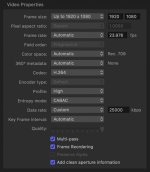
It's in the 'video properties' section. You change the 'data rate' to 'custom' and then type in your number.

Data rate.jpg
 
Is it the same method in Compressor 4.4.3? I didn't see anything that said "video properties", how do I access it? I find Resolve's Delivery page very intuitive, and Media Encoder makes sense as well.
 
It's been the same for 10-12 years, but the terminology and location may have changed (IDR).

But you always had to manually customize it.

Press ⌘4 to open the inspector window and you'll see everything there. The three tabs up top - General, Video, and Audio - control everything. (I can take screenshots, but I'm sure you'll find it right away.)

Click the setting preset that you have applied to your video to change settings in those tabs above for that preset. You can apply multiple presets with custom settings for batch exports.
 
So just a quick update. I've been playing with Resolve a bit more. Running a lot smoother with just it going and not FCPX and PPCC at the same time. As to be expected. No crashes yet even on my Mac Mini.
That said, I also installed it on my 2017 15" Macbook Pro just to have there as well, so I can play around with it. Since there is a free version.

So far I'm liking it. It's not radically different than Premiere Pro, at least in terms of the basics. Still has multiple timelines and adjustment layers and all those things. It's just a matter of finding everything and learning it.
I managed to export one of my PPCC timelines to a couple of ProRes files. One for the interview and the other the b-roll. No music or lower thirds. Then imported them in Resolve and used the automatic scene detect to cut the b-roll clip into multiple clips and reassembled all of it on a timeline. Worked like a charm.

I'm still going to mess around with FCPX as well. But at the moment, between the two, I'm learning more toward Resolve. I think it's just more familiar to Premiere editors.

P.S. I also watched that FCPX documentary. Pretty good stuff, thanks for linking that Puredrifting.
 
It's just a matter of finding everything and learning it.

Indeed. And don't forget about all of the free training resources that BMD offers. There are whole books to work through that will really make you learn Resolve properly (including downloadable project files). And with the world only moving at half speed maybe now is a good time?

If that is too much of a commitment, at least start by watching their videos on Editing and Color correction.
 
Wow I don't think I've even heard of Lightworks before. Interesting. Looks like they charge you monthly though. Not for me, having finally unshackled myself from Adobe extortion.

They have monthly, annual, and outright purchase licenses. But the free version is fully functional except for being limited to 720p max H.264 exports for YouTube or Vimeo and can be renewed indefinitely. Some people just buy a single month license when they need to export finished projects at higher resolutions.
A British NLE that has been around as long as AVID. Started as a non-linear editor for feature films and still has full edgecode support for negative conforming.

I like the classical flexible layout that lets you place and size content windows, both source material and sequences on an open desktop UI in whatever layout suits. You can have multiple source clips, stills, video, sound, open on the desktop at the same time and multiple sequences too. A sequence that is not in active record mode is treated like a source clip. Timeline rendering is rarely needed except for complex FX sequences. This is what the opening desktop page of a project looks like.

50075946836_b8137b0097_h.jpg


You can set up multiple individual pages in a project to suit whatever task you want to accomplish or just move things around within one page.
 
Back
Top