If your DJI Go 4 App is giving you the dreaded CPU Overload warning...

puredrifting

Major Contributor
A good percentage of DJI Go 4 users have reported glitchy video feeds, green screens and their Go 4 app putting out a CPU Overload message. A few have even had their iPads or other tablets shut down mid-flight. I had my Mavic Pro for a few weeks in the Spring, did half a dozen long flight sessions with no issues or problems. Then in June, I was flying at Long Beach Harbor at Marine Stadium and I began having video glitches and received the CPU Overloaded warning repeatedly on my iPad Mini 4. We have been complaining to DJI in the forums and DJI staff has told us that they know the latest version of the application seems unnaturally ineffective and that it is a glitch in the app. They say they are working on it. Evidently, it is a complex issue that has to do with the application becoming more sensitve to the iPads or other tablets heating up too hot, which is probably why many of us didn't begin seeing this warning until it was June or July, obviously when the ambient temps have gone up quite a bit in the U.S.

It's a multi-faceted issue because the iPads and other tablets have always ran hot, the DJI Go 4 app is taxing on the system but I have a theory that because of the time of year, many of us were getting a pass on overheating because the ambient temps had been cooler. Apparently with the latest Go 4 app update, DJI re-wrote the proram code as to be more sensitive to the overheating issues on the tablets. Many are wishing we could go back to the blissful ignorance of previous versions of the app, but the bottom line is that heat damages things in computers so even if the app wasn't reporting the CPU Overloaded warning, you were still doing tha damage by running your tablet at extreme temps. I did some research and many people experiencing this issue are jury rigging up cooling packs to the backs of their tablets. But this obviously doesn't last long, water can condense as the cold packs discharge and overall, that is just a basic hack way of cooling off the iPad temps.

I stumbled across the X-Naut line of iPad cooling systems so I just ordered one for my iPad Mini 4. It's $179.00 plus tax and shipping for those of us in California so close to $200.00 but if it will let me fly my Mavic without video signal glitches, it will be money well spent. I have it mounted to the tablet arm on my MavMount and will be giving it a try tonight as soon as the Sun gets lower in the sky. I'll report back on my results after I fly it this afternoon. I had to get creative to securely mount this to my Mav Mount arm, hopefully it will stay in place.

https://x-naut.com/collections/all/products/x-naut-ipad-cooler-mini
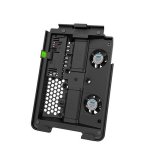
xnautmini_2_5cd538cb-c539-41c8-8c13-0d37f60ca286_2048x2048.jpg
 
It's 87F here and humid with a slight breeze. Just took the Mavic down the road to my favorite practice spot, flew two 20 minute flights with the fan on the iPad turned on, no glitches, freezes, etc. and no CPU overload warnings. I would say this thing does the trick! Didn't want to spend an additional $200.00 but it's worth it to fly the drone without the reception breaking up and freezing.
 
This is interesting. Thank you. I'm using dji app 3.1.11 on an ipad mini 2 (I think) with a phantom 3 pro and inspire 1 pro and several weeks ago started getting the CPU overload message. It started happening during days that actually weren't as hot as previous days I've flown (80s and 90s F).
I don't have any photos or other apps on it except Sony play memories mobile.
It's an annoying problem.
 
This is interesting. Thank you. I'm using dji app 3.1.11 on an ipad mini 2 (I think) with a phantom 3 pro and inspire 1 pro and several weeks ago started getting the CPU overload message. It started happening during days that actually weren't as hot as previous days I've flown (80s and 90s F).
I don't have any photos or other apps on it except Sony play memories mobile.
It's an annoying problem.

Did you download the latest firmware and version? I just did Saturday night and yesterday, I forgot to turn on the fan. Not one error, glitch or CPU overload warning. I am still glad that I bought the fan for my iPad, I will be flying in some more extreme conditions soon but for now, it seems that the new version of the app may have toned down the CPU overload notices? When I had the previous verison of the app, two before this current update, I never had any issues, it worked perfectly. Then I updated the app and that's when the issues began. I have a feeling as the weather begins cooling off in many places in the Fall, this issue will not be happening as much. It seems that the iPad getting too hot is what triggers the warning in the DJI Go 4 app.
 
I'm running older firmware and version. Once I get things working I try to leave them alone and they've been working fine....until just a few weeks ago.

Plus a friend of mine updated his Dji App and P4 and now it will not let him fly more than 100ft away no matter what settings we change and on more than one attempted flight wouldn't let him fly at all due to the new restrictions where you have to go online and get proper clearance through DjI's process, which he did.

So I wanted to leave my ipad and p3 on the old software since it was working fine and avoid these newly imposed headaches....but then the CPU warning started. And what's funny is that I had no CPU warning on the hottest days I've flown. It doesn't make sense why this issue would start much later and on days that weren't as hot, and when I've changed nothing. Same firmware and software I've had for like a year
 
I'm running older firmware and version. Once I get things working I try to leave them alone and they've been working fine....until just a few weeks ago.

Plus a friend of mine updated his Dji App and P4 and now it will not let him fly more than 100ft away no matter what settings we change and on more than one attempted flight wouldn't let him fly at all due to the new restrictions where you have to go online and get proper clearance through DjI's process, which he did.

So I wanted to leave my ipad and p3 on the old software since it was working fine and avoid these newly imposed headaches....but then the CPU warning started. And what's funny is that I had no CPU warning on the hottest days I've flown. It doesn't make sense why this issue would start much later and on days that weren't as hot, and when I've changed nothing. Same firmware and software I've had for like a year

FWIW, I ran into both of these. I bought the Mavic Pro, used it for six flight sessions over two weeks, everything worked perfectly. I then went the following week to Long Beach Harbor and tried to use it, it was glitching and giving me the CPU Overload warning repeatedly. Same thing, I had not updated anything or changed anything from the previous six successful flights, it just started doing it. I strongly suggest you update your firmware and the DJI Go 4 app asap. DJI has been aware that many of us have been enduring this stupid CPU overload thing and they said they were working on a solution. So far, the solution appears to be this latest update.

As far as the 100ft thing, that is because your friend is not signed in to the DJI app probably. I ran into this on Saturday this week, I did one battery, flew out to 1800 feet away, everything worked great. Brought it back home, rested, changed out the battery and same thing, wouldnt let me go more than 100 feet. I researched it and your friend needs to make sure he is hooked up to WiFi if he is using a tablet, and sign out of the DJI app and then sign back in. Some glitch where somehow the user gets signed out of the app, which limits your range and height. I kept double checking to make sure I wasn't accidentally back in beginner mode, I wasn't but it would just stop in mid-air. At home, after researching this, I signed out and signed back onto my DJI account and then went flying, it worked flawlessly once again.

I am afraid that having a drone means you have to be constantly checking, researching and experimenting as it seems as things are constantly changing. Geofencing is getting more restrictive and more and more places are just banning drones, period. All of my county's parks did, the parks commission just arbitraily banned all drones from county parks, which supremely sucks, that was a large portion of why I bought a drone, I wanted a Hawk's eye view of one of my favorite hiking spots, now I am booted out of there. At least I found out that unless otherwise posted, I can fly drones in any State Park. But then I have the jursidictional issues. I thought I could fly at county line down near Malibu to film some surfers and windsailers but I found out that the entire coastline from Oxnard, near where I live, all of the way down to a little gap at Pacific Palisades, is all technically Santa Monica Mountains National Park, no drones are allowed to fly in any National Parks. Sucks. There is a small narrow slice of flyable land in Pacific Palisades, then further south near the Santa Monica Pier, you are in LAX and SM Airport Flight path, which means you have to call the control towers to notify each time you want to fly. Drones are awesome but trying to find legal places to fly is turning into a full time job in itself.
 
Last edited:
Thank you very much puredrifting.
I passed that info onto my friend.
Yeah it seems the drone business is just an ongoing line of problems, workarounds, red tape and issues.
My friend flies much more than I do and told me of a number of things he has had to go through.
On top of all the heavy regulatory stuff there seems to usually be quirks with the units themselves and also the software.
Nonetheless I am still grateful for the drones. We can do things now I couldn't even dream of for many years in this business.
You live where there are some beautiful scenes if only you could fly there.
 
You live where there are some beautiful scenes if only you could fly there.

Tell me about it, it's a bit frustrating. I won't fly illegally, but my options are seeming so limited. I live in the burbs and basically everywhere but one area about 2 miles down the road are off limits for various reasons. Of course, in So Cal, open space is at a premium, there just isn't much of it, the land is worth too much to not develop it and what little there is that isn't developed seems to be either county parks or national park wilderness, both off limits.

Yes, this is my third DJI product. I like their stuff but dealing with their quirks on software/firmware, updates and bugs is a nightmare. Unfortunately, they seem to own the consumer drone space, nobody is making any drones nearly as cool. The Yuneecs are more expensive and have fewer features. The Go Pro drone was a complete bust so DJI seems to dominate. It's kind of ironic that we buy drones for the freedom of flight and unrestricted views we could never get any other way short of hiring a real plane or helicopter, yet the best drones are made and administered by companies from China, probably one of the most restrictive, big-brother societies in the world. I am convinced that any and all of your flight data recorded by DJI is easily available to any law enforcement and the U.S. Government. We now know that the NSA is monitoring this post, every e-mail, text, PM, DM that we make, it would not do to NOT be able to monitor our drone use. But that's the price we pay if we want to fly drones.
 
Last edited:
There's so much more to all of your DJI related issues that most are aware of. The CPU overheat was only partly related to actual heat. From personal experience and research, it was more brought on by the added encryption they put into more recent firmwares, making it more processor intensive. And it doesn't matter whether you authorized an update or not. DJI used a method of pushing through tweaks to their app without letting you know or going through the review and approval process via the app store. Hence why some users were noticing issues all of sudden for no known reason (me being one of them). Without writing a novel here of all the history, there are work arounds to almost anything thanks to a very talented group of individuals. And with a little time and effort, it is possible to bring any DJI craft that uses Go4 back to state where "it just worked". Do so at your own risk. It's not for everyone, but whatever you decide, you at least deserve to be informed.

http://dji.retroroms.info/about/start
 
There's so much more to all of your DJI related issues that most are aware of. The CPU overheat was only partly related to actual heat. From personal experience and research, it was more brought on by the added encryption they put into more recent firmwares, making it more processor intensive. And it doesn't matter whether you authorized an update or not. DJI used a method of pushing through tweaks to their app without letting you know or going through the review and approval process via the app store. Hence why some users were noticing issues all of sudden for no known reason (me being one of them). Without writing a novel here of all the history, there are work arounds to almost anything thanks to a very talented group of individuals. And with a little time and effort, it is possible to bring any DJI craft that uses Go4 back to state where "it just worked". Do so at your own risk. It's not for everyone, but whatever you decide, you at least deserve to be informed.

http://dji.retroroms.info/about/start

Not sure what DJI did but so far, I have flown three times since the latest DJI Go 4 App update, I updated it last weekend and have had zero issues, even without turning on the fan. I am keeping the fan though for when it gets hotter, I have not tried flying since this most recent heatwave began a few days ago, if I can find the time, I will try flying now to see if the fan is still needed. What you said seems about right as far as the cause of the issues. Mine worked fine for a few weeks and then all of a sudden stopped working fine and got glitchy. That point something had to have changed, even though I didn't authorize any updates.
 
I'm only flying my Inspire on an older version of the Go App and both AC and Controller FW...I have never spent as much time with any company, who's product I've purchased, troubleshooting, as I have with DJI...it's to the point, where I feel if anything went wrong with my Inspire, I would call that an expensive excersize, and let it go...I think it's more prudent to hire an operator and AC for paid work, and treat my Inspire as a hobby...my failsafes are, never open my GO app with WiFi on in my IPad, and automatic updates on my IPad is disabled...touch wood...as 99 percent of the complaints I read, are about buggy updates....either in the App or AC/Controller FW....I've had over a year of carefree flying, with the one exception of the HDMI module going on my controller...replaced it and now the HDMI cable into the controller is cemented/clamped into place with about $5 worth of gaffers tape...although DJI is top of the game, this is my last Waltz with them!
 
my failsafes are, never open my GO app with WiFi on in my IPad, and automatic updates on my IPad is disabled...touch wood...as 99 percent of the complaints I read, are about buggy updates....either in the App or AC/Controller FW....I've had over a year of carefree flying, with the one exception of the HDMI module going on my controller...replaced it and now the HDMI cable into the controller is cemented/clamped into place with about $5 worth of gaffers tape...although DJI is top of the game, this is my last Waltz with them!

And that is where I messed up. Once the software and firmware did everything I wanted I left it all alone and working great for a long time...but I left wifi turned on (no cellular) on the ipad, with auto updates turned off. Flying my inspire 3 days and all is well until the 4th day on location again and the dji app suddenly requires a log in which I can't do since I'm out away from wifi.
So that night I go back to where I have wifi, log in and everything seems fine. I still do not update anything of course.
Next day flying the inspire the CPU overload starts.
Sounds like they got me somewhere in that time frame.
 
And for some reason our inspire 1 pro only outputs 50hz via the hdmi even though the setting is set to 60 so it could not be input to the switcher during a live event :(
 
My ipad says Model A1490 on the back. So I assume it's an ipad mini 2. 16GB.
Not near the processing power of the newer ones I suppose...
 
So we did some more testing with our Inspire 1 Pro again today to try to resolve some issues...
We saw that transmission quality was turned way down so we turned it way up. And we put the channel selection on manual instead of auto.
Now the black screens, freezes, glitches and CPU overload message have not recurred. And the video lag is mostly gone.
So it seems to be much better now...
 
I'm really glad I stumbled onto this thread... I have a P4 that I got mostly just for personal interest, but I haven't been using it much as it became a PITA... and I hope some of the info in this thread will get me back to it. A really good drone-op is a rarity. The drones themselves are so good that they make up for it, but occasionally I see someone who is truly talented, and it inspires me to practice more and get really smooth. The "CPU Overloaded" and other crap has harshed my buzz on drones... I'd love to get back to taking the tech for granted and just play around with mastering technique.
 
I have flown for years with no issues with the apps, but for the last 10 days or so DJI GO 4 with my Mavic on an iPhone 6+ is closing every five minutes or so during flight, and occasionally giving the CPU overload warning. Have still managed to fly, but it is annoying as all heck. Not too warm weather, so not sure that is it.
 
So far, the app seems rock solid on my iPhone 7(iOS 10?) with a Mavic Pro Platinum. Just got a X and plan on dedicating the 7 to use just with the remote.
 
I just now bought an iPhone 6s plus for backup use with my Phantom 3 Pro and Inspire 1 pro. Problem is you cannot download anything but the newest DJI Go3 app....I've read many reasons not to download the new(er) versions so I want to download an older version instead.
Anyone have advice how to do this?
I've read some users using a program called Charles that pauses the itunes download mid-stream and allows you to manually enter a value to download an older version of your choice. I really am not good at this type stuff at all, and am extremely short on time. I wish it wasn't such a hassle using these otherwise fantastic machines.
Ideas?
 
Back
Top