I need tips on how to properly light an interview with a black BG

szimmer

Well-known member
Hello,

Recently I filmed an interview using a black background that I bought from backdrop alley.

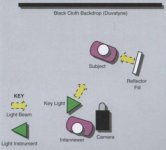
I used the light setup from a book I had recently read. See Lighting Setup image.

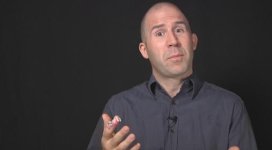
As you can see from the attached image labeled Noise.png, I had a lot of noise in the black backdrop. The camera I was using was the Panasonic HMC-150 at 1080-30p.

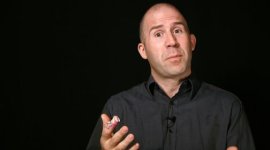
Fortunately, I have Magic Bullet and was able to improve the black backdrop as you can see from the Black_MagicBullet.png. However, I realize now the video seems too dark. But the client liked the look so that is good.

But in the future, I would like to shoot the interview without having to fix the background in post. Any suggestions on how to improve the black background effect without filming so much noise?

Any suggestions would be appreciated and if you know a better way to create this effect, I would love to hear what others are doing.

Thanks,

Simon
 

Attachments

  • Black_MagicBullet.jpg
    Black_MagicBullet.jpg
    9.2 KB · Views: 0
  • Lighting Setup.jpg
    Lighting Setup.jpg
    13.5 KB · Views: 0
  • Noise.jpg
    Noise.jpg
    8.8 KB · Views: 0
What was the gain setting on the camera set to? If it's anything above zero then you can reduce noise by using more light and lowering the gain.

I wouldn't call the second image too dark so much as high contrast. Crushing the blacks like that can, as you discovered, also reduce the appearance of noise.
 
Hello,

The gain setting was set to zero.

The final look with Magic Bullet was a good solution. As I learned from another forum, I need to move the subject further away from the backdrop, raise the light higher and configure the black level on my camera.

I will try it out and see if that helps.

Thanks for your input.

Simon
 
One quick way is by raising your key light up and aiming it down so that the light strikes the subject and less of the background. It's a bit of a challenge to pull off in a small room with a small backdrop and without the right tools. I use an egg crate over a softbox to throw soft light into tight spots. Another way is to flag or block any stray light that may be hitting the background. So, if you can get the subject further away from the background and you block the lights, you should see a better result. Matthews makes something called "road rags" - a kit of portable flags that you might want to checkout. One more tip is to go ahead and use the camera's set-up to crush the blacks in-camera- just be careful not to throw away too much of the shadow detail on the subject. You can find out more in this DVD too, they call it "black limbo" http://www.dvcreators.net/dv-enlightenment/
 
If you don't mind, I'll make some other suggestions.

1. Your subject shouldn't look at the camera, rather at the interviewer.

2. The others are right, your key should be higher so that the tip of nose shadow falls a little lower above the top lip.

3. This is major. The camera should mostly see the FILL side of the face. This is counter-intuitive.

4. You need more contrast across the face to produce more modeling so the face doesn't look so flat. Move the fill reflector farther away.

5. Use an armed out back light on the axis of the camera and subject to produce an edge on the shoulders, maybe a kiss on the cheek and just a little on the top of the head (even with a bald or thinning guy if you don't overdo it).

6. Consider a background light on the floor near the backdrop gelled with some party color and pointed up making a subtle fountain of color.

7. Don't shoot an interview in a small space if it's humanly possible not to.

I learned to shoot interviews from Doug Jensen and Walter Graff, two fine teachers who sell inexpensive DVDs, and from studying every interview I can find to this day, to see if something catches my eye. You'll be able to branch out and make your interviews more handsome all the time as you work at it to achieve excellence.

My $.02.
 
Back
Top