
Homunculus
Carbonite Member
Hello everyone I purchased a Gossen Luna Pro analogue meter like the one shown here
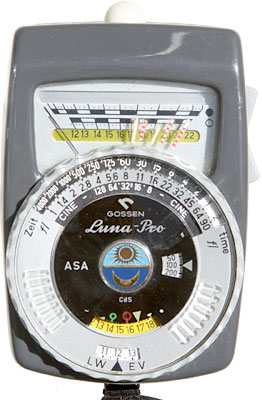
unfortunately it was used and as such comes with no instructions. I am clueless as how to properly operate it. Please assist me.
When I click the button the needle settles on a number at the top. No idea what those numbers represent but I can only imagine they represent F-stops on the aperture.
If that is the case, then what is the stuff I have to calibrate myself with the wheel in the middle. One ring says Fl or FL, and another says Zeit. Mine seems to be in German perhaps? It seems to mean "Time" though. But what is the thing underneath?
Someone familiar with this please tell me what exactly all this stuff means and how to properly use this?
I have it set on 200 ASA and I went around a daylight lit room and got readings of 12, 11, 13, things of that nature. Are those readings indicative of the f-stop that the meter wants me to use on the camera to get proper exposure?
What about the whole foot candles and lumens thing, is there any way to read any of that?
Thanks!
unfortunately it was used and as such comes with no instructions. I am clueless as how to properly operate it. Please assist me.
When I click the button the needle settles on a number at the top. No idea what those numbers represent but I can only imagine they represent F-stops on the aperture.
If that is the case, then what is the stuff I have to calibrate myself with the wheel in the middle. One ring says Fl or FL, and another says Zeit. Mine seems to be in German perhaps? It seems to mean "Time" though. But what is the thing underneath?
Someone familiar with this please tell me what exactly all this stuff means and how to properly use this?
I have it set on 200 ASA and I went around a daylight lit room and got readings of 12, 11, 13, things of that nature. Are those readings indicative of the f-stop that the meter wants me to use on the camera to get proper exposure?
What about the whole foot candles and lumens thing, is there any way to read any of that?
Thanks!
