how much RAM does Premiere Pro CS6 need???

Asking this question becaue I have a 2008 Mac Pro desktop and I notice that in the Project panel, Premiere Pro CS6 way too long to find any file when I type a file name in the search box. Whatever I type in the find dialog box, I'm forced to wait up to 10 seconds for the word to finish typing. Is it because I have only 4 GB of RAM?

If so, how much RAM does Premiere Pro CS6 need to function efficiently???

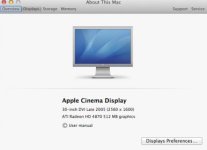
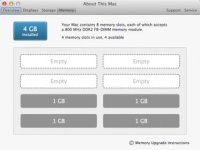
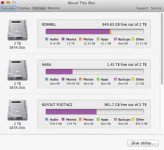
Here are my computer specs:
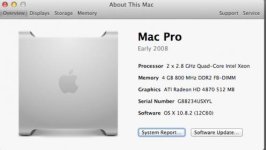
Screen Shot 2013-01-19 at 6.25.57 PM.jpgScreen Shot 2013-01-19 at 6.26.12 PM.jpgScreen Shot 2013-01-19 at 6.26.30 PM.jpgScreen Shot 2013-01-19 at 6.26.46 PM.jpg
 
Last edited:
Throw all you can afford at it.

But I doubt that RAM will fix a simple lag in entering and displaying text input from a keyboard.

Your GPU is very under powered to take any of the true benefits of Adobe Mercury Playback also.
 
Thanks Shooter. Do you mean it's not worth adding any more RAM?
Do you think I'd be much better off (performance wise) upgrading to a 2012 model?

How powerful does the GPU have to be to get reliable speedy performance out of PP CS6?

Compared to what's out there now, my 2008 model must be a dinosaur.
 
OK, but what about the latest Mac Pro desktop? Wouldn't the pro desktop specd out be a lot more powerful than the iMac?

I just realized that my PP CS6 preferences show that I can only use 2GB out of the total 4GB of RAM I have.
 
Last edited:
OK, but what about the latest Mac Pro desktop? Wouldn't the pro desktop specd out be a lot more powerful than the iMac?

I just realized that my PP CS6 preferences show that I can only use 2GB out of the total 4GB of RAM I have.
You have slower processors. You have slower RAM. You have less video RAM. You have no thunderbolt. THe new Imacs are quite amazing. My buddy has one and it's really fast and tidy.
OR... You can hold out and see if Apple releases a new Mac Pro this year.
 
Thanks Shooter. Do you mean it's not worth adding any more RAM?
Do you think I'd be much better off (performance wise) upgrading to a 2012 model?

How powerful does the GPU have to be to get reliable speedy performance out of PP CS6?

Compared to what's out there now, my 2008 model must be a dinosaur.

As Dusty said (confirms)...Yes it is.

But what I was saying..Premiere needs RAM and needs decent GPU. VRAM and NVIDIA CUDA Cards for example.

I would disagree with Diusty on one point. MAcs. Get a Win PC for better bang for the buck and better Premiere performance.
 
Last edited:
As Dusty said (conforms)...Yes it is.

But what I was saying..Premiere needs RAM and needs decent GPU. VRAM and NVIDIA CUDA Cards for example.

I would disagree with Diusty on one point. MAcs. Get a Win PC for better bang for the buck and better Premiere performance.
Then he would have to buy ALL of his software again. Out of my 9 or 10 Macs, only one has ever died. Out of all my 5 or 6 PC's, all of them have died. Some bang for the buck. But let's stop the PC v MAC right here and now. Yes, you can get a mighty PC for the $.
The OP has a five year old computer that would still run great if he adds some RAM and a new graphics card. "FIVE YEARS OLD" Or he can take that money and get an iMac, transfer all his software over to it and enjoy the speed the new Imac has and not worry about buying all his software again.
 
Thanks everybody. I couldn't afford to switch to a Windows PC, because it would mean buying a ton of software all over again. My workflow is 100% mac. I used to own a top of the line Windows PC, but it gave me too much grief. I spent far too much time troubleshooting Windows-related bug issues. I'm sure Windows has come a long way, but I'd rather not have to spend even more money buying new software on top of a new computer.
 
Last edited:
heres the missing thing here: ram is cheap. very cheap. get at least 12 gigs and be happy. if you buy a mac don't get their ram, go third party to crucial or newegg and find matching sticks with good user reviews
 
I have 24GBs of Crucial RAM in my Mac Pro, which I bought for even less at Newegg.

Just be sure to get the right RAM for your machine (processor).
 
I dont know that processor is not pulling hard enough i have a 3.2 quad core with 8 gigs of ram and i feel like im at minimum. I can still do what i need to do smoothly but i feel it can be smoother
 
Going forward given your situation, I would get a W7 PC, switch the CS6 licence to PC (no cost), and continue to use all the other Mac software on the Mac.
A well done W7 PC is considerably more powerful than an equally priced Apple product.
As far as ram, you can do with 6 GB as a minimum, but 12gb or higher is recommended. Ram does not 'speed up' the machine as you add more, but it prevents it from slowing down if there is enough for the task at hand. 12-16gb is enough to be comfortable and confident that you won't have a lack of Ram space for CS6 and simultaneous OS operations.
 
Part II.

Taking a closer look at the specs posted, you can actually work with that. Put 8gbs of ram in the open slots first. Second - transition the OS disk to SSD. This is critical; it will lead to the greatest leaps forward regarding perceived computing speed for you. The little lags, long program loads, and other waits will suddenly be gone. Third, make sure that you are editing Prores or proxy (not h.264), which will be hugely beneficial for scrubbing and spontaneous frame recall. Fourth, have a high performance footage drive - different TBs of space are not created equal. Recent 750GB-1TB 7200rpm drives seem to be the speed demon atm, nothing exotic needed (the 2/3tb drives take a hit in speed). A step higher, and you can invest in a true raid set up, but this is not strictly necessary.
 
RAM is part of the total. I maxed min out at 32GB, installed a SSD for scratch and RAID and 1 for OS & CUDIA card. It has no issues now, my work flow is also MAC and when it comes to exporting video using Media Encoder this 3 year old machine beat hands down my new I7 I just built. You must config CS6 to use the right scratch locations for best performance. Still running Snow Leopard and no issues, why spend money when you dont need to.
 
im running a AMD anthlon x4 3.2ghz processor with 8 gigs of ram I run premeriere cs5.5 with no problem see what i put out youtube.com/rale2001 the major issue i might have is i have to prerender when i want to preview when i place in new blue transitions in my time line and i can only preview in 1/2 quality mode.
 
Back
Top