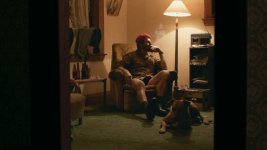
how do you shoot wide in low light?

Soldier

Well-known member
Hi All,

I've been shooting with the GH1 and Nikon AI lenses (24mm, 35mm, and 50mm). I've just looked at the rushes of my latest project and I must admit I'm not entirely happy with the results of the wide shots. When the talent is say 4-5 meters from the camera he or she looks soft.
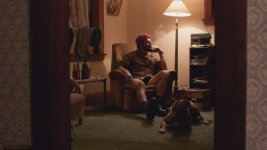
hunter wide.jpg

For example in the shot above, my aperture was about f/4 and my iso was about 400, I seem to recall. I haven't uploaded the full resolution file, but you get the point. How would you tackle a situation like the one above? throw more light at the scene and open the aperture up to f/8? I had a 200w practical in the lamp and a 300w arri hitting the lamp shade. I also had a mini kinoflo dimmed for fill behind the wall on the left hand side of the frame.

thanks
 
Is f/4 the lens' aperture wide open? If so, yeah, close the iris a bit more and add more light. A lot of these Nikon primes are known to be quite soft wide open.
 
I really like the interior framing and composition of your scene, BTW. The entire mise en scene, it tells the story with just a still. Your character's skin tones blend with the wall a bit, IMO, and that's not an easy fix unless you light to darken those walls. Then again the affinity in tones may be part of the visual strategy of this particular scene.
 
Last edited:
Is f/4 the lens' aperture wide open? If so, yeah, close the iris a bit more and add more light. A lot of these Nikon primes are known to be quite soft wide open.

The 24mm lens I used above is wide open at f/2, but I wouldn't use it for anything wider than an MCU
 
Hi All,

I've been shooting with the GH1 and Nikon AI lenses (24mm, 35mm, and 50mm). I've just looked at the rushes of my latest project and I must admit I'm not entirely happy with the results of the wide shots. When the talent is say 4-5 meters from the camera he or she looks soft.

View attachment 33051

For example in the shot above, my aperture was about f/4 and my iso was about 400, I seem to recall. I haven't uploaded the full resolution file, but you get the point. How would you tackle a situation like the one above? throw more light at the scene and open the aperture up to f/8? I had a 200w practical in the lamp and a 300w arri hitting the lamp shade. I also had a mini kinoflo dimmed for fill behind the wall on the left hand side of the frame.

thanks

You'd be closing the aperture to an 8 :)

But regarding your image, I REALLY like it. I'm not sure what you dislike. I'll take your word that the full res image is soft.

Maybe it's more of the camera? Depending on the compression and etc, detail far away can loose its definition and look 'softer' than when the texture is close enough to read on screen.

I totally dig the image. It reminds me of a film called Fat City which was shot by the great Conrad Hall, ASC. The best cinematographer to have ever lived, imo.

 
Last edited:
The 24mm lens I used above is wide open at f/2, but I wouldn't use it for anything wider than an MCU

I have that same lens. It should be fine at f/4. Have you tried sharpening in post? My 'people' setting for Unsharp Mask is 150, 1, 10. If this is a static shot, I also recommend taking a still that you can blend in later to avoid any potential blow outs with the practical.
 
Hi All,

I've been shooting with the GH1 and Nikon AI lenses (24mm, 35mm, and 50mm). I've just looked at the rushes of my latest project and I must admit I'm not entirely happy with the results of the wide shots. When the talent is say 4-5 meters from the camera he or she looks soft.

View attachment 33051

For example in the shot above, my aperture was about f/4 and my iso was about 400, I seem to recall. I haven't uploaded the full resolution file, but you get the point. How would you tackle a situation like the one above? throw more light at the scene and open the aperture up to f/8? I had a 200w practical in the lamp and a 300w arri hitting the lamp shade. I also had a mini kinoflo dimmed for fill behind the wall on the left hand side of the frame.

thanks

So, what exactly is wrong with the shot... at f/4 the dog is a bit soft, but it looks like the subject... presumably... in the chair is ok... The Wife tries to use her Nikons at F/8... and only opens up when absolutely required to get anything... these are stills but I don't see why that's not good for film... so yeah, if it requires more light to do F/8, then that's what you may have to do.

The other thing is using unsharp masking to increase apparent 'sharpness', doesn't really, but make the human observer think it's sharper...

The parameters for unsharp mask are a balance between getting a better look, and avoid 'ringing', or obvious sharping artifacts...
 
Thanks for the encouragement. I'm not an actual DP. I've done a little camerawork, but usually write or edit. Unfortunately, my funding didn't stretch for a DP on this project, so I shot myself this time.

I tried out the unsharp mask and it does make a difference. Thanks for the tip on the still too.

I wanted to keep the character at a distance at the start of the film and to hold shots long enough to let the audience figure out what was going on in the frame. I needed to keep it visually interesting so I started playing with cropping, through doorways, windows, foreground objects etc. When I wanted the audience to focus on the emotions of the character, I cropped more out, rather than punching in. I was influenced in terms of framing by Rainer Werner Fassbinder's films.

Thanks Ryan for your link to Fat City. Why haven't I heard of this film!? I'll have to hunt it down.
 
Then again the affinity in tones may be part of the visual strategy of this particular scene.

I was trying to go for the golds and green. I probably could have darkened the wall a little more, but the idea was that this character was very much a part of his abode and I wanted him to blend in with it. He lives the same day everyday, but has basically got all this energy built up because of it. Every evening is spent in his chair etc. I suppose I wanted the affinity of tones to represent the same-sameness of his world. I could have used flatter grey/blue colours, but I felt that the golds gave it a kind of tension, an edgyness that his character possessed, almost the feeling anything could happen but it never does. The character receives the beret as a gift, and it's very much a new element that doesn't belong to his world. I had hoped the green carpet acts as a conterpoint to this to bring it out a bit more.
 
Last edited:
Thanks Ryan for your link to Fat City. Why haven't I heard of this film!? I'll have to hunt it down.

I think it would do well to hunt down ever John Huston film... in fact even if he didn't direct but just acted... but if nothing else, the ones he directed.

From the wiki on John Huston... regarding his directorial style...
----
Actor Michael Caine also observed the same technique: "Most directors don’t know what they want so they shoot everything they can think of—they use the camera like a machine gun. John uses it like a sniper."
----
 
Shoot with more light, and if you need/want to, lower the levels in post.

I know I could throw more light in there but when I do I tend to lose control of it. For example in the shot above, I wanted to keep the arcs on the wall from the practical. The biggest practical bulb I had was 200w, as soon as I hit the lampshade with an 800w redhead, it flooded out the 200w practical. I guess I could have put a 500w practical in the lamp, but the lampshade was pretty much smoking as it was. Is there a way to fake those lamp light arcs with black wrap or something?
 
Hi All,

I've been shooting with the GH1 and Nikon AI lenses (24mm, 35mm, and 50mm). I've just looked at the rushes of my latest project and I must admit I'm not entirely happy with the results of the wide shots. When the talent is say 4-5 meters from the camera he or she looks soft.

View attachment 33051


thanks

Why not try a low wattage fresnel pointed out of frame at a reflector, so the light bounces and softens onto your actors face? Or if you want to make life easy, replace the lamp with something a foot or so lower, so it will bring the light closer to your actors face.

Nice framing though, love the scene. Mise en scen is spot on (especially the dog)

For example in the shot above, my aperture was about f/4 and my iso was about 400, I seem to recall. I haven't uploaded the full resolution file, but you get the point. How would you tackle a situation like the one above? throw more light at the scene and open the aperture up to f/8? I had a 200w practical in the lamp and a 300w arri hitting the lamp shade. I also had a mini kinoflo dimmed for fill behind the wall on the left hand side of the frame.
 
I agree with several other posters, that shot looks really great. With a little CC it'll be just fine. I think the door frames are a tad to bright and diffuse a otherwise perfect composition but that's a pretty easy fix in post. While you're at it you could up the contrast and colours in the room a smidgen and that will make it feel less soft (a matter of taste though). See attached quick job in Photoshop.

SoldierWideShotCC.jpg
 
Thanks Martti,
I think you're right. It looks much better with the walls brought down in post.

Cheers!
 
Back
Top