roxics
Veteran
On my home machine I have an external 2TB hard drive where I keep all of my photos and videos. My folder structure goes like this:
Photography > Camera Name > Date/Title
So for example:
Photography > 60D > 2014-09-28 Apple Orchard
Since I have used many cameras over the years I have many folders such as: GH1, GH2, D7000, D40, iPhone4S, 60D, etc. Each with various dated event folders inside them.
My iPhones on the other hand are a little more choatic. I tend to just shoot one image or one video here and there, sometimes on the same day and somtimes days apart. So it makes little sense and way to much work either organizing or viewing, to split them up into dated events.
Instead I tend to wait a while (sometimes a couple of months) before offloading images and video from my iphone. When I do, I just date the folder as the day I do the offload. That way I know that if I have two folders for example 2014-07-19 and 2014-09-30, that everything in the latter folder was shot between July 19th and September 30h. I can then go into EXIF per file if I need more details.
That is my home structure. I don't really trust any of these apps like iPhoto, Lightroom or Aperture to do all my organizing for me. I've had way too many HDD failures over the years and had to transfer things too many times that I want to keep it simple and folder based so it's easy to copy and paste. I've been lucky in that I've never lost anything.
Above is my home structure. My work struture is "stranger" beause in some ways it's more organized and in other ways it's way too complex.
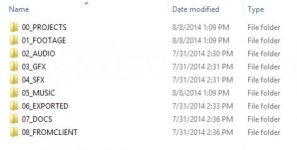
Projects > Client Name > Various folders
Various folders includes:
Assets
Audio
Production Docs
Stills
Video
There are various folders inside each of those as well, such as in the Video folder we have Raw, Intermediate and Final subfolders. Inside Raw are further dated subfolders for mutliple shoot days per project and camera. Example: Raw > 2014-09-28-Canon60D
I'm always curious how people organize their files, maybe there is something I can learn. A better way of doing things. So please share if you're willing.
Photography > Camera Name > Date/Title
So for example:
Photography > 60D > 2014-09-28 Apple Orchard
Since I have used many cameras over the years I have many folders such as: GH1, GH2, D7000, D40, iPhone4S, 60D, etc. Each with various dated event folders inside them.
My iPhones on the other hand are a little more choatic. I tend to just shoot one image or one video here and there, sometimes on the same day and somtimes days apart. So it makes little sense and way to much work either organizing or viewing, to split them up into dated events.
Instead I tend to wait a while (sometimes a couple of months) before offloading images and video from my iphone. When I do, I just date the folder as the day I do the offload. That way I know that if I have two folders for example 2014-07-19 and 2014-09-30, that everything in the latter folder was shot between July 19th and September 30h. I can then go into EXIF per file if I need more details.
That is my home structure. I don't really trust any of these apps like iPhoto, Lightroom or Aperture to do all my organizing for me. I've had way too many HDD failures over the years and had to transfer things too many times that I want to keep it simple and folder based so it's easy to copy and paste. I've been lucky in that I've never lost anything.
Above is my home structure. My work struture is "stranger" beause in some ways it's more organized and in other ways it's way too complex.
Projects > Client Name > Various folders
Various folders includes:
Assets
Audio
Production Docs
Stills
Video
There are various folders inside each of those as well, such as in the Video folder we have Raw, Intermediate and Final subfolders. Inside Raw are further dated subfolders for mutliple shoot days per project and camera. Example: Raw > 2014-09-28-Canon60D
I'm always curious how people organize their files, maybe there is something I can learn. A better way of doing things. So please share if you're willing.
Last edited: