How do you get screenshots from Premiere?

Angelshare1

Well-known member
Is there an easy way? Right now I'm burning a DVD and using my DVD player on my computer to get one. It doesn't look that great. What's a better way?
 
I´m not sure what you mean.
A screenshot with all the windows and timelines andwhatnot or just exporting a single frame.

Frank
 
I´m not sure what you mean.
A screenshot with all the windows and timelines andwhatnot or just exporting a single frame.

Frank


Sorry yes, just a single frame. My actor wants some stills from the film for his portfolio.

Actually printscreen of the image in Premiere with a photochop would probably be a good poor mans solution.
 
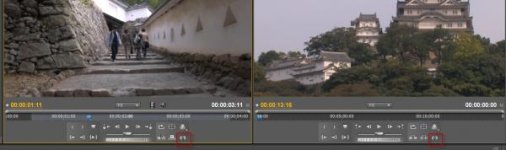
Go to your program window - there is a little icon that says "export frame"

If you got an older version, go to "Export" - than select Tiff or BMP in the export settings - thats all.

Frank
 
Go to your program window - there is a little icon that says "export frame"

If you got an older version, go to "Export" - than select Tiff or BMP in the export settings - thats all.

Frank

Good lord, is that it? I looked in the help section and googled it and it said I had to download software and go through all these processes. Thanks! I'll give it a shot when I get home!
 
Sorry attached images is horrible. Look in the right left bottom side of each pane. There you will find a little photocamera.
 
Back
Top