how do you bring a multi-layered illustrator file into After Effects???

I'm working on a map of the world where I need each country to be on its own layer. I have all the layers in Illustrator. But when I bring it in as a comp (not as footage), I just end up with two layers when in fact I have about 80 layers in Illustrator.

Can anyone point me to a link that shows you how to preserve all your Illustator layers so they all show up in AE?

Thanks very much in advance.
 
Import as Composition not Footage

Edit: Sorry only just fully read your post...Yes check as Matt suggests, you can then break all the elements into seperate layers using the Release to Layers command
 
Last edited:
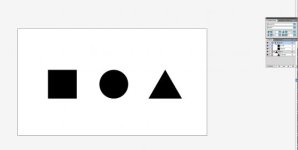
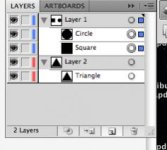
Sounds to me like you have all your layers (sub layers) inside of 2 groups/layers. Check to see if you have a drop down ticker on the top group layer. See attached image:
Screen shot 2011-10-12 at 11.17.50 AM.jpg Screen shot 2011-10-12 at 11.30.30 AM.jpg
If you notice, Layer one has the layer of a Square and layer of a Circle in it while Layer 2 only has the layer of a triangle. Whenever you create a new object or image, Illustrator by default puts them as sub layers in your original default layer. You only get a new layer if you manually click the create new layer button or I believe when you choose to import to a new layer. So all you should have to do is select your main layer in the layers pallet and click the options tab on the layer pallet (looks like a little notebook/Dropdown arrow with a bunch of lines next to it) and choose release to layers. Then select all the new layers and drag them above your original main layer.
Best of luck!
 
Last edited:
Back
Top