I started editing a project and for some reason all of track 2 is way too loud. The actor's voice is constantly peaking. Now in the original audios he does peak at all and the files are fine. I double checked on two systems to be sure. So the originalf files are fine, but track 2 is turned up way too loud, and I want all the tracks at just a normal, good volume. How do I turn it down? Thanks.

Navigation
Install the app
How to install the app on iOS
Follow along with the video below to see how to install our site as a web app on your home screen.
Note: This feature may not be available in some browsers.
More options
You are using an out of date browser. It may not display this or other websites correctly.
You should upgrade or use an alternative browser.
You should upgrade or use an alternative browser.
How do I turn down audio in Premiere Pro.
- Thread starter ironpony
- Start date

keylight
Veteran
Honestly ironpony.... try using teh Google:
http://help.adobe.com/en_US/premierepro/cs/using/WS1c9bc5c2e465a58a91cf0b1038518aef7-7f35a.html
http://help.adobe.com/en_US/premierepro/cs/using/WS1c9bc5c2e465a58a91cf0b1038518aef7-7f35a.html
Last edited:

You can also keyframe the tracks .... or clips.. of put compressors and limiters on channels ANd the master fader in the mixer..... or you could sent to Audition for sweetening there..... in fact.... sooooo many ways......
Out of interest, what did you deduce from reading the manual on this subject?
Out of interest, what did you deduce from reading the manual on this subject?
I read the manual but so far have only been able to fine this solution: I could pull down the volume but then the volume is more quiet. Like even though it's not peaking, it's more quiet than the other actor's voices in the scene, and should be louder. When I turn the volume up later, there is too much hissing as a result of it being too quiet. So that doesn't seem to help. A lot of the audio has already been edited in in several cuts though. Instead of working on each cut, can't I just turn down the volume of all of track 2 in the editing program? The manual says to select the master clip for turning down the volume of an entire sequence. But what is the 'master clip' in the timeline, I do not understand.
I also tried lowering the gain by 6 decibles, but it still has the same peaking sound, when the original does not peak.
I also tried lowering the gain by 6 decibles, but it still has the same peaking sound, when the original does not peak.
Last edited:

Shooter
Veteran
Is it over recorded?
What do the Audio Monitors tell you? Are they red lining (peaking). Over modulated.
You seem a bit confused when you tell us..
What do the Audio Monitors tell you? Are they red lining (peaking). Over modulated.
You seem a bit confused when you tell us..
I could pull down the volume but then the volume is more quiet. Like even though it's not peaking, it's more quiet than the other actor's voices in the scene, and should be louder.

ryanjf
Well-known member
ironpony - is this the same project you're referring to in the Location Audio/Post thread on DVX? Or is this a new project you're cutting? If this is the same project you're talking about, then your "audio engineer" aka "re-recording mixer" should be able to care of this for you..
If this is a new project you're cutting, then hire a good, experienced post sound person to do this work and level out everything for you. If you find someone to do post audio work for you, request dialogue guide tracks periodically so you know what things will sound like and you're not left in the dark. If you don't want to do this, then I'm more than positive that Premiere can lower the volume for you and you'll probably want to read about volume automation within Premiere. Maybe its called key framing. If Premiere has compressors built-in to it, then you can call those up on the audio tracks and learn how to use those. There's some good threads in the Location Audio section of this site that talks about compression. Even more on the Post Production Forum on Gearslutz and on the DUC (Avid's Pro Tools thread).
If this is a new project you're cutting, then hire a good, experienced post sound person to do this work and level out everything for you. If you find someone to do post audio work for you, request dialogue guide tracks periodically so you know what things will sound like and you're not left in the dark. If you don't want to do this, then I'm more than positive that Premiere can lower the volume for you and you'll probably want to read about volume automation within Premiere. Maybe its called key framing. If Premiere has compressors built-in to it, then you can call those up on the audio tracks and learn how to use those. There's some good threads in the Location Audio section of this site that talks about compression. Even more on the Post Production Forum on Gearslutz and on the DUC (Avid's Pro Tools thread).
You can absolutely effect the entire track volume, or you can do it clip by clip, or you can keyframe some bits to be lower volume and others to be higher volume
You can also use compressors within Premiere Pro mixer to limit the volume of the loud bits while boosting the volume of the quieter bits.
You can use the soft limiter to boost the over-all track volume without clipping.
There is so much you can do that the choice is absolutely yours.
Check out some online training if you aren't good at reading manuals....
Lynda.com
LarryJordan.biz
are just two of them.....
You can also use compressors within Premiere Pro mixer to limit the volume of the loud bits while boosting the volume of the quieter bits.
You can use the soft limiter to boost the over-all track volume without clipping.
There is so much you can do that the choice is absolutely yours.
Check out some online training if you aren't good at reading manuals....
Lynda.com
LarryJordan.biz
are just two of them.....
possibly , your audio is in wrong format, so mediaplayer can read it ok , while premiere is a bit lost.
when the general setting for audio, you can choose how sound is rendered, you could try the other settings.
or at least check the format of the sound, should be 48Khz 16bit.
when the general setting for audio, you can choose how sound is rendered, you could try the other settings.
or at least check the format of the sound, should be 48Khz 16bit.
ironpony - is this the same project you're referring to in the Location Audio/Post thread on DVX? Or is this a new project you're cutting? If this is the same project you're talking about, then your "audio engineer" aka "re-recording mixer" should be able to care of this for you..
If this is a new project you're cutting, then hire a good, experienced post sound person to do this work and level out everything for you. If you find someone to do post audio work for you, request dialogue guide tracks periodically so you know what things will sound like and you're not left in the dark. If you don't want to do this, then I'm more than positive that Premiere can lower the volume for you and you'll probably want to read about volume automation within Premiere. Maybe its called key framing. If Premiere has compressors built-in to it, then you can call those up on the audio tracks and learn how to use those. There's some good threads in the Location Audio section of this site that talks about compression. Even more on the Post Production Forum on Gearslutz and on the DUC (Avid's Pro Tools thread).
This is a different project. And the audio is fine in the original recording. I checked it all and it only peaks twice. Where as if I put it all on track 2, it all peaks. There is something about track 2. On track 3 it doesn't peak though. Why is that?
ryanjf
Well-known member
This is a different project. And the audio is fine in the original recording. I checked it all and it only peaks twice. Where as if I put it all on track 2, it all peaks. There is something about track 2. On track 3 it doesn't peak though. Why is that?
If there's something wrong about track 2, then move your audio regions from track 2 to track 3.............
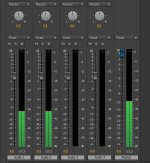
I can't figure out how to reset the db in Premiere Pro. As far as moving it all to track 3, track 3 is cluttered with other audio from another character as well as many other tracks. It would just be much easier and organized if I could figure out how to reset the db.
keylight
Veteran
Just to clarify, now that he has posted yet another thread....
ironpony is trolling
View attachment 64855
Trolling
ironpony is trolling
View attachment 64855
Trolling
The art of deliberately, cleverly, and secretly pissing people off, usually via the internet, using dialogue. Trolling does not mean just making rude remarks: Shouting swear words at someone doesn't count as trolling; it's just flaming, and isn't funny. Spam isn't trolling either; it pisses people off, but it's lame.
The most essential part of trolling is convincing your victim that either a) truly believe in what you are saying, no matter how outrageous, or b) give your victim malicious instructions, under the guise of help.
Trolling requires decieving; any trolling that doesn't involve decieving someone isn't trolling at all; it's just stupid. As such, your victim must not know that you are trolling; if he does, you are an unsuccesful troll.
Signs that your trolling is succesful:
*Your victim screaming in all-caps at you.
*Personal attacks (Calling you a retard, idiot, etc).
*Being an Internet Tough Guy.
*Making a crude remark, before quickly logging off before you can retort.
Signs that your trolling is unsuccesful:
*Your victim identifying you as a troll.
*Identifying yourself as a troll.
*Your efforts being ignored.
*Being counter-trolled
Last edited: