How do I Remove a Characters' Eyes?

KarlB

Active member
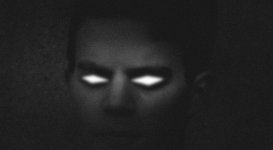
Hi. I took some video. I would like for the person in the vide to have glowing, red eyes like he's evil. When I cut the eyes out to make a mask, all that's left ae the eyes. I want to do the opposite - I want to remove the eyes and keep the rest. Anyone know how to do this?

Many thanks!
 
It's actually a little more complicated than that. If Vegas has a function that allows you to reverse the mask shape then it would take out the eyes, but the effect wouldn't look very real unless you can motion track the eyes so that its replacement moves with the head. This should be done in a program like AE, look at this tutorial for reference

http://www.videocopilot.net/tutorials/eye_replacement/
 
You can do it just fine in Vegas. Rather than "cut them out", simply duplicate the video and layer it so you have the original video with the cut out eyes on track one, then on track two, have the same video with a glowing effect added. To cut out the eyes, you'll need to change a setting the the mask window to "negative" rather than "positive". Experiment with the feathering, and roto the mask frame by frame. What will happen is that the top track will show the glowing track through the cutouts. Since the cutouts are around the eyes, only the eyes will glow and they'll match perfectly. I've attached an example from a noir type film I did.
 

Attachments

  • Noir.jpg
    Noir.jpg
    134.3 KB · Views: 0
Back
Top