
Navigation
Install the app
How to install the app on iOS
Follow along with the video below to see how to install our site as a web app on your home screen.
Note: This feature may not be available in some browsers.
More options
You are using an out of date browser. It may not display this or other websites correctly.
You should upgrade or use an alternative browser.
You should upgrade or use an alternative browser.
How do I open up the diffent tracks from an imported sequences?
- Thread starter Amadou
- Start date

Shooter
Veteran
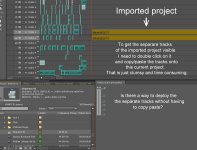
If you have imported a project and its sequences into a new project...you should be able to see all the "tracks" (video and audio) exactly as you saw them in the old project.
You said you can open the sequence so can you see all the tracks???? Whats the issue then?
Post a screen grab so we can see what you are dealing with.
You said you can open the sequence so can you see all the tracks???? Whats the issue then?
Post a screen grab so we can see what you are dealing with.
Shooter
Veteran
Nothing to do with IMPORT ( You have done this correctly)
YOU created the nest by placing a Sequence inside another Sequence. (That is how nested sequences are created by design. - in all NLEs)
It takes a short time to copy and paste the assets across. ( 10-15 seconds maybe) Consider your only alternative of re creating the sequence from scratch in the new sequence!
Just ensure that you target the track level so the paste falls where you want them.
YOU created the nest by placing a Sequence inside another Sequence. (That is how nested sequences are created by design. - in all NLEs)
It takes a short time to copy and paste the assets across. ( 10-15 seconds maybe) Consider your only alternative of re creating the sequence from scratch in the new sequence!
Just ensure that you target the track level so the paste falls where you want them.
Shooter
Veteran
I can see clearly in your frame grab that it shows a Sequence in a Sequence. (ie. old sequence in new sequence)
You imported a Project into a Project then you dragged a sequence into another sequence. That is a nest.
If you open the old sequence...it has all the assets in the sequence ( timeline) in track form.
You copy and paste them to the new sequence.
Not sure why you are arguing the point when you have been given the solution.
You imported a Project into a Project then you dragged a sequence into another sequence. That is a nest.
If you open the old sequence...it has all the assets in the sequence ( timeline) in track form.
You copy and paste them to the new sequence.
Not sure why you are arguing the point when you have been given the solution.

Amadou
Carbonite Member
- [h=2]This makes absolutely no sense. What is a "current time indicator"? What is "the frame of the nested sequence that you want to reveal in its original sequence"? What does this mean: " source sequence in the Timeline panel, with the current-time indicator at the frame you specified in the nested sequence"?
None of this makes any sense. I have no idea what they're saying.
Reveal a source frame from a nested sequence[/h]
- In the Timeline panel, target the track in which a nested sequence is located by clicking the header of that track. If you target multiple tracks, the targeted track that is on top is used to select the nested sequence.
- Drag the current-time indicator to the frame of the nested sequence that you want to reveal in its original sequence.
- Press Shift+T to open the source sequence in the Timeline panel, with the current-time indicator at the frame you specified in the nested sequence.
- Double-click the clip where the current-time indicator rests to open the clip in the Source Monitor.
Shooter
Veteran
Sorry. I cant help any more.
You should have had this edited by now if you had followed the advice given.
I just dont know any other ways of informing you apart from directing you to the Manual ( pdf Help Files).
Read up on Project, Sequences, Nests... but it will be quicker to re read this thread and accept that is how it is done.
FWIW: Ann Bens is a "Community Professional" on the Adobe PPRO Forum and I am professional Film Maker / Editor in the broadcast field.
You should have had this edited by now if you had followed the advice given.
I just dont know any other ways of informing you apart from directing you to the Manual ( pdf Help Files).
Read up on Project, Sequences, Nests... but it will be quicker to re read this thread and accept that is how it is done.
FWIW: Ann Bens is a "Community Professional" on the Adobe PPRO Forum and I am professional Film Maker / Editor in the broadcast field.

Ann Bens
Well-known member
Last edited: