How do I get the Casino Royale look?

Host a HQ frame grab of the raw ungraded footage, in TIFF format, and I'll see if I can recreate the look. Don't upload it as an image to the board, because that severely degrades the quality. Host it on google drive or dropbox and either share the link on this page if you want others to give it a crack, or PM me the link.

If I can get close I'll show you my settings.
 
We've explained that doing this in the camera just prevents the detail you need to be enhanced being recorded in the first place. Shoot with the white balance white! Shoot when the scene, to your eye looks good. Remember what we said in your stills photography topic - you need an eye for what looks good. A grey day and uncontrolled features is never going to work. On a grey day, at best you will get nice soft light. For what you seem to want, then you need contrast and shadows, as in a blue sky. If you have some white CN clouds they look great, BUT you might waste 50% of the day when they are in front of the sun!
 
Well I've done the whole shoot white balanced and flat, and correct it in post thing and it always looks crappy if I do it in post as oppose to in camera. People I collaborate with who know more about cameras and color grading say it's because my camera, the T3i, is H.264 and the color grading does not work well with that codec, as oppose to RAW. So it seems with my camera, I have to do large number of it in post. Here's a test I did at different kelvin temperatures at sunset. The first is white balanced, and then I adjusted the Kelvin temperature up from there:

http://www.youtube.com/watch?v=X_YcsVh8ul8&feature=youtu.be
 
That is an interesting test. I am not a big fan of monkeying with white balance during shooting. My standard MO is to stick with either 3200K or 5500K depending on the situation. Maybe this is because my orientation comes from learning to shoot on film and adjusting color balance on set was never an option (Well, outside of the use of camera filtration that is). I just think that making continuous adjustment to the white balance during shooting, especially to try and limit the amount of post color balance that is needed, is fraught with the possibility of mistakes. This could lead to a situation where more post color balance work is needed. I think the simpler your on set work flow is the better. Especially if you are shooting very low budget with limited resources. Adjusting white balance and general color balance in post, even with the lower end codecs is really not that big of a deal. I am shooting most of my stuff now with the internal codec on my FS-100 for web delivery and simple adjustments to color balance using 3 way color in FCP works out just fine.
 
Okay thanks. I've always had problems changing the color temperature in post though. For example I did a test shot at night a while ago, where I white balanced orange sodium lights to white. Then later I decided I wanted the lights to be orange so I tried adding the orange back in, but everything went pink and the more I tried to get it orange, the more noisy and desaturated it became. I could have been doing something wrong but with my Canon T3i's H.264 codec, the color grading is limited and it seems I will always end up with desaturation or noise in post, even if just a little. One time I white balanced flourescent lights and decided in post I wanted the flourescents to be blue, but peoples' faces came out too pink after. I tried again making them blue while shooting at a lower color temperature and the faces looked more normal.

It seems for me the more basic I try to shoot, the more post work has to be done, as oppose to getting it right in camera. Sometimes it's no big deal though like you said, and has worked for small adjustments, but getting that Casino Royale yellow look, would be a bigger one.

You said you go by the old film days where adjusting color balance was not an option. But in film days a lot of pro DPs still shot with filters on the camera to give the movie a yellow sunlight or blue night feel, right? So if shooting with filters was acceptable in film days, is adjusting color balance really so risky in the digital days?
 
Well, the sodium vapor street lights and fluorescent lights, especially consumer grade fluos, are discharge sources that do not output a continuous spectrum. You have to do what ever works best for you to get good color under those types of lights. I think they are a pain in the butt. The lights I hate the most are consumer grade "Warm" compact fluorescent lights. They look horrible dang near what ever you do. I've tried white balancing to them in camera and it is still very hard to get good color. If I have my druthers I either switch them out with regular incandescent bulbs (Which have a continuous spectrum even if they are very warm) or bring in my own lights to light the shots (I have a "Duffie bag kit" with a bunch of small 650 watt open faced lights, some cheap LEDs, a few E26 clamp lights with some screw in halogens and basic grip and electric gear I always carry with me). Even if I can't change out the warm CFLs or use my lights I will, usually, stick with either the tungsten or daylight white balance pre-sets. That way I know that even if color is screwed up, at least it will be consistently screwed up through out all of the shots. By working through a couple of reference shots in post I will usually have the necessary settings worked out that I can add to all of the shots I cut together, with a little tweaking here and there.

I read a post here on DVXUSER a while back by Postmaster (Frank Glencairn) that referenced a blog post of his. He did a short and sweet test about white balance and noise that really makes a lot of sense.

http://frankglencairn.wordpress.com/2010/07/23/why-white-balancing-in-your-camera-may-be-a-bad-idea/

I am not saying that the way I do things is the best or only way. You are on the right track with your testing. Find what works best for you.
 
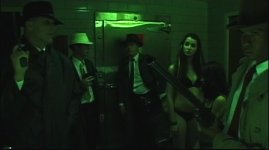
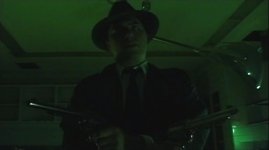
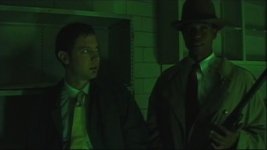
I also say never say never. I have used white balance for creative color control for sure. These images are kind of embarrassing, but back in the mini-DV days I shot a very low budget horror movie in an abandoned hospital in Virginia. For one scene I wanted a sickly green color. We were shooting in the morgue of the hospital that was lit with old fluorescent lights. To get the green lighting I took my camera (A Sony DSR-PD 150) into a dark bathroom and white balanced to a pen light, with a fading battery, off of a white card. This turned the rather blue looking fluo lights green. As I said these images are kind of embarrassing, screen grab off of a ripped DVD of the movie. All of the green was achieved through white balance only.

Shadow Hunters 1 cc.jpg

Shadow Hunters 2 cc.jpg

Shadow Hunters 3.jpg

There was no color grading done back then. So there is a lot of creative control to an in camera look. I just find that I now like to go for consistency in camera knowing that I have a lot of control latter. But Like I said, work out what works best for you.
 
Back
Top