How do i fix the hard edges on these lights?

Beeboop

Active member
Someone told me that this question is better suited for here.


I had a second shooter for this wedding and I believe he was using an A7S in log mode because there's barely any color in the original footage. How do I fix the purple rings around the spotlights? I want to make the edges softer.

https://drive.google.com/open?id=0B9...1JqeHN4cGxIZ0k

attachment.php


I had a second shooter for this wedding and I believe he was using an A7S in log mode because there's barely any color in the original footage. How do I fix the purple rings around the spotlights? I want to make the edges softer.


https://drive.google.com/open?id=0B9...1JqeHN4cGxIZ0k
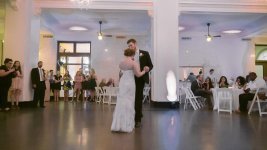
 
Played with the single frame in Adobe Light Room. I was able to get rid of the color cast, but as for the really hard lights you might want to mask and blur them to soften them a bit. No way to lose them entirely
LR corrected--2.jpg
 
I added some vibrance, saturation, and increased the hue wheel to the footage.

The camera just can't handle those lights. I want to keep the purple color, the ambient light, so there is really no way to fix this without some skills outside of Premiere. At least that's what I think.
 
You want to keep the purple color? Was there purple lighting in the room or did that come from the white balance setting?
 
It's been awhile since I've used premiere so I can't find the matte functions in my CS6, but what you need to do is create mask shapes over the areas you want to correct, feather them out so the effects are not abrupt. Once you have the masks you can add some blur, and some color correction to just the masked areas. You will also need to animate the masks so they move with the camera. Most likely easier using After Effects and Mocha AE, which if you're using the CC bundle you have access to. There are some great online tutorials for using AE and Mocha.
 
It's been awhile since I've used premiere so I can't find the matte functions in my CS6, but what you need to do is create mask shapes over the areas you want to correct, feather them out so the effects are not abrupt. Once you have the masks you can add some blur, and some color correction to just the masked areas. You will also need to animate the masks so they move with the camera. Most likely easier using After Effects and Mocha AE, which if you're using the CC bundle you have access to. There are some great online tutorials for using AE and Mocha.

Good gawd that sounds tedious and painstaking. Which is why I shoot, and shoot only.:tongue:
 
Good gawd that sounds tedious and painstaking. Which is why I shoot, and shoot only.:tongue:

And hopefully you shoot it right so it wont have to be fixed in post. And the lighting was probably done for the event and out of the shooters control, though adding some diffusion to the par can lighting the column would have helped a lot
 
It's been awhile since I've used premiere so I can't find the matte functions in my CS6, but what you need to do is create mask shapes over the areas you want to correct, feather them out so the effects are not abrupt. Once you have the masks you can add some blur, and some color correction to just the masked areas. You will also need to animate the masks so they move with the camera. Most likely easier using After Effects and Mocha AE, which if you're using the CC bundle you have access to. There are some great online tutorials for using AE and Mocha.

Thanks, this actually sounds like the solution. I'll try to fix it when I have time as I already gave them the footage. The camera he used was an A7S but I don't know what settings or PP it was on because those highlights look terrible. We had a C100 and a canon 7D that handled the footage like a pro, both cameras captured the highlights just fine. The settings on the A7S were just off somewhere.
 
You might want to try HSL secondaries in lumetri. Since this is an issue with the A7S gamma curve You could just isolate the affected part of the range and adjust it out (probably lower the saturation and push up the value a bit). Even just qualifying the highlights and desaturating them might be enough to make it much less offensive.
 
Back
Top