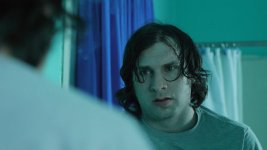
How can I improve my lighting?

Azmyth

Veteran
I know I come here all the time asking lighting questions, and then I try to go back and practice to see if I get a better result.

In this example I tried to recreate a scene from my film, where a girl is inside an old abandoned haunted house.

There's already a few things I can see I need to fix (more background light, and more light in general).

My main issue is figuring out how to make things looks dark with contrast vs. actually darkening the whole image.

429629_10150728164176620_557591619_11834482_183784701_n.jpg


Brighter

423131_10150728174256620_557591619_11834553_594552607_n.jpg


425661_10150728179756620_557591619_11834598_744630574_n.jpg


416859_10150728185776620_557591619_11834641_1450065124_n.jpg


416998_10150728197831620_557591619_11834673_1689832940_n.jpg
 
I mentioned in your previous post that you get a dark look with "lighting".

What I was saying ...was...it is not a matter of just cranking the iris down.

The light(s) controls the contrast and you control the "look of the light" by what type of unit you use and where you place and point it. The volume of light is to be considered.

Think about it as " painting" the frame/ scene..with light. More here..less here..and a little bit there.

The aperture controls where you set the tone levels in the overall exposure.
 
I mentioned in your previous post that you get a dark look with "lighting".

What I was saying ...was...it is not a matter of just cranking the iris down.

The light(s) controls the contrast and you control the "look of the light" by what type of unit you use and where you place and point it. The volume of light is to be considered.

Think about it as " painting" the frame/ scene..with light. More here..less here..and a little bit there.

The aperture controls where you set the tone levels in the overall exposure.


I see, sculpt to the image with light.. control the overall exposure of the image with the aperture.. not the aesthetic value of the image.
 
bounce light (but watch out for it to not spill too much)and yours is too much on side(maybe you wanted it that way i dont know but looks fake cause cheeks are shiny and bit brighter) and should be a bit in front, also blue rim light should be behind her and higher, not on side.But that could be fixed by just moving camera and actress.You need stronger lights.Take some frame grabs from movies and try to mimic exactly what you see on them, direction of light,framing and colors, face could be a bit green during night scenes, not orange/pink, it really depends what youre after, i have screen grabs taken from movies with a lot of different colors during night scenes, even completely orange frames.Get some frames from movies you'd like to immitate and try to recreate lighting.Light actor separately from background, actor is one layer,background is another layer, dont light both layers with key light only. its hard to color correct the picture if its too dark, especially with DSLR's codecs limitations.Shoot brighter and then darken it in post, this is how watchmen was done for example.
Original grabs and uncorrected grabs straight from cam even without white balance correction:
62ed5d1fc5827ba7987485c6c9af176c.jpg


8095dd5d6227b22db4f2334f28f48393.jpg


3e779e17424dfb9799198925af59661b.jpg


8cb3d4a30a15deb11df839705595c4ad.jpg
 
Last edited:
Sounds like you have a pretty good handle on the problems you have now, if increased contrast is what you're looking for, harder light is your friend. Easiest way to get higher contrast is with harder light (if you're diffusing now, use less... you may need to get new lights). If harder light isn't possible, I guess the next option would be to move the light back and try to find a sweet spot... as well as changing the angle. Moving it more to the side/back of the person will help increase the contrast on the face, hopefully you'll be able to still get it to a point where there's enough on the face to see the side you want.

edit: my suggestion of moving the light seems to contradict the post above mine, but if you're looking for increased contrast on the face in camera, moving the light can help. Common sense... if you want less light on one side of the face, don't point the light on it. Darkening in post is another method.
 
Last edited:
bounce light (but watch out for it to not spill too much)and yours is too much on side(maybe you wanted it that way i dont know but looks fake cause cheeks are shiny and bit brighter) and should be a bit in front, also blue rim light should be behind her and higher, not on side.But that could be fixed by just moving camera and actress.You need stronger lights.Take some frame grabs from movies and try to mimic exactly what you see on them, direction of light,framing and colors, face could be a bit green during night scenes, not orange/pink, it really depends what youre after, i have screen grabs taken from movies with a lot of different colors during night scenes, even completely orange frames.Get some frames from movies you'd like to immitate and try to recreate lighting.Light actor separately from background, actor is one layer,background is another layer, dont light both layers with key light only. its hard to color correct the picture if its too dark, especially with DSLR's codecs limitations.Shoot brighter and then darken it in post, this is how watchmen was done for example.
Original grabs and uncorrected grabs straight from cam even without white balance correction:
62ed5d1fc5827ba7987485c6c9af176c.jpg


Where did you get the 'uncorrected' images?

But yes, shoot 'up' from dark, with the ratios of lighting 'correct' for your final image, then use post-processing to get the final 'low' level and good contrast for the mood. However, there are 'limits', and this is one of the places where the 'low end' needs to go just 'so far'. A high end camera with 'bit depth to spare', may be able to take a flatter image, and process it to the mood.

For example, increasing contrast may 'enhance' the low bit rate codec problems. However, these show up in 'untextured' areas more than textured areas, and so, one would make the background or other areas more textured, or avoid shots where the lighting is on some 'flat' area, sky, smooth wall, etc...
 
in your example I should light to keep all the detail, and darken in post..

I will have to give this a try. I've read other articles where they say to get as close as you can to the look you want in camera.
 
in your example I should light to keep all the detail, and darken in post..

I will have to give this a try. I've read other articles where they say to get as close as you can to the look you want in camera.

There is some sort of balance... and you do have to know what your camera is capable of doing, in order to know 'how close'.

There are also certain 'aesthetics' in viewing images... The Wife use to make the rounds around the country doing seminars to pro still photographers and those who want to become pro for some value of 'pro'. Mostly wedding and portrait photographers.

I would be the dutiful Ace Gun bearer, and of course when there were 'hard technical' questions, I'd get introduced as the 'guy who reads manuals for pleasure'... anyway, on these outings, often there would be a print competition, or the like... it is astonishing to see how many people produce photographs, think they are 'wonderful', and they are just plain awful... one of the Wife's other attributes is being able to find something 'good' in such situations... were as the 'manual's guy' would probably not have much in the positive direction...

Anyway, on certain technical issues, most images failed on a few 'principles'... these are like any other 'rules'... they are to be broken for affect... but by someone who 'understands' the rules and knows when those rules can be broken to achieve a desired mood...

1) small, white and black 'elements' that key the contrast of the image... even in color one can sill use this as a criteria...
2) avoiding blank white/black large image elements.
3) Important stuff lit in such a way to move the eye to the important stuff...

Obviously all these things can be dumped for effect. Have a foggy morning... no 'white or black'... well of course the image will read as 'a foggy morning', and if that is the desired mood, done...

Also obvious, if one is going for high contrast, perhaps 'lithographic' contrast... one will have large areas of black, and white... but for most shots with a 'continuous grey shading'... having large areas of white, unless it is 'cyclorama' shot (think THX-1138, vast whiteness, continuous tone actors... in white suits...).

On item three often people will have distracting elements that move the eye around the frame, away from the important stuff. For example, in one of your shots, you have a young woman with glasses, and the light right above her eye is 'pretty hot' (aka bright). Unless that is the 'focus' of the shot, the lighting needs to be toned down relative to the rest of the lighting on her face... no amount of overall lightness/darkness changes will change that 'ratio'. One can use masking to affect portions of an image these days, but that means work.

One of the things that I have to work on is 'blocking', since moving pictures are not 'stills', setting up lighting that works for static still shots, may not 'work' for moving pictures and attendant movement of the actors.

I took the liberty of reworking one of your shots. It was a global operation, in Photoshop, so it would be more amenable to 'film post-processing'...

I don't know if this is the 'mood' of what you are looking for or not, but it is just to demonstrate the ability to take a shot, and with a few simple processing activities, 'get some thing different'... I did not go with the darker original, because it appears that you have lost detail in the wall behind the woman, and this shot, allows for more detail to be brought into the shot if desired, whereas the other, the detail is lost.

Created a B&W layer, set the layer mode to Hue, set the percentage of transparency to 50%.

attachment.php


Original.
423131_10150728174256620_557591619_11834553_594552607_n.jpg
 
The biggest difference I can see is that you took the color our of her face and made her look undead.

For me the shot was 'pretty dark' already, given my 'aesthetics'... so, yeah, I just dropped the saturation a bit. For me, there are certain things I want to get 'in camera', the lighting ratios, the framing/composition, etc. but some of the things like value, saturation (or non-saturation...), should be done post process, so that if one does change one's idea, like 'more of the human flesh tone', or 'more blue from the apparent window light source, one has 'room to move'.
 
Well, there's a difference between having a more vibrant flesh tone and looking ashen. It doesn't strike me as an improvement.
 
I think darkness is perceived

Most frames should have some portion of the image close to fully exposed

So thats a poke towards harder lights, rim lighting etc

S
 
I want to try a few more tests..

http://vimeo.com/33522142

I found this.. at about 2:00 is the biggest example. The little girl is fully visible, all the detail is there.. but once he's done in post it looks as dark as what I'd want some of the stuff in my film to be. Is this the correct method to get the most out of the image? I just don't want it to look faked.

I have Lighting for film and TV by Barry Green and Dave Jimerson, and in little mouth to feed is another good example.. where the characters are fully exposed, but certain parts of their face or the location is dark, but the focus of the image seems to be fully exposed. I'm just not grasping the best way to go about that.
 
I want to try a few more tests..

http://vimeo.com/33522142

I found this.. at about 2:00 is the biggest example. The little girl is fully visible, all the detail is there.. but once he's done in post it looks as dark as what I'd want some of the stuff in my film to be. Is this the correct method to get the most out of the image? I just don't want it to look faked.

I have Lighting for film and TV by Barry Green and Dave Jimerson, and in little mouth to feed is another good example.. where the characters are fully exposed, but certain parts of their face or the location is dark, but the focus of the image seems to be fully exposed. I'm just not grasping the best way to go about that.


I think at this point, you really should shoot some tests, then use the After Effects type plugin you reference, or get some of the online tutorials which show other ways of getting the effect.

But start with a fairly 'well' exposed shot, and work from there. At some point there really is no substitute for 'just doing it'... well, unless you have the budget to hire people...
 
Another attempt!

Original

552546_10150735195221620_557591619_11865750_2121106507_n.jpg


Graded

301836_10150734910601620_557591619_11864942_1245937265_n.jpg


Original

484953_10150735196911620_557591619_11865751_1922037256_n.jpg


Graded

560540_10150734911381620_557591619_11864945_515571437_n.jpg
 

Attachments

  • 484953_10150735196911620_557591619_11865751_1922037256_n.jpg
    484953_10150735196911620_557591619_11865751_1922037256_n.jpg
    37.8 KB · Views: 0
I think this thread needs an injection of Picture Styles if we're shooting with a Canon DSLR. I see from your signature you've got a T2i Joseph. What picture style are you using?
 
Back
Top