
Joshua Cadmium
Well-known member
I am trying to figure out the best way to capture audio in two small classrooms with a budget of about $500 for each classroom.
My wife is a teacher for a small school and is trying to mimic the classroom environment for live-streaming. Part of her classroom meets in person and part is on Zoom.
Her organization got Owl Labs Meeting Owl Pro conference cameras (https://www.owllabs.com/meeting-owl). The cameras work very well - they are literally 360 and follow the speaker across the room. The audio is poor, though.
The device was meant to be used with everyone sitting at the same table. On top of that, the proper height for video is not the proper height for audio. We also tried putting the Owl on a 3x3 foot table in the middle of the room to see if audio would better be reflected into it, but it made no difference.
Here's an example of two classrooms where they use the devices in (they have an Owl in each classroom):
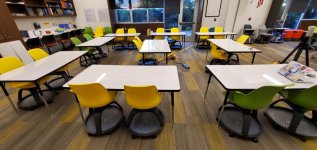
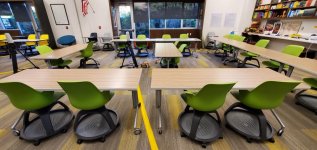
I was looking to see what would work best to capture the audio for each chair in the classroom, which can be moved around somewhat to whatever makes the most sense. As it is right now, each chair is about 8 feet from the middle of the Owl. Also, because of COVID-19, the microphones need to not be touched by the students in order for them to work.
The solution I was looking at was the Philips 9172 mic: https://www.dictation.philips.com/products/transcription-accessories/meeting-microphone-lfh9172/ . Up to six of them can be daisy chained together. I was thinking maybe four of them would be needed for each room - placing them in the corners of the rectangular layout of the tables and chairs. The mics are $125 each on Amazon, so that puts it at $500 plus about $100 for an Behringer U-PHORIA UM2 and cabling.
Does anyone have any other suggestions, though?
My wife and I would super appreciate any help. Audio is not really my forte.
My wife is a teacher for a small school and is trying to mimic the classroom environment for live-streaming. Part of her classroom meets in person and part is on Zoom.
Her organization got Owl Labs Meeting Owl Pro conference cameras (https://www.owllabs.com/meeting-owl). The cameras work very well - they are literally 360 and follow the speaker across the room. The audio is poor, though.
The device was meant to be used with everyone sitting at the same table. On top of that, the proper height for video is not the proper height for audio. We also tried putting the Owl on a 3x3 foot table in the middle of the room to see if audio would better be reflected into it, but it made no difference.
Here's an example of two classrooms where they use the devices in (they have an Owl in each classroom):
I was looking to see what would work best to capture the audio for each chair in the classroom, which can be moved around somewhat to whatever makes the most sense. As it is right now, each chair is about 8 feet from the middle of the Owl. Also, because of COVID-19, the microphones need to not be touched by the students in order for them to work.
The solution I was looking at was the Philips 9172 mic: https://www.dictation.philips.com/products/transcription-accessories/meeting-microphone-lfh9172/ . Up to six of them can be daisy chained together. I was thinking maybe four of them would be needed for each room - placing them in the corners of the rectangular layout of the tables and chairs. The mics are $125 each on Amazon, so that puts it at $500 plus about $100 for an Behringer U-PHORIA UM2 and cabling.
Does anyone have any other suggestions, though?
My wife and I would super appreciate any help. Audio is not really my forte.