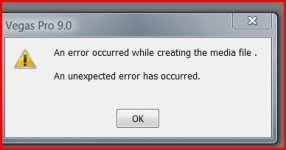
Help With Rendering Titles--Crash on Print to Tape

Dear All,

I am trying to print my film to tape. However, when it gets to the titles at the end it keeps crashing. I am using the pre-generated credit rolls and solid background titles. White lettering on black.

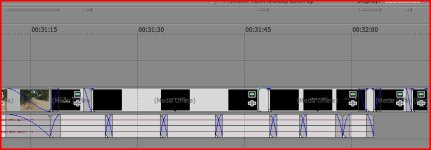
When I render separately , it crashes. And when it prepares my video to print, it renders all other effects (fades ect) fine. However, it is not rendering the titles as there is no render lines above them. It is skipping them.

I used 2-3 pulldown removal and I am editing on a 23.97 timeline. I generated titles within the project. They, too, are 23.97.

I have to ship this tape off to a film festival I am in by Tuesday. Any help would be greatly appreciated!

Many thanks,

Jay
 
Are you asking about Vegas? There are no render lines above footage in Vegas.

If you are asking about Vegas, can you post a screenshot showing what you mean?
 
Dear David,

Many thanks for your reply. I had to go out of town unexpectedly. I apologize for the delay in getting back to you.

I tried to grab a screenshot, but it keeps crashing. It appears to be the pre-rendered status "lines" tha are dark grey above the time-line. When I try and just print that section to tape or "pre-render" it only does the empty events in between title sections and then crashes. When I take them out the same happens.

May be I am going about the process wrong? I have since rendered them in 23.97 to an avi file, an re-imported them into my project. Is this the best practice in this case?

Also, when I print to tape, the project properties shouldn't matter right? I just re-insert 2-3 pulldown when printing? In other words, Gaussian, de-interlace etc won't make a difference?

I will keep trying to grab a screenshot.

Thanks again.

Best, Jay
 
OK; thought you might have been referring to the red/yellow/green render lines which appear in Premiere and FCP; Vegas doesn't have those.

I'm not sure I totally get what's happening -- you're trying to print to tape, and it does fine for everything except the credit roll?

The project properties DO matter if there's anything to deinterlace. If it's all 24p footage and text, it wouldn't be an issue, but if you have any interlaced material, it would affect that.
 
Hey David,

Yes, that is correct. It crashes when it gets to the title work at the end after printing fine until that point. It isn't one continuous title, but has a couple of sections to it. All the footage is 24p from the DVX 100B. I made the titles on that timeline. However, I did switch the properties from good to best at one point.

I don't have any interlaced footage in this particular film. In regards to that, What would be the best settings if footage was mixed between 60i and 24p? Although that is a separate issue I can explore on the boards.

The title at the beginning--just one continuous media generated event-- processed fine when printing.

Thanks again for your time.

Sincerely, Jay
 
I guess I'll need more detail -- I can't replicate this error. All my prints to tape have worked fine.

Tell me absolutely everything, as detailed as possible.

For 60i to 24p, use Interpolate Fields, almost always. Using Blend Fields can save you resolution, but that only works if you have almost no motion -- and how often is that?
 
Dear David,

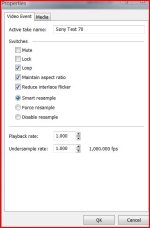
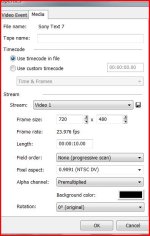
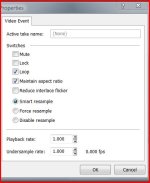
I use Vegas 9.0. I captured my video exactly as you demonstrate in your video. I cut it on a 23.97 timeline. I used the media generator for my titles. Screen shot #5 and #6 are title attributes. Shot #7 is empty media event attribute.

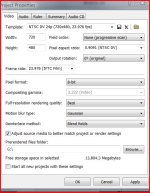
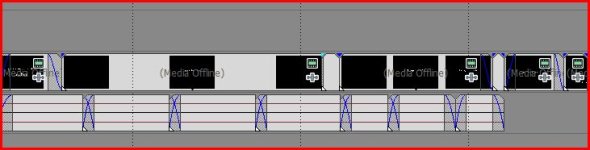
I have attached a screen shot of my project settings and the timeline area of question (#1 and #2)

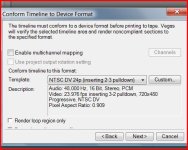
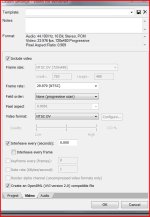
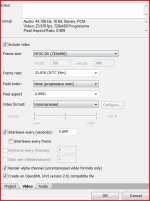
I choose print to tape. OHCI compliant. I have included screen shots for the rest of my settings (#3 and #4)

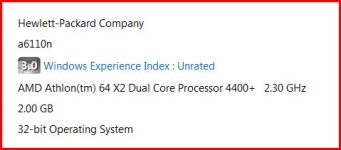
I also have included a shot of my computer specs.

I hope this is what you were looking for.

Best, Jay
 

Attachments

  • screen shot of vegas #1.JPG
    screen shot of vegas #1.JPG
    72.9 KB · Views: 0
  • screen shot of vegas #2.JPG
    screen shot of vegas #2.JPG
    35.4 KB · Views: 0
  • screen shot of vegas #3.JPG
    screen shot of vegas #3.JPG
    52.1 KB · Views: 0
  • screen shot of vegas #4.JPG
    screen shot of vegas #4.JPG
    72.2 KB · Views: 0
  • operating system.JPG
    operating system.JPG
    23.6 KB · Views: 0
  • screen shot of vegas #6.JPG
    screen shot of vegas #6.JPG
    39.5 KB · Views: 0
  • screen shot of vegas #5.JPG
    screen shot of vegas #5.JPG
    52.2 KB · Views: 0
  • screen shot of vegas #7.JPG
    screen shot of vegas #7.JPG
    38.8 KB · Views: 0
I don't see anything wrong there, except possibly that you're using 29.97 in the render settings while you conformed the timeline to 23.976. That shouldn't matter, but it's the only thing which sticks out. Try making them match.

Try this -- you said you did some pre-rendering -- get rid of all of your pre-render files and render the whole timeline.
 
Hey David,

I cleared all pre render and selected print to tape again. It rendered "everything" and started printing. Again, when it got to the end it crashed at the final fade into title.

I was able to grab a screen shot of the lines above the timeline. The empty events are "lined" but the rest is not. When it hits the section not lined is when it crashes. The pictures are attached.

If nothing else, I am going to render the whole thing this time as an AVI uncompressed then open a new timeline and drop it on there and print.

Thanks again for your time.

Jay
 

Attachments

  • vegas error.JPG
    vegas error.JPG
    21.7 KB · Views: 0
  • vegas error 2.JPG
    vegas error 2.JPG
    49.6 KB · Views: 0
Yeah, obviously, it's not prerendering the titles. I have no idea why this would be; I've never seen this behavior before. It should work.

Your idea to render the whole thing as uncompressed should work.
 
Hey David,
I ended up rendering the end titles as an AVI uncompressed file. I then dropped that back onto my timeline and then printed to tape inserting 2-3 pulldown. That worked. (When rendered the whole thing as an uncompressed AVI file, I got choppy results/glitches)

When printing to tape does it matter if its uncompressed or a DV Template when using pulldown?

Thanks, Jay
 
You mean the project settings? Doesn't matter, though it's usually a good idea for your project to match the desired final output so you don't get any surprises on the render (like placement of graphics, etc.). If you mean for printing to (DV) tape, the only format you can use is DV. As you want this to be watched, use the NTSC or 24p with 2-3 pulldown templates, not 2-3-3-2 (but you already did that).
 
Yes, the DV capture but the video format is set to uncompressed instead of NTSC DV. I was just wondering if it makes a difference in quality? I have attached pic.

Jay
 

Attachments

  • Capture.JPG
    Capture.JPG
    63.5 KB · Views: 0
You can only print to tape as DV. That is the only format a DV recorder will accept.

The media it encodes from to get to DV, however, doesn't matter.
 
Oh, backing up a bit -- the uncompressed file you made of the entire timeline may have been fine, but uncompressed rarely plays back smoothly. Too much bandwidth.
 
Back
Top