Help with Conference - Live Sound & Recording

  • Thread starter Thread starter PeopleCanFly
  • Start date Start date
P

PeopleCanFly

Guest
I've been hired to record a conference in about a week. We'll have to supply everything, including an improvised PA system for the room. The idea is we'll have the main presenter on a wireless mic, probably a lav, but we'll also have a laptop (Videos will be played during the presentation) and two condenser mics (Shure SM58s); One that will be shared between a small panel of four, and one for audience Q&A at the end. All of these sources will have to be output to the speakers. All of this will also need to be recorded for the video. Portability is the biggest concern, since ideally we may be using most of the equipment again in various cities across the country. We'll need to pack light to make airline travel as easy as possible.

Now, as the guy, my lucky task is to figure out what equipment to rent or buy for this project. Live sound is new territory for me. I normally decline live projects like this since I'm more comfortable with short film commercial type work, but I know the person and I'm willing to give it a try to help them out. Of course, the budget is super tight. I'm accepting some of the gear we purchase as partial payment for the gig.

With my limited knowledge of all things audio, I'm thinking about using a Mackie 402VLZ4 mixer with some cheap studio monitors as the PA system (I use these monitors at home and they can get stupid loud to my virgin ears). With that mixer, I should be able to record the stereo mix of everything via the headphone out straight to camera or into my Zoom H5. For the wireless setup, I figured if I'm getting paid with gear, I might give the Rode NewsShooter kit a shot. It looks like something that would be a great benefit to my future projects and I think it will serve us well as the wireless mic for the main presenter.

I guess my main question would be is this completely stupid? Am I missing something? That and I know next to nothing about quality lav mics. Anything good I should keep an eye out for? I'd love something easily concealable for use in my future projects! Countryman B3? Sony ECM-77B? :happy:
 
Not very large; About the size of a classroom. Max 50 people.
 
I did this type of gig for 20+ years for a NYS legal org. 2-3 cams, live switched and audio mixed on-the-fly. Three person crew, cam op, switcher and audio tech/mixer (me).
BTW, the SM58 is not a condenser mic and the Mackie 402 only has two mic inputs.

Yes, how many folks in the audience. What are the anticipated venues? Hotel ball rooms?
Studio monitors are not good for any type of live sound reinforcement (including spoken word and to an audience of 50). They're not designed to project the sound more than a few feet.. I would recommend two of small 'Anchor Audio' powered speakers like the AN30 or AN1000.
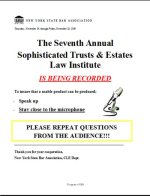
If the recording and sound system is integrated, feedback is an issue, so a cardioid lav may be better.. there are pros and cons though. 58s will be fine for the podium and/or the panel. Audience questions are tricky.. many folks will not come to the Q&A mic unless specifically orchestrated by an MC. I would suggest a room mic (NOT fed to the PA) to pick up these (as best you can) as well as audience applause. As well, I always instructed the presenter to repeat the questions AND placed written instructions to do so on the podium and panel table. I also instructed them to "stay close the mic and SPEAK UP".
If you're doing this as a OMB, that's an awful lot to handle... especially for someone with limited audio experience.
 

Attachments

  • NYB Notice.jpg
    NYB Notice.jpg
    35.7 KB · Views: 0
Last edited:
I don't have more specific input on which gear you should buy but like Rick, I too did these type of gigs for a few years. I will say that once you get the right gear and can make sure that the SOUND is always clear and legible, you are 90% home and these gigs become no brainer, money makers. But getting to the point where the SOUND works can be difficult because as you have alluded to, people are the variable. Audience questions always are killer and people are too lazy to go up to two or three pre-designated mics to ask the question without serious prodding from the presenter and possibly the crew and they are too impatient to wait for one or two audience runners to run a handheld wireless mic over to them ala Oprah, Phil Donahue or Sally Jessy Rafael style (wow, am I dating myself with these references!). If you cannot hear the questions on the video or live and the presenter FAILS to repeat or paraphrase the question and just answers it, it makes the whole viewing experience totally disjointed and this stuff is semi out of your control as you can hammer, repeat and remind the audience and the speakr(s) of this and they still ignore your direction and forget to do these things. It can be maddening. Combine this with feedback issues, RF issues and you have a recipe for frustration. The best way to do this is to have a video crew that worries about camera and lighting and a sound crew that worries about the sound only and how to get the speaker and audience to working microphones all of the time so that they can be heard live and on the video. Having a couple of assistants to help the sound mixer here is a must. They can be cheap PAs or other emplyees of the company, they don't have to all be knowledgable sound mixers.

This is why I rarely do live events anymore, they are a PITA and can be incredibly frustrating because guess who the execs, speakers and the audience are going to blame when there are sound issues? You! Even if you told them exactly what needs to happen, it will be YOUR fault. That sucks. Been there, did that for years, not doing it anymore. You will typically be underbudgeted to have the right tools to do this and you will typically be understaffed because you will need at least three people dedicated to just the sound, wiring people with lavs (NEVER rely on podium mics only, you will get screwed everytime). People will roam, people will drum their fingers on or pound the podium, or they will ignore you and walk away from the podium because they "have to roam", which I find dumb and obnoxious if there is no stage motivated reason they should roam.

Proceed with caution and only do this IF the powers that be will budget for the proper equipment and the proper amount of staff/crew needed to carry it off. Otherwise, you will be frustrated and you will be blamed.
 
Thanks for the input guys! Not sure how I overlooked the dynamic Shure SM58s...Anyway, the Anchor Audio speakers look like the perfect companion. I can't seem to find any reviews about the AN-30 online, though and the others are pushing the budget. As for that mixer, I chose that since we'll only need to power the two Shure mics; the Rode wireless kit and laptop should power themselves and connect into the third and fourth channels via the 1/4" plugs. It is my understanding that I can mute and unmute the presenter during the laptop videos via the wireless receiver (If they forget to do so on their end). We'll have the day before to plan out who's doing what so it should, theoretically, work out fine... should...

My biggest gripe is knowing if I'll have room to stretch the budget, since I know extra mics, more channels, and more hands would make it easier, I just don't think that's in the cards for this particular job. It's a super quick, low key, rinky dink setup that can pass off as semi decent for future use! :tongue: I also have a 2 channel JuicedLink preamp I normally run into my camera, so if I need to do some jankey connection from that to the mixer I will if I can get full control of each source separately that way (Powering the Shure mics through that and running the wireless kit and laptop through channel 1 and 2 on the mixer).
 
To clarify, dynamic mics (like the SM58) do not need any external power... from a mixer or battery, just a mic preamp. Condenser mics OTOH (which you are apparently not using), generally need "Phantom Power". Lavalieres which typically have a 3.5mm plug, usually require "plug-in power", which most devices supply these days, including wireless mic body-pack transmitters.
If you need to input two SM58s and a wireless mic reciever, you would need at least three mic inputs. Most of the budget wireless mics do not output line level so you probably would not be able to use the 1/4" inputs. If you need to put a laptop's audio in the mixer, most folks use a direct interface (DI), which outputs mic level as well. I would recommend a mixer with four mic inputs (XLRs).
 
Last edited:
For live sound you have a choice of a powered mixer, and passive PA speakers. Or,

A mixer and powered speakers (DJ type setup). Or,

A mixer, a power amp, and passive speakers.

I would look for something that has about 8 mic (xlr) inputs, if you were doing bands you would want 16 inputs.

Strangely, you can do that for a few hundred bucks, or a few thousand. That is the gear you need beyond the video sound stuff you probably already have. Yamaha seems to be about the middle of the road, there is cheaper and more expensive stuff out there. I would recomment the mixer and powered PA speakers as the easiest and most versitile setup. Mixer, speakers, stands, cables get you going.
 
Live is definitely not something I'll be doing super often; This is strictly for a super low key, super low budget setup. Something functional, but not the best is absolutely OK.

I was able to stretch up to the Mackie 802VLZ4 to make my life not a living hell, but we can only get one speaker. Do you think one small speaker like the AN-30 or would something a little bigger be better (Without costing more haha)?

Also, would I be correct in assuming I'll need something like this Peavy USB interface to get a balanced signal from the laptop up front to me with the mixer near the back? Since we'll only have one speaker with us, everything will be mono anyway, so one less cable to worry about. Unless there's something easier that will do the same thing (Balanced output signal from the laptop).

Thanks again for all the input guys; I'm a little short on time now but I'll hop back on here later today.
 
Most of the small Anchor AN series powered speakers are rated for audience/room to around 100 persons. They project "a clean 100dB + SPL". Anchor Audio gear is made in the USA and is highly regarded by audio pros.
http://www.anchoraudio.com/AN-130-Speaker-Monitor/
I have a pair of the 1st generation AN-130, they are rugged, kick ass and only weigh about eight pounds. There are currently good deals on eBay (less than 1/2 retail) for the AN-130 and 1000. You may need some kind of stand to elevate them to at least audience head level.

Even with the USB interface you still need to run cables to your mixer. I would recommend the Rolls DB-25b ($25) or the Rapco LTIBLOX ($35) laptop Interface. Both of which have a volume control to aid proper gain staging. Output is a single mic level XLR-M. The Rapco has a built in 3.5mm input cable. The Rolls has a 1/4" input so you would need an 1/8" to 1/4" adapter or adapter/cable.
 
I was able to stretch up to the Mackie 802VLZ4 to make my life not a living hell, but we can only get one speaker.

Given that your budget is tight, that you want at least 3 XLR mic inputs, and you want something compact, how about this...

Behringer Xenyx 1202 : $80

Which will give you more budget for speakers.

And then something like one or two of these for speakers...

Behringer Eurolive B208D 200W 8" Powered Speaker : $180

These are pretty light-weight for their size. ( 14.7 lbs )

Also, I would avoid most LAV mics because they have an omni-directional pick-up pattern and are prone to feedback. ( I generally like to use these mics for live events or their wireless equivalent if you have the budget or can rent )
 
Obviously I have a lot of research to do still, but it looks like we'll have to order something by tomorrow at the latest. I mean, of course - Why should I get adequately prepared? :huh: I stuck with the Mackie due to the XLR Outs (I'm not biased to the brand, I swear!). I also found a used version for $40 less than new. The extra outputs and controls will make simultaneous recording a lot easier too.

I plan to only have two cameras (one locked off), both right beside me at the mixer. I'm going to have to record audio directly in-camera if I'm going to have any chance of keeping my sanity in post. I don't even want to think about syncing audio, but then I'll have the Zoom H5 there just in case something gets screwed up on one or both cameras. My last call made my heart sink with the vast scope of this project and just what exactly I got myself into...

As for the Peavy Direct Box, I was going to plug that into the laptop, then run a single XLR cable into to the mixer via one of the stereo line-in jacks (This would require an XLR to 1/4" TRS adapter). The specs for the Peavy indicate it outputs a line level signal so it should work fine that way. That leaves the three mic inputs open for the three mics we'll have.

I've pretty much fallen in love with Ricks suggestions on the Anchor Audio speakers. Their size means I don't even have to think about how to transport them and it seems like one will be more than enough for what we have in mind.


Edit: Ok, a wireless hand held mic is perfectly fine. Never mind the paragraph below (I'll leave it in, though just cause):

I'm going to make another call today to check on the wireless situation; They insisted on a wireless mic, and from other videos I've seen it appears that a lapel mic of some sort is her preference. I will ask her about a wireless hand held mic, but if I have to use a lav, what kind of wireless system would you guys recommend? I can understand feedback issues with an omni, but is that still the case with a cardioid lav? It'll be in the middle of a large city and I have no clue on frequencies or brands which is why I figured buying the Rodelink system (Even if it's just the cheaper Filmmaker Kit) would be a hassle free, no-thought-required setup to get me through this.
 
I stuck with the Mackie due to the XLR Outs

You can always use balanced 1/4" to XLR cables if you need to connect to another XLR device. ( or use a balanced 1/4" to 1/4" cable to connect to your Zoom H5, as it also accepts 1/4" balanced inputs )
There is no technical advantage to using balanced XLR connections instead of using balanced 1/4" connections. Both work equally well.

As for the Peavy Direct Box, I was going to plug that into the laptop, then run a single XLR cable into to the mixer via one of the stereo line-in jacks.

I've always fed the laptop's audio output ( usually an 1/8" stereo mini-plug ) to the mixer's RCA TAPE inputs which has never been a problem in terms of reliability or audio quality. ( using Lenovo laptops )

I can understand feedback issues with an omni, but is that still the case with a cardioid lav?

The main issue with cardioid lavs happens when people turn their head from side to side and the volume of their voice falls off. ( this is why most lav mics are omnis )

I have used head-set lav mics that I think were cardioid mics, and they worked great because the mic travels with the speakers head, so it's always positioned correctly.
 
Thanks for the pointers! :) It looks like we're going to try to rent a wireless Sennheiser mic from a local company. I think the Peavy was to give me peace of mind, since I don't really know how far away I will be from the laptop (It'll probably be somewhere else, or hooked up to a projector up front. All the details I've been given about the room are extremely vague, so what I've mentioned is all I've got really.

I think I'll give that Behringer 1202 a shot. Since everything is basically mono already, how would you recommend hooking these up to my camera's 3.5mm input? Just a simple 1/4" to 3.5mm? Then the Zoom a 1/4" patch cable, and the Anchor Audio another 1/4" to 1/4" cable from the main out?
 
If your cam has a 1/8" input, it's likely microphone level. I recall the H5 has a 1/8" mic level output to feed a cam. Feed the PA with line level The Mackie and Beringer both have RCA outputs which will work.
Not to confuse the OP or anyone else, but I always fed the PA with a pre-fader send, so if I raised the level of a mic, (a low talker for instance), only the recording feed would get louder and not risk feedback from the PA.
 
I guess I should have mentioned it, but the camera can take either a mic or line level signal.
 
Most of the cameras with 3.5mm inputs I've encountered are microphone level. Even with the aforementioned XLR> 1/8" adaptor cable and if the cam can support a line level input, it would be -10dB, so feeding a nominal +4dB signal could overdrive the analog input stage regardless of lower record volume settings.
BTW PCF, what make/model cams do you plan on using?
 
Since I already own one, have multiple accessories for them, and the client is cutting rental costs as much as possible, I'll be using two Blackmagic Pocket cameras recording in ProRes LT on 128gb SD cards (I have 4). The crop factor is actually a bonus for getting in closer when I'll most likely be tucked in the back of the room hogging a power strip for everything else, so having two of those on AC power will make things much simpler, and light for me.

I also asked to get the mixer and a few other things shipped to me before hand so I can test the setup for more than 3 hours (We're flying in the day before).
 
Back
Top