Help with After Effects output judder please

_JD_

Well-known member
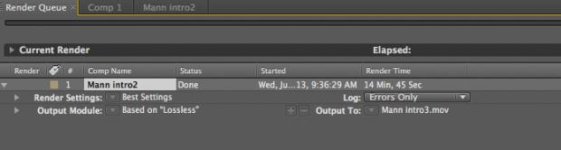
doing some keying work in AE. I attached a screen shot of my render settings. There's a ton of judder at the beginning and then it smoothes out at the end. Has anyone run into this before? Trying to get samples to client and keep running into this issue. I tried "lossless + alpha" as well, but that made it worse. Using CS4.
http://www.youtube.com/watch?v=HIcgNnAwhmc&feature=youtu.be
TIA
 

Attachments

  • Screen shot 2013-06-26 at 12.15.45 PM.jpg
    Screen shot 2013-06-26 at 12.15.45 PM.jpg
    13.5 KB · Views: 0
Rebuilt a whole new composition and I'm still getting the same effect but even worse
 
Is it like that in the ram preview, before exporting in the render queue?

Is it like that in the export (before uploading to youtube), or is the problem only on youtube ?

Try clearing the media cache before adding to render queue (sometimes AE uses old ram preview files, and occasionally there can be glitches or misordered frames)
 
Thanks PDR-
It's hard to tell in the RAM preview as it's so slow
It is like that in export before uploading to YT or Vimeo- just uploaded to show the effect
I'm clearing the media cache now

I did have the background plate as a .jpg- switched that to .psd file along with the logo- thought I had solved it but no go.
 
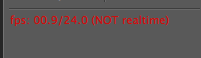
This shows up in the info pane under RAM preview- don't know if it's relatedScreen shot 2013-06-26 at 6.30.38 PM.png
edit- yes it plays with judder on RAM preview
 
Last edited:
It doesn't matter that it's not realtime.

AE will render the frames and you will see a green bar over the timeline (rendered frames are cached in ram) , over that green section it should play realtime

If , over the green section, that the frames are still out of order, you likely have a decoding issue with your primary assets (your video) . What format is the video that you imported to AE ? What container and compression ?
 
PDR- yeah you're right- I'm using AVCHD in .mts- probably need a transcode eh? But yes, with RAM preview the frames are still out of order.
Downloaded Media Converter and re-wrapping the AVCHD to .mov- preview looks good
Thanks for the tips PDR- guess AE doesn't play nice with .mts- the files sure look good on the parts where it doesn't reshuffle the frames:)
 
Last edited:
PDR is right...it's clearly a codec issue. Just wanted to chime in on the RAM preview, which even after rendered will not always play back real time...don't worry about that as it doesn't affect the final output. Depending on your computer, AE can't always playback in real time but it will render it correctly for output even if it takes forever.
 
Back
Top