Help colour correcting a few shots

Richy Lacey

Active member
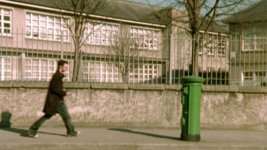
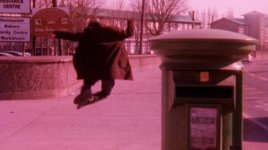
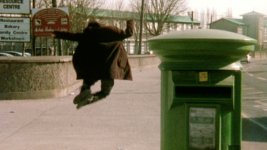
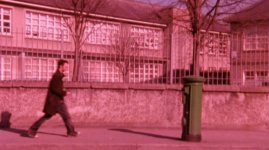
Two shots in a short film I shot on 16mm came back from the lab looking a little rough to say the least -

attachment.php


attachment.php


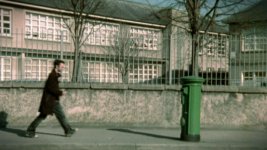
I've managed to colour correct it a bit using the standard 3 way tool in Final Cut Pro. It still doesn't quite look right to me though.

attachment.php


attachment.php


Can anyone advise me as to how to get it looking better?
I don't know any colourists or editors locally so I haven't been able to get any help.

Thanks
 

Attachments

  • Head Wrecker.jpg
    Head Wrecker.jpg
    132.1 KB · Views: 0
  • Head Wrecker Corrected.jpg
    Head Wrecker Corrected.jpg
    142.6 KB · Views: 0
  • Head-Wrecker-2.jpg
    Head-Wrecker-2.jpg
    118.2 KB · Views: 0
  • Head-Wrecker-2-Corrected.jpg
    Head-Wrecker-2-Corrected.jpg
    125 KB · Views: 0
That's pretty ridiculous correction, but it's almost as if you're missing an entire channel of information... Well not really, but it's seriously deteriorated in any case. Perhaps do secondary or even tertiary correction the result you already have, to throw a bit color into the mix.

Using what you already did, I tried to make it a bit more neutral, but I honestly like the somewhat warm look of yours:

O6vFQ.png


29Hni.png


This was done in Photoshop using color balance and channel mixer, but the settings can probably be mirrored in After Effects, or similar tools in FCP.
 
Last edited:
That's pretty ridiculous correction, but it's almost as if you're missing an entire channel of information... Well not really, but it's seriously deteriorated in any case. Perhaps do secondary or even tertiary correction the result you already have, to throw a bit color into the mix.

Using what you already did, I tried to make it a bit more neutral, but I honestly like the somewhat warm look of yours:

O6vFQ.png


This was done in Photoshop using color balance and channel mixer, but the settings can probably be mirrored in After Effects, or similar tools in FCP.

Cheers for the reply :)

That's probably the best version of that shot I've seen so far.
I haven't been able to get the grey of the building looking anything like as natural as you have.
Any tips on getting that result using the 3 way colour corrector?
 
Did you look at my last offering on the other forum you posted this on?

The difference between what he's done in photoshop, and what you've done in the color corrector is obvious on the window frames. He's taken out far more of the magenta cast in the highlights.

A small touch of desaturation and a small push in the midtones toward blue/cyan should clean things up nicely.
 
Did you look at my last offering on the other forum you posted this on?

The difference between what he's done in photoshop, and what you've done in the color corrector is obvious on the window frames. He's taken out far more of the magenta cast in the highlights.

A small touch of desaturation and a small push in the midtones toward blue/cyan should clean things up nicely.

I had a chance to look over your posts on DV Info last night, greatly appreciate the advice.

I've worked on the highlights a bit (getting the window frames looking right) but it's impacted on more of the image than I'd like.
Added some vignetting on your recommendation.

Although your directions were quite straight forward, with my knowledge of the tools I didn't get far with them.

This is where I am now

attachment.php
 

Attachments

  • Picture-3.jpg
    Picture-3.jpg
    142.8 KB · Views: 0
As I said there, What you are asking to do is not easy. And there are things about the tools that are hurting you. Primarily something called "slope". Which defines how tightly an selected color or range of colors can be affected. I don't think the color wheels in FCP have a slope setting, though they are available in "Color". That is really the app of choice for doing this with the standard FCS suite. Otherwise you'd be on Resolve or something similar.

You're really either going to have to accept "close enough" on this job, or pay someone to fix it "per frame" in a better tool. Or learn to do it yourself in photoshop or color. Welcome to why post takes so much longer than shooting the actual movie.
 
Back
Top