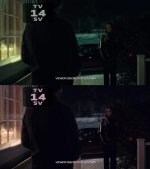
Hannibal - color grading decomposition

hateom

Member
I'm a big fan of Hannibal movie series, and I'm sure there are a lot of fans here too :)
I don't think I need to explain that the visuals in the show are beautiful.
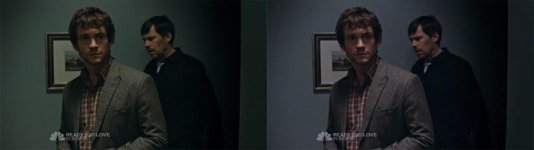
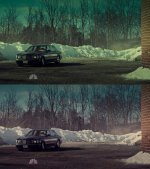
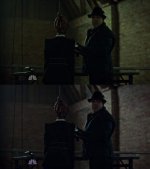
What i tired recently was to "revert" the grading process, trying to color correct the final image towards the more natural looking picture that came straight from the camera.
Here are a few examples:
1.jpg

2.jpg

3.jpg

9.jpg

The general impression is that it's not really that complex colour processing applied to the image to achieve the stylised look, but obviously my before versions are not what came out from the camera. What makes the show look fantastic is in my opinion the production design, locations and lighting. All those things makes the visuals impressive and the grading is the final ingredient gluing it all together.

A few more examples and a colorista settings can be seen on my blog here: http://blog.tomasz.cc/2014/10/hannibal-grading-decomposition/
 
Last edited:
while some of that may be true, without knowing for sure the grading process you cant know how much is grading and how much is in cam. for instance there may be many "mini-grades" where skin tones are treated differently from backgrounds, they may have deepened the contrast from what was achieved in cam, etc.
 
while some of that may be true, without knowing for sure the grading process you cant know how much is grading and how much is in cam. for instance there may be many "mini-grades" where skin tones are treated differently from backgrounds, they may have deepened the contrast from what was achieved in cam, etc.

Of course, this was just a simplification to stress other aspects even more (production design, lighting). I'm not saying that the grading consisted of only one color adjustment, by doing what I did I came closer to the picture I "could" get straight from the camera, allowing me to understand the process better. Let's call it "the final look" adjustment in the grading process :)
 
This was cool! i'd like to see more. (But wow, the first hannibal grade with the car looks horrible! (not yours)
 
It all comes down to the fact that the final look is on the filmmakers.
I get the point of the reverse engineering to see what they started with, but you have to set the image when recording according to the look you're after, I think. Don't set it to a Picture Style that have high contrast if you want to "wash" it out in post.
Great little experience here though!
 
Interesting post!
Question: i bought Magic bullet a couple of years ago....
What does Colorista gives you more? I saw many advertisings and wedding videos are Graded with Colorista so i was wondering if i have to buy it or keep doing my edit in color with MBL

Thx for the help
 
Interesting post!
Question: i bought Magic bullet a couple of years ago....
What does Colorista gives you more? I saw many advertisings and wedding videos are Graded with Colorista so i was wondering if i have to buy it or keep doing my edit in color with MBL

Simply put, Colorista gives you more control. It takes more experience to achieve a look we are looking for, perhaps it will require more steps, but eventually we will be able to control every single step and adjust it the way we want to. Plugins like Magic Bullet give you recipe with the ingredients under the hood... Your options are limited, but you can achieve a specific look with one click.
So it all depends what you want to achieve. For a quick grade MBL is convenient. For a in-depth colorisation you need more precise tools that give you control over every single step and every single detail.
 
Last edited:
Back
Top