Hi there,
I'm currently having an issue with resolve:
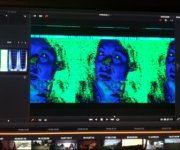
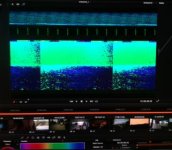
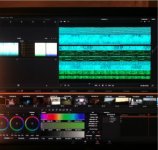
I wanted to grade 1080p footage from my 5D Mark III but Resolve shows
some crazy artifacts (see attachment or: http://tinyurl.com/oujbc9h)
I just did some minor changes like Tonal correction - nothing fancy and GPU "stressing". I haven't had this before...
It shows up an error: "lower resolution of timeline" (btw. where can this be done?)
But 5D Footage shoundl't eat up all the 4 GB of DRAM just with minor adjustments...
Is my GPU damaged?
My Speca:
Windows 8.1 / i7 4930k / ASUS P9X79 / Gigabyte 770 4GB / Corsair H100i / G.Skill 32 GB 2133mhz RAM / Cooler Master V850 / 250 GB SSD C-Drive
PS: I'm also having some issues with Speedgrade: https://forums.adobe.com/message/6935131
I'm currently having an issue with resolve:
I wanted to grade 1080p footage from my 5D Mark III but Resolve shows
some crazy artifacts (see attachment or: http://tinyurl.com/oujbc9h)
I just did some minor changes like Tonal correction - nothing fancy and GPU "stressing". I haven't had this before...
It shows up an error: "lower resolution of timeline" (btw. where can this be done?)
But 5D Footage shoundl't eat up all the 4 GB of DRAM just with minor adjustments...
Is my GPU damaged?
My Speca:
Windows 8.1 / i7 4930k / ASUS P9X79 / Gigabyte 770 4GB / Corsair H100i / G.Skill 32 GB 2133mhz RAM / Cooler Master V850 / 250 GB SSD C-Drive
PS: I'm also having some issues with Speedgrade: https://forums.adobe.com/message/6935131