GH4 and slr magic anamorphot

Polaroid22

Well-known member
Hey,

I just got the slr magic anamorphot 1.3 for my GH4. So I recorded some 4K(UHD PAL) clips. But now i want to import them into premiere or after effects, and desqueeze them correctly. But I do not know what the correct way to do this is? Does anybody know?

Thanks!
 
Last edited:
So I shot 1920/1080p on my GH4. I created in after effects a composition with the following settings: 1920 width 812 height and Pixel aspect ratio DV PAL 1,09 not sure about the aspect ratio?

And on the footage itself I made a horizontal stretch of 133%. Then linked the vertical and horizontal stretch again and then scaled it down. But i always seem to loose some part of the image, mostly height. Have got no clue if this is the right way to do this? Or please teach me :)
14bhpxd.png


Thanks!!
 
There's more than one way to skin this cat, but here's a way that works without data loss from scaling, etc...

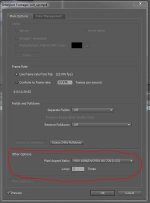
If you're using After Effects right click on the footage in the Project window and choose Interpret Footage>Main. In the dialog that pops up, look down in the "Other" section and choose a Pixel aspect ratio of 1.33 from the drop down. 1.33 works because the SLR Magic Anamorphot is a 1.33 squeeze lens. Here's a quick screen grab of the dialog..

Capture.JPG

Now, if you want letter boxing then make a comp with square pixels (1.0 pixel aspect ratio) at 1920x1080 and drop the footage into it. When you do this it should look like the footage fits the vertical, but is going off the edges on the horizontal. In the timeline, right click the footage and choose "Transform>Fit To Comp Width". You should see it snap into the proper width & scale down the height appropriately giving you the black bars top & bottom, all with no data loss due to scaling.

If you don't want letter boxing then make a comp with square pixels (1.0 pixel aspect ratio) at 1920x812. Drop the footage into it. It should look like it's overscanning the footage (ie: it seems to be zoomed in and overhanging the boundaries of the image). To fix this just go in the timeline, right click the footage and choose "Transform> Fit to Comp". The image should snap to fit with no black bars.

Others more experienced in dealing professionally with anamorphic footage can correct my errors or omissions, but this should get you what you're looking for.
 
Back
Top