getting 24p from a canon 1100d at 25p

n1c02

Well-known member
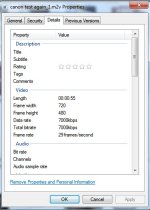
I am trying to use a Canon T3 1100d instead of my DDVX100a and M2 adapter.. But the only settings are 25p and 30p.. I was told to use 25p because it would convert to 24p easier.. so far this is what I get.. I have taken a small test video and it saves and when I goto the properties is tells me it is 25fps......

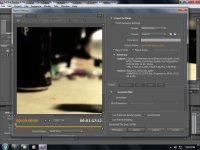
Now I go into Premiere and put it on a time line for 24p DSLR.. and I export with these settings. I go into the properties and it always tells me that is is 29fps... What am I doing wrong?
seams to do the same to the exported videos that I am filming with my DVX too and I am using 24p adv on that.. but it ends up 29fps when i export...... can anyone help.
export 2.jpgexport.jpg
 
DVD can only hold 30 fps video. When you have 24p source, there are two ways to compensate. You can add the extra frames directly, or flags are added to the data stream telling the DVD to add the pulldown upon playback. In this case, it's likely Windows is reading those flags.
 
ohhh... ok so when im exporting to mpeg-dvd it would always do 29... i wasnt even thinking.. I was going crazy trying to figure out what I was doing wrong.. Thank You soooo much
 
What export settings would you suggest for both the canon at 25 and my dvx at 24padv. if i mix them both on a timeline... I can always convert to dvd later.. but for video purposes.. the best video quality that I can get keeping a 23.976 frame rate what should I be using to export..

Thanks
Terry
 
DVD can only hold 30 fps video. When you have 24p source, there are two ways to compensate. You can add the extra frames directly, or flags are added to the data stream telling the DVD to add the pulldown upon playback. In this case, it's likely Windows is reading those flags.

When you encode with flags, the video on the DVD is 24 fps, not 30 fps.
 
Flags are instructions in the video which tell the DVD player to insert extra fields into the video stream if it needs to play to an interlaced TV.
 
You must slow down the 25p material to 24p.
This is the only way to keep them all on the same timeline.
You could try retiming the 25p stream to 24p using twixtor or compressor with proper frame blending, but it will look like utter garbage.

Forget about trying to mix a multiple-camera live shoot with 24p & 25p cameras.
 
Back
Top