FS700 Cinegamma 1. Help me understand Knee settings a bit better

Gene Sung

Veteran
I'm still a bit confused on understanding the Knee settings on the FS700. It seems that many people are saying to generally keep the Knee high on the FS700 (or at least above 97.5).

Shouldn't the knee be adjust for the situation? Here are my knee questions

1) What exactly is the benefit of a very high Knee (say at 105)? From my understanding this allows the image to retain a high IRE verses a low Knee (say at 80) which will limit the highlights, thus the dynamic range?

2) I've seen on Frank G's FS100 profiles, that the Knee is a bit lower for his bright sunny day profiles. Does the low knee translate from the FS100 to the FS700 as well? Especially when using the FS700 Cinegammas? Or is the Knee treated differently because of the Cinegammas on the FS700?

Here's 3 different Knee scenarios.

1) Scenario 1: On a bright, sunny day, high contrast shots, what's Knee settings do you guys recommend? Obviously, at 80 Knee, the sky is retained and at 105 knee, the sky is just white. So somewhere in the middle? Would between 90 to 95 be too high on a bright day?

2) Scenario 2: Overcast days. Since the contrast is not so extreme on overcast days, Then maybe the knee can be set higher (105) to get the full dynamic range?

3) Scenario 3: Indoors. Since the lighting is a bit more controlled, Should the Knee be kept higher for greater dynamic range?

Thanks for any help in my better understanding Knee as it's a bit confusing as obviously important to your final image.
 
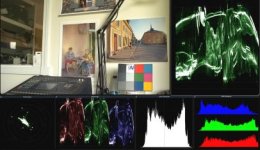
If you have a way of looking at scopes and a evaluation monitor at the same time, it is easy to see the effect of changing the knee and knee angle.

I use Scopebox and a Kona card in my MacPro for this. I run the HDSDI out of the 700 to the SDI eval monitor and then loop it into the Kona card and I run Scopebox on the MP. I also have a set of older Tektronix scopes but frankly the Scopbox scopes are much more versatile and easy to read. You get real time histogram as well.

PP Off.jpg

The above is a screen shot of how I set up the scopes on my Mac.

Here is a link to the settings I have come up with:
http://www.westsideav.com/FS700PPs.png

I am finding that the 700 really handles highlights very well. I find that setting Zebra to 105+ (with Cine4) and dialing the aperture down until there are no stripes, or only letting very bright reflections show zebra, works very well.

I am still dialing in the cam but the scopes really help to show what is going on.

You can alway rent a new SDI monitor with built in scopes if you don't have access to one.
 
The whole concept of cinegammas is not to use knee. On any other Sony camera with cinegamma capabilities knee is disabled.

Set it to 105 +2. +2 because then it uses the full 109 IREs and you get a tiny bit more highlight detail. Setting it to 90 or 80 with a negative slope only lowers the whitepoint of the camera. There is no additional detail gained in the highlights unlike with REC709 gammas where knee has a great effect.
 
The whole concept of cinegammas is not to use knee. On any other Sony camera with cinegamma capabilities knee is disabled.

Thanks Felix, that makes way more sense now. I've been confused because I've been reading a lot of FS100 posts on Knee which seems really crucial for the highlights. But with Cinegammas, the FS700 is a different beast.

And Thanks Olof for the profiles, I will definately check them out today.
 
Back
Top