frequency for wireless kit in church setting

droliff

Active member
Hello all,

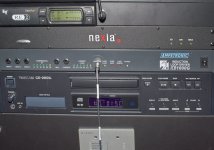
I know this is a difficult question to answer without particular details of the audio system in our church ( see attached jpegs for snapshots of the system ). I am advising ( low level tech advice for sure, that's why I came here to ask pros ) a couple people at my church
that videotape homilies for upload on Youtube to embed in their website. I recommended a nice prosumer Canon video camera, Vixia HF G40 (now G50), to do their video work ( upgrading from a palm size camcorder ) and since clean audio is absolutely essential, they ( against my recommendation )
purchased a Comica wireless audio kit on Amazon for 129.00. Well, 3 months later this kit has taken a poop. So I am recommending that they requisition for a Sennheiser G4 kit ( I use the G3 so am familiar with it's durability ). My question is this:
The church wants to utilize the A and G frequencies for the lavaliers/wireless system on the priest and deacon. I see that the Sennheiser G4 comes in three frequency choices, A1, A and G. Should I recommend the A1 frequency to the person videotaping homilies so that it
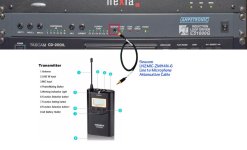
does not interfere with the A and G frequencies that the priest and deacon will be using? As you can see in the attached reference jpegs, I have the transmitter ( formerly the Comica ) plugged into a monitor out jack via a Sescom line to mic attenuation cable which sends the audio
signal to the receiver on the camera. This setup seemed to be working very well until the Comica's went south. Here's an example of the audio setup from a homily when the audio workflow was healthy.

Any advice on whether to recommend the A1 frequency choice for the Sennheiser's?

Thanks.

Dennis
_DSC2677_1000px_001.jpg

closeup_ampetronic_loop_driver.jpg
 
Last edited:
"Sennheiser G4 comes in three frequency choices, A1, A and G. Should I recommend the A1 frequency to the person videotaping homilies so that it
does not interfere with the A and G frequencies that the priest and deacon will be using?"

Each of those choices (A, A1, and G) are for frequency blocks, and for Sennheiser each block contains about 1500 different specific frequencies. That means you can simultaneously operate several wireless systems on the same block without problem, if you choose the right frequencies. And the G4 includes an Easy Setup feature and preset frequency groups to help you avoid intermod interference.

I work with G3 systems fairly regularly (at my church, for example), and I'm fairly familiar with them, though not super familiar (for film/video I use Lectrosonics). But the manuals are good. So read one of those to see what's involved. You may very well know this better than me. :-)

Here's a list of all the G4 systems available (in the US):
https://en-us.sennheiser.com/wireless-microphone-system-evolution-g4

This might be one of the specific SKUs you'd want to consider, and if you don't have your manual handly, you can find and download the G4 manual here: https://en-us.sennheiser.com/wireless-lavalier-microphone-set-ew-100-g4-me2

Cutting and pasting, it looks like these are frequencies each block embraces:

Frequency range
A1: 470 - 516 MHz
A: 516 - 558 MHz
G: 566 - 608 MHz

Which of those are best for your location? I don't know, and the Sennheiser Frequency Finder database is a year old (though it looks like they'll update it). But it's still worth a gander: http://sennheiser.us/freqfinder/index2.html

This might also be a bit helpful, but mainly to suggest that maybe you don't want to go for the G band: https://en-us.sennheiser.com/sifa

If you have a local installed-sound (or professional video) dealer, they may be able to provide some local knowledge and insight. Or ask other local installed-sound people (theater, school, other houses of worship). Or use your G3 system, do a scan and see how clear things look...

I think I have the specifics of the G3/G4 systems right. If not, someone else here will correct me. But hopefully what I've written will help you get moving in the right direction. But short version: It might be nice to have camera audio and audio audio on seperate frequency blocks, but it's not necessary. The key thing is choose frequency blocks that aren't already crammed with outside signals.

Hope this helps!
 
Choosing a common band also of course gives everyone access to everything - so if the Deacon is being put through the PA, and the video needs a feed, then tune too the same channel and share the one transmitter - If you use completely separate bands, then this facility is not available - ever.
 
"Sennheiser G4 comes in three frequency choices, A1, A and G. Should I recommend the A1 frequency to the person videotaping homilies so that it
does not interfere with the A and G frequencies that the priest and deacon will be using?"

Each of those choices (A, A1, and G) are for frequency blocks, and for Sennheiser each block contains about 1500 different specific frequencies. That means you can simultaneously operate several wireless systems on the same block without problem, if you choose the right frequencies. And the G4 includes an Easy Setup feature and preset frequency groups to help you avoid intermod interference.

I work with G3 systems fairly regularly (at my church, for example), and I'm fairly familiar with them, though not super familiar (for film/video I use Lectrosonics). But the manuals are good. So read one of those to see what's involved. You may very well know this better than me. :-)

Here's a list of all the G4 systems available (in the US):
https://en-us.sennheiser.com/wireless-microphone-system-evolution-g4

This might be one of the specific SKUs you'd want to consider, and if you don't have your manual handly, you can find and download the G4 manual here: https://en-us.sennheiser.com/wireless-lavalier-microphone-set-ew-100-g4-me2

Cutting and pasting, it looks like these are frequencies each block embraces:

Frequency range
A1: 470 - 516 MHz
A: 516 - 558 MHz
G: 566 - 608 MHz

Which of those are best for your location? I don't know, and the Sennheiser Frequency Finder database is a year old (though it looks like they'll update it). But it's still worth a gander: http://sennheiser.us/freqfinder/index2.html

This might also be a bit helpful, but mainly to suggest that maybe you don't want to go for the G band: https://en-us.sennheiser.com/sifa

If you have a local installed-sound (or professional video) dealer, they may be able to provide some local knowledge and insight. Or ask other local installed-sound people (theater, school, other houses of worship). Or use your G3 system, do a scan and see how clear things look...

I think I have the specifics of the G3/G4 systems right. If not, someone else here will correct me. But hopefully what I've written will help you get moving in the right direction. But short version: It might be nice to have camera audio and audio audio on seperate frequency blocks, but it's not necessary. The key thing is choose frequency blocks that aren't already crammed with outside signals.

Hope this helps!

Hi Jim,

Thanks for the pro input on this. It is very helpful and helps me learn some things as well. The church does have an audio house.

Here is some correspondence that I received from the church's music director:

Hi, Dennis —

My apologies for not getting back to you sooner. The limit of my range of knowledge is to be able to adjust which microphones are louder/softer/etc. We had the guys from Paladin out earlier in the year, and they said we probably need a whole new system, since frequencies are being eaten up by other electrical broadcasting/receiving devices. They said they would get back with a quote, but have not, to my knowledge, even though I have nudged them. Fr Norm approved getting two new wireless lapel mics. Currently, we have two that broadcast on G frequency. They would like to be able to use them simultaneously, one for Father and one for Deacon Bob, which would mean we would need one on G and one on A. What are your thoughts/recommendations on this, Dennis? Can you enlighten me as to where we should be aiming?

Thanks for anything you can offer.

Nancy

I'm not sure what the audio house meant by "needing a whole new system since frequencies are being eaten up by other electrical broadcasting/receiving devices."
Just trying to gather as much constructive and professional advice to send their way as possible.

Dennis
 
You do not need different frequency blocks for two or more of the G2, 3, 4 systems. Just use the preset channels in a bank which will be intermodulation free.
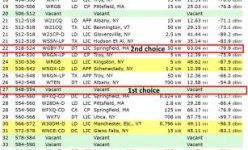
Go to the Sennheiser Frequency finder, and choose a block AND use a frequency range within TV channels that are "Vacant". If they are all in use (common in large metro areas), choose a TV channel range that has a modulation (prx) of at least -80dB. (See frequency finder screenshot ) In a fixed location, the system should not have to be reset. Otherwise, I would recommend a GHz system for non-audio folks, where channel selection (and pairing) is automatic. Both have pros and cons.
Additionally, I have encountered more than a few H.O.W. system problems where the receivers are in backrooms and/or in metal racks with no line-of-sight antenna consideration.
The ME2 mic that is usually included with the G series, is sub par IMO, so many folks upgrade to a better mic and keep the ME2 for back-up. For H.O.W. I recommend headset mics, which have more clarity and are less likely to have feedback issues. This should discussed with the officiants for what their comfortable with.

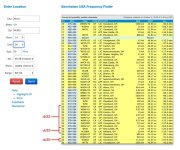
- Freq finder screenshot of Albany NY area using Sennheiser freq, block A (512-554 mHz as I recall).
F Finder.jpg
Correction: Channels 24 or 25 would be an alternate if the vacant channel was not available both are -80dB or better.
 
Last edited:
You do not need different frequency blocks for two or more of the G2, 3, 4 systems. Just use the preset channels in a bank which will be intermodulation free.
Go to the Sennheiser Frequency finder, and choose a block AND use a frequency range within TV channels that are "Vacant". If they are all in use (common in large metro areas), choose a TV channel range that has a modulation (prx) of at least -80dB. (See frequency finder screenshot ) In a fixed location, the system should not have to be reset. Otherwise, I would recommend a GHz system for non-audio folks, where channel selection (and pairing) is automatic. Both have pros and cons.
Additionally, I have encountered more than a few H.O.W. system problems where the receivers are in backrooms and/or in metal racks with no line-of-sight antenna consideration.
The ME2 mic that is usually included with the G series, is sub par IMO, so many folks upgrade to a better mic and keep the ME2 for back-up. For H.O.W. I recommend headset mics, which have more clarity and are less likely to have feedback issues. This should discussed with the officiants for what their comfortable with.

- Freq finder screenshot of Albany NY area using Sennheiser freq, block A (512-554 mHz as I recall).
View attachment 136894
Correction: Channels 24 or 25 would be an alternate if the vacant channel was not available both are -80dB or better.

Hi Rick,

Thanks for the input. All this seems pretty much over my head ha ha. I might just have them consult the audio house.

Dennis
 
The audio house may be trying to make a sale. There are two things that they could sort of be talking about. The first is that the FCC keeps selling off public frequencies for private use, so some wireless blocks that used to be fine are no longer, or won't be shortly. This should not be an immediate problem for you since those devices can't operate in blocks that haven't been sold off. Then there is the WiFi wireless systems which can in theory get impacted by too much other WiFi activity, but you don't those systems so?

Your sound guy doesn't seem to realize that theses systems are not at all like the days of old where a transmitter was on a single frequency pared to a single receiver. That is really old school. I don't think you can buy any new system that is paired like that. So as mentioned the letter codes for blocks are actually that Blocks of frequencies and you can use any frequency in the block. Practically you can't use all of them at the same time but your church only needs a couple of the 1500 in each block.

In a lot of ways it would make life easier if all of your systems were in the same block because you would be able to swap out a unit if something went wrong.

So think of each of the blocks as long strips of raffle tickets. You can use a ticket and give someone else a ticket and you still have a bunch to pick from.
 
The audio house may be trying to make a sale. There are two things that they could sort of be talking about. The first is that the FCC keeps selling off public frequencies for private use, so some wireless blocks that used to be fine are no longer, or won't be shortly. This should not be an immediate problem for you since those devices can't operate in blocks that haven't been sold off. Then there is the WiFi wireless systems which can in theory get impacted by too much other WiFi activity, but you don't those systems so?

Your sound guy doesn't seem to realize that theses systems are not at all like the days of old where a transmitter was on a single frequency pared to a single receiver. That is really old school. I don't think you can buy any new system that is paired like that. So as mentioned the letter codes for blocks are actually that Blocks of frequencies and you can use any frequency in the block. Practically you can't use all of them at the same time but your church only needs a couple of the 1500 in each block.

In a lot of ways it would make life easier if all of your systems were in the same block because you would be able to swap out a unit if something went wrong.

So think of each of the blocks as long strips of raffle tickets. You can use a ticket and give someone else a ticket and you still have a bunch to pick from.

Hi Scott,

Thanks so much for the expert advice. It sounds like, since they already have two pair of transmitters/receivers in the G frequency range, they just need to figure out how to pair each with a viable frequency in that range. I could probably help them do that, but I have no idea what's going on in their 'rack system' ( see photos in original post ). I suppose they would need a pro audio technician to make adjustments there so that the two pairs of wireless kits could operate independently. The problem they are having is that the one set transmitter/receiver works fine for the pastor but they haven't been able to figure out how to make the second set work for the deacon at the same time. I suppose also, in my recommendation to the couple that are videotaping the homilies for the church website, that they would be fine with a G4 kit that was in any of the frequency blocks... A1... A or G. And, since they already have two sets of wireless in the G block, depending on the number of viable frequencies available in that block, it might be a good idea to have a third wireless kit also in the G block so that, as you said, if something went wrong with one, they could be swapped out? Does that sound fair to say?

Thanks again for your generous input.


Dennis
 
If you can state your HOW's zip code, I could recommend a frequency bank/channels which should work. However there are always variables; antenna placement, specific Tx/Rx settings, undocumented RF in proximity to your location, ect., ect.
btw, I work a lot in Midtown Manhattan (aka, 'RF hell') and usually use an external RF scanner to choose a 'friendly' frequency range.
 
If you can state your HOW's zip code, I could recommend a frequency bank/channels which should work. However there are always variables; antenna placement, specific Tx/Rx settings, undocumented RF in proximity to your location, ect., ect.
btw, I work a lot in Midtown Manhattan (aka, 'RF hell') and usually use an external RF scanner to choose a 'friendly' frequency range.

Hi @Rick R ,

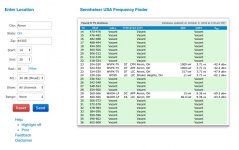
Thanks for the note and offer to give your expert input. I am located in Akron, Ohio 44303 and the church is St. Vincent ( connected to St Vincent/St Mary High School where Lebron James went to school ). I utilized the sennheiser frequency finder by plugging in my location and came up with the results you see in the attached jpeg. I also viewed this very well done, simple and straight forward 10 minute sennheiser G3/G4 setup video on YouTube. My next question is, how many choices are there
per frequency? In other words, there seem to be choices between for example 557 MhZ and 558 Mhz, because in that video... the fellow has his frequency ( at the end ) set and matched at 557.925 . In making a recommendation of the Sennheiser G4 kit and which of the 3 frequency ranges to get, A1, A or G,
it appears from the Sennheiser frequency search for Akron, Ohio 44303 that they would be safe with any of the three. Does that sound fair to say?

Thanks.

Dennis


sennheiser_frequency_finder_Akron_44303.jpg
 
The radius parameter you have is set to 10 miles. Not nearly enough to adequately ID potential interference. Use a radius of 70 miles..
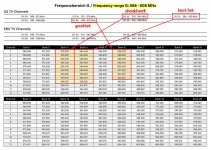
Based on the TV channels in the Akron OH area using up to eight Sennheiser G4 100 systems w/ US frequency block G. (566-608 MHz)
NOTE: I could not find a G4 bank/channel chart so this is based on the chart for the G3 EW100 Range G
(Radio Microphone EW100/300/500 G3 Range G (566-608 MHz, TV channels Ch33-Ch38)

- Best bet: TV Channel 33, (584-590 Mhz), highest modulation: -80.7 dB
Bank 4, Channels 1 thru 8 will be intermodulation-free

- Good: TV Channel 35, (596-602 Mhz) highest mod: -77.9 dB
Bank 6, Channels 1 thru 8 will be intermodulation-free

- Should work: TV Channel 32, (578-584 Mhz) highest mod. -76.2 dB
Bank 3, Channels 1 thru 8 will be intermodulation-free

(Channels 9-12 in these banks are also intermodulation-free but on different TV channel with more signal strength.)
There are other frequency options but I do not have time to calculate them.
Any one of these three banks should work and use channels in the same bank
 
Last edited:
"Consult with Sennhieser, last time I contacted them about this topic they were very helpful."

- Sennheiser support is helpful but in terms of frequency selection would likely recommend the Rx internal scanner, which in my experience is inadequate, especially for populated RF environments, which Akron seems to be.

Update: I found the G4 ew100 frequency table chart, G4 banks 3, 4 and 6 are similar to the G3.

- Best bet: TV Channel 33, (584-590 Mhz), lowest mod: -80.7 dB
Bank 4, Channels 1 thru 9 will be intermodulation-free

- Good bet: Channel 35, (596-602 Mhz) lowest mod: -77.9 dB
Bank 6, Channels 1 thru 8 will be intermodulation-free

- Should work: TV Channel 32, (578-584 Mhz) lowest mod: -76.2 dB
Bank 3, Channels 1 thru 9 will be intermodulation-free
 
"Consult with Sennhieser, last time I contacted them about this topic they were very helpful."

- Sennheiser support is helpful but in terms of frequency selection would likely recommend the Rx internal scanner, which in my experience is inadequate, especially for populated RF environments, which Akron seems to be.

Update: I found the G4 ew100 frequency table chart, G4 banks 3, 4 and 6 are similar to the G3.

- Best bet: TV Channel 33, (584-590 Mhz), lowest mod: -80.7 dB
Bank 4, Channels 1 thru 9 will be intermodulation-free

- Good bet: Channel 35, (596-602 Mhz) lowest mod: -77.9 dB
Bank 6, Channels 1 thru 8 will be intermodulation-free

- Should work: TV Channel 32, (578-584 Mhz) lowest mod: -76.2 dB
Bank 3, Channels 1 thru 9 will be intermodulation-free

Hi @Rick R,

Thanks again for the input and also for taking the time to find the G4 chart. I watched this very well done 10 minute YouTube video on setting up your Sennheiser G3 wireless kit and it was very helpful on learning some basics that I did not know before ( disabling the 'mute' button on the transmitter sounds like a great idea ). Can you take a look at the attached images and see if I am understanding things correctly? Instead of using the 'scan for frequencies option' on the transmitter then syncing to the receiver, I would use the 'manual tune option' to tune the recommended frequencies in banks 4, 6 and 3 into a list, then sync?

Thanks.

Dennis

ew_100_G4_G_Range_Frequency_Sheet_01_2018-2.jpg

sennheiser_frequency_finder.jpg
 
Yes, I think you basically understand the procedure using the on-line frequency finder method.. except you stated: "Instead of using the 'scan for frequencies option' on the transmitter" The frequency scan option is in the receiver, not the transmitter, but we do not need that anyway and have already chosen exactly which bank and channel(s) to use. We just need to select the preset(s).
Syncing the transmitter to the receiver to establish a radio link, is a different procedure.

You do not have to use the manual tune option. Just set the first system receiver to preset Bank 4 / Channel 1, then 'sync' the transmitter to the receiver to establish the radio link ..or.. set the transmitter to the same bank & channel manually.
Do the same on the second system except use preset channel 2 in Bank 4.
If there are reception problems (which there probably won't be), try one of the other recommended channels in Bank 4.

Otherwise, for optimum performance keep the transmitter (Tx) and receiver (Rx) antennas in line-of-sight. Additonally avoid having the Tx antenna in contact with bare skin, this will signifiactly reduce RF strength, especally if the skin moist from sweat and such.
I would consult the wearer prior to disabling the mute switch. Most of the pastors I've encountered are adept at using the function. OTOH, I disable the mute swtch or 'lock' the Tx for inexperienced folks
 
Last edited:
Hi @Rick R,

Thanks again for your expert input and going the extra mile to help me with my recommendation of the Sennheiser G4 wireless kit to my church. It was also quite an education for me as well. Do you have a website or Instagram that I can follow?

Best regards.

Dennis
 
How many systems are you buying? When you get up to about 4 of them you should consider the antenna divider. And if they are the same as the G3 systems, the combiner also powers the receivers.
 
Back
Top