Free official BlackMagic Davinci Resolve training resources.

Greg_E

Veteran
Torn between putting this in NLE or general software as it certainly covers a wider gamut than just editing. Also maybe sticky worthy and maybe we should have a Resolve section created (maybe?).

Some of you may have seen this in other threads or other forums, but it looks like BlackMagic is starting a push to get people up to speed with their software. They have people actively working on their training page on their website. Big changes between Friday and today already https://www.blackmagicdesign.com/products/davinciresolve/training

#1 the official training videos are now embedded in the page, you won't need to track them down on youtube

#2 the sample files used in the videos have a link, you no longer need to search for them in the video description

#3 the official training books have more courses with a couple to go as they are finished

#4 the official training books are no longer pay only, there are free PDF versions for download on the training page. They weren't making money off of these before, the Kindle versions were around $6usd each and the printed versions were reasonable for the color printing and number of pages, still a nice desk reference to have on hand.

#5 the certification exams are still free! The links are located in the books.

What I don't know is how well the videos track with the books, I asked on the forum but since I am new, my posts all need administrative approval and get buried in time when they get approved. I'll ask one of the training people directly and maybe they will respond.

No I can't comment on those other training videos, I have not purchased them or seen them. Honestly, with what BMD has offered us for free, there may be zero reason to go looking for training elsewhere. With the training books, and a bunch of time to work with them, and a huge pile of practice, you should be able to master the mechanics of operating the software. The art of cutting (telling) a story, grading a project, mixing the audio, and creating the special effects will still be something that only comes with talent and practice.
 
I theory you can go to the BM forums. But in practice your first several posts will be moderated and probably lost in all the other posts by the time they are approved. I just sent a PM to see if there was a way for the moderation to be lifted on my account.
 
Very cool. Does it have a WORKFLOW aspect to the training? Like “when color grading, first do this, then this”? obviously every project is different but there’s still a recommended workflow that works for anything. The only thing I’ve found online that I trust is that two-hour BM video because the talent is an actual colorist and Resolve trainer, but I don’t think she touched on that too much.
 
Very cool. Does it have a WORKFLOW aspect to the training? Like “when color grading, first do this, then this”?

Daria, the woman in the latest videos from Blackmagic has a great YouTube channel (Goat's Eye View) where she covers most of Resolve 12-12.5 in a very efficient manner. Even if it's centered around Resolve 12.5, it should be bookmarked by every new Resolve user.

Regarding your question: it's considered best practice to balance your footage first (color correction). This can be done in one node, which might be followed by a second node that only deals with local exposure/contrast. The idea is that you end up with a correctly exposed image, without any color cast, but with proper contrast and saturation (without going overboard) so that you can apply creative looks to many clips at the time without having to re-grade on a clip by clip basis.

Even if you want to end up with a low con, desaturated image, it's better to work off of more contrast and saturation as it will be easier to pull clean keys this way. You can lower contrast and sat at the end.

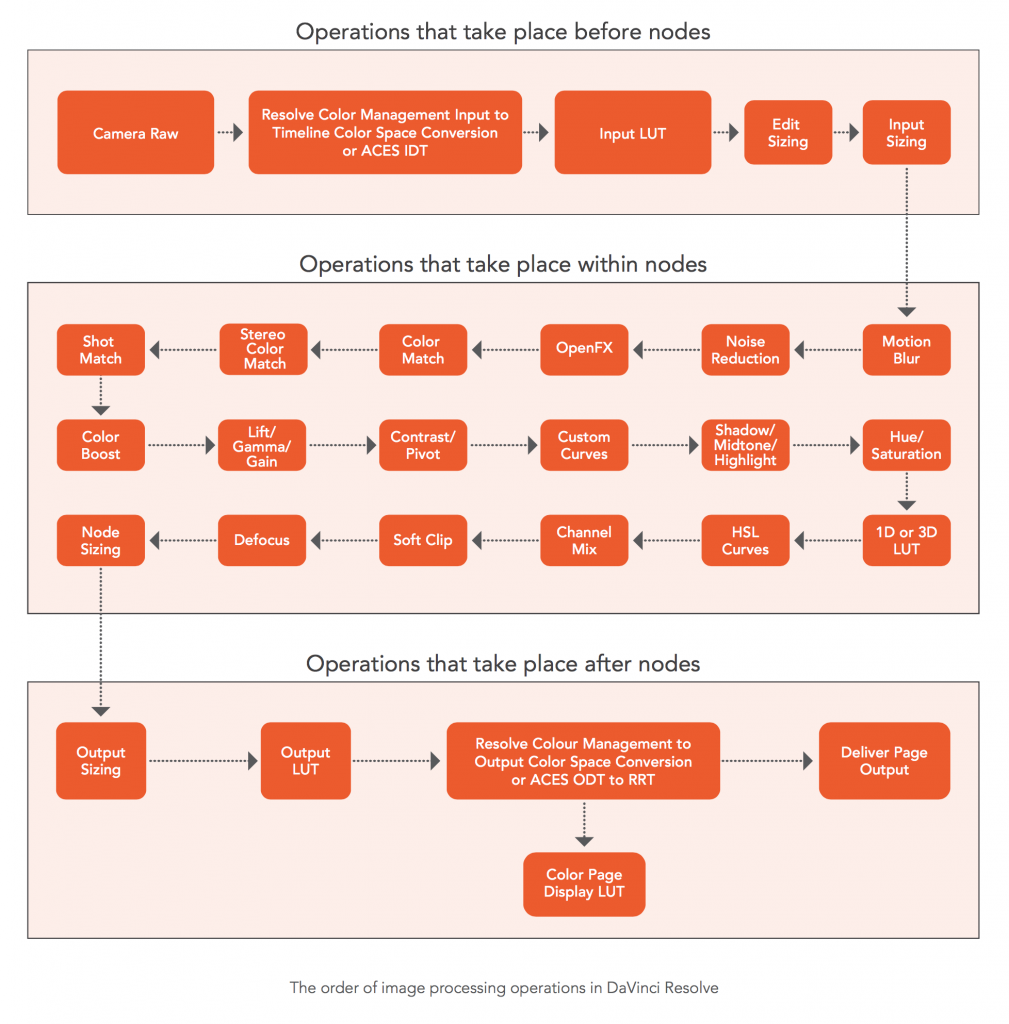
Many colorists have a fixed node structure that they just paste in via a Power Grade. It might be 8, 12 or 16 nodes (whatever) that are deactivated but all prepared in a pre made structure in order to speed up things. Before doing any of that, it might be a good idea to check the "Resolve order of operations" chart that is in the manual. Resolve processes things in a specific order.

Resolve is a creative software that lets users work in many different ways. Reading on dedicated color grading forums, it quickly becomes apparent that there is no One Way.
 
Yes I am aware of the basics of that two step process, correction/matching and then grading. Trying to do it “properly”, for the first time on current project, but wondering just how much youre supposed to do in the correction/matching phase. I think I probably did “too much”...I was thinking of what the shot should look like out of camera in a perfect world but still found myself getting very particular with white balance, doing specific tweaks on color ranges or specific elements in the shots, and trying to get everything that should match from shot to shot in the same environment to do so...I think that extra level of neurosis would have been better left to the grading phase because I find myself having to match many of those things again when applying my look (lots of uncontrolled outdoor footage); even when simply copy pasting from one clip to the next similar one (that’s already been matched), the same nodes/settings will manifest differently. Perhaps that’s just zero budget man’s burden, but I think I probably did too much in that first phase.
 
It sounds like you've got the concept down. In the end of the sprawling process, all the t's needs to be crossed and i's need their dots. The more consistent your footage is going in, the less work in stage one. If you shoot yourself with constant WB and systematic exposure levels it's easier than if someone hands you footage with Auto WB from different conditions.

But I think that if you yourself react to your own process, it's a sign that you could streamline it further. But I'd say that's normal? Keep developing the rituals until they help you more than get in the way.

And once this discussion becomes technical, it's back to that graphic that I mentioned above: Resolve's order of operation:

003-1009x1024.png


This is the official graphic from BMD but it's a few years old. Always check manual for latest info.
 
Thanks. That chart is useful. Tried to do what I could for consistency on this project but its basically a music video that was shot like a zero budget documentary and not because of intent so I am trying to make it look NOT like that, so uphill battle I guess.
 
Last edited:
Thanks, Greg, very useful info.
Thanks, Andree, for the guidance.
I join Brian and others - there is a room and a need for DaVinci Resolve section here.

Resolve is my only used NLE and color work software now. I dumped Adobe Premiere Pro few years ago due to their repeated bugs - camera files (Canon C300 MKI) that PP opened before wouldn't open after one of their 'updates'. Off course, there is no issue opening them in Resolve. Vegas Pro 15 sits unused on my PC since I purchased and tried it. To my needs and use, there's nothing lacking in Resolve as an NLE.

Blackmagic Design offering the basic Resolve for free and their pricing for Resolve Studio, with free and frequent updates, is the fairest I've encountered so far. Plus their free official video trainings and now their trainings books are offered free in pdf form.
Hats off to Blackmagic Design.
 
Again, to be fair Ive found bugs and crashes in my short time with just the color section of resolve 14. Perhaps thats only the free version or theyve been solved in 15 but Im thinking at this point that all these packages have their bugs.
 
One word of warning... There are piles of counterfeit dongles on ebay (etc). If you want a hardware dongle, make sure to ask questions and search out the differences between real and fake dongles. If the seller has more than 1 or two, it's almost definitely a fake. If it doesn't comes with the box and SD card, it may also be a fake.

I'm pretty sure that I dodged this issue when I bought mine, so far working through a couple of updates which is the other sign your bought a ripoff. BMD is actively going through and disabling the software for these illegal dongles so each update could make a new batch fail.
 
Again, to be fair Ive found bugs and crashes in my short time with just the color section of resolve 14. Perhaps thats only the free version or theyve been solved in 15 but Im thinking at this point that all these packages have their bugs.

All of these have bugs, but to be fair our number of crashes from Media Composer are down to one or two a year with our students. We used to see the spinning beach ball (when we had Macs) every single day, and usually multiple times per class. Things have come a long way. Also if you aren't on 15 you should probably upgrade, the bug list has changed a large amount since 14. Word of warning, I think going to 15 requires a database conversion, make sure you back up the project database before you attempt it.
 
Oh. That may be the one thing about BMD, they are constantly pushing to have your OS at "current". The exception might be their Linux version, but it sounds like there are a few things that don't work in Linux. I'm still thinking of buying a drive to use for the Linux version and see how it goes. Might be something for you to get up to 15.
 
Im on a Mac on Sierra. May make jump to Mojave after this project is wrapped if I can put the software I’m going to obsolete-ize on my very old laptop to keep it available for just in case scenarios.
 
I am running 15 on High Sierra and it works flawlessly. I am in NO hurry to upgrade to Mojave and loose software use as a result. If it ain't broke...don't fix it. Staying with HS also since I am running NVIDIA graphics card.
 
ah but I think you have to jump to the newest thing dont you? I guess I could get high sierra on a disc? Anyway I lose the same software packages either way
 
Back
Top