Fool proof data back up processes for the one-man-band

I just do four pelican card cases, two have a couple green stickers and a label that says READY and two have a couple red stickers and a label that says FULL.

I don't move them from full back to ready until they have been offloaded to a PC *and* backed up to a second source (always maintain two copies of anything).

I saw a clever sign in an edit room once that said "remember, it doesn't exist unless it's in two places" and right next to the sign was the exact same sign. Ha.

If you can't get through an entire shoot day (or project requiring multiple shoot days before non-rushed access to an offload computer) with enough memory cards to use the system above, you simply need more memory cards. In general, I try to have double the memory cards I need - you know, in case you have back to back shoot days and no energy that night for an offload or what not.

They aren't that expensive. I mean, not in comparison to the turmoil and regret you are experiencing now anyway, nor the cost of the reshoot. Memory cards are just the cost of the job.

Having lots of cards and never formatting once the shoot has started is my personal philosophy and how I like to work, but unfortunately we all know there are exceptions to every rule. I have been on a handful of shoots over the years where there just weren’t enough cards period. The last few times all involved shooting 4K. One was shooting 4K RAW with a Sony R5 recorder on my F55. The rental house only had two “cards” available. And another bigger rental house had all of their recorders and cards out on some big concert that happened to be going on that weekend. We had to shoot, dump and reformat. Fortunately it was BTS interviews for a big budget movie and a DIT/data wrangler was a mandatory position, so everything was backed-up in duplicate (maybe triplicat)and checked before the card was formatted and given back to me. And I ran an internal back-up in-camera, just to be safe. It was only 2K/slog, but better than nothing if something DID happen.
 
Just had the "pleasure" of dropping about $2.5K on new cards, cases, and an additional external SSD.

Here's where I've landed so far (I have a C200 and C200B):

-Enough SD cards to ALWAYS shoot dual slot record on both cameras when shooting UHD even on the fullest of full-day 2-camera shoots (approx 2 TB of cards)
-Enough CFAST cards to get me through a full-day 1-camera shoot and/or a modest 2-camera RAW shoot (approx 2.25 TB of cards)
-Additional Pelican card cases which will be only for exposed/full cards & the cases will be labeled accordingly
-This 4TB External SSD to give me the fastest possible offload of a full day's shoot, which then could be double backed up to a cheaper, slower drive (or my editing raid at my office if it's not a travel gig) overnight before wiping cards.
 
Imho, this is the "real" cost of professional level production which is a bitter pill. Make sure your rates reflect your expenses! I know this is a tough one to raise prices over. I struggle with buying any of this kind of extra stuff as pricing power is often limited. My wall of hard drives on shelf are mainly full which I shuffle around space on. Another area that is tough for the one man band - extra client charges...

You should be covered with your new setup.
 
Imho, this is the "real" cost of professional level production which is a bitter pill. Make sure your rates reflect your expenses! I know this is a tough one to raise prices over. I struggle with buying any of this kind of extra stuff as pricing power is often limited. My wall of hard drives on shelf are mainly full which I shuffle around space on. Another area that is tough for the one man band - extra client charges...

You should be covered with your new setup.

Anyone who has seen me post on here over the years knows that I’m one of the guys that’s been trying to hold the line and fight the lowering of rates that’s been happening, but this is a tough one and I don’t see and easy way to boost your rates just because you have added media to your inventory, because having cards is a necessary, expected and required part of the package. It’s expectedd that you have a minimum amount of media to cover an average shoot day. Don’t get me wrong, we all have spent a lot of money on gear and I know I have a ton of gear that I own, that others don’t, but I don’t make any extra than they do on most shoots. The only way I can think of trying to re-coupe some of the cost, is on shoots that require more cards than normal, billing for them that way(i.e.: stating that your usual package includes X cards which cover a “normal” shoot day and if more are required, it’s $x/card). This may work on some clients and some may tell you no. Usually with things like that, it plays best when it is something a little out of the ordinary and it’s discussed in the very beginning.
 
Sounds like you made a smart choice. I recently had to do the same regarding some spendy new memory cards, having more than enough is KEY.

Even when I one man band I try to label the cards. If you're the kind of shooter that preps the camera settings the night before, loads cards etc... that's a good time to get a label on the side of the camera. I didn't read through this entire thread so my apologies if this has been addressed... but here's my little "not gonna fool me" standard practice with labeling cards...

Card in camera and formatted, ready to shoot, A001 / the date - label on outside of camera, ready. usually a corner folded over on itself so there's an easy pull off tab.

When card gets pulled because it is full, tape comes off camera and attached to card, COVERING the contacts. this means the tape will have to be removed in order to fit in the card reader. Sticker goes on card reader that now card goes into, a001 is clearly visible as the card in the reader, and can be copied....

when it's finished, pull the card, remove label from card reader and attach to card leaving the contacts exposed.

That little system of differentiating cards that have been copied by their contacts being exposed and cards that have not been copied by their contacts being covered.... that's a beautiful little stupid thing. For all the 9039 thousand times you won't need to worry about it, the 1 time someone interrupts you with some insane crazy news and you lose track of having two different cards and can figure it out easily because of this system.....
 
I wish you could all just treat your cards as write-once. That is, you never reformat a card that has footage on it. That card goes on the shelf. It could first go into a binder or a box, but the point is it goes into your archives. You bring it out to edit the show and never again --- unless a client calls a year or 10 years later asking for a copy or a new project that reuses this old footage. In fact that's another advantage to write-once: it's there if you need it years later.

A 128 GB SDXC card is now around $25 and holds an hour of ProRes 422 HD, which is a spectacular format. It's a shame we keep moving the resolution bar, so that we never reap the benefits of falling prices.
 
Costs.

Data has two lives, camera cards, archive.

Every client project one should simply bill a data charge that will cover archive.

In terms of camera cards.. yep one should be billing for the camera and a portion of this should be cards.

A 'camera' might cost $8k but kitted will be $12k, so bill the kit as a $12k rental item.

As for C200raw vs FS7 400.. well that is where the efficient fs7 has a 'real costs' advantage over the C200 or BMC options.

Any producer (who is good) would know this and probably pick a fs7 on a multi day shoot. I dont think C200raw is a great option for longer form low budget work.

Operators who back up into the night for free or show with $5k of media for free damage the industry for all.
 
Last edited:
I wish you could all just treat your cards as write-once. That is, you never reformat a card that has footage on it. That card goes on the shelf. It could first go into a binder or a box, but the point is it goes into your archives. You bring it out to edit the show and never again --- unless a client calls a year or 10 years later asking for a copy or a new project that reuses this old footage. In fact that's another advantage to write-once: it's there if you need it years later.

A 128 GB SDXC card is now around $25 and holds an hour of ProRes 422 HD, which is a spectacular format. It's a shame we keep moving the resolution bar, so that we never reap the benefits of falling prices.

I think plenty of people are taking advantage of falling prices. I have about 20+ of these sandisk 64gb sd cards. It's pretty much at the point where you can add the SD cards used as a line item and let the clients walk away with a few SD cards - no hard drive/transfer required (small files FTW!).
 
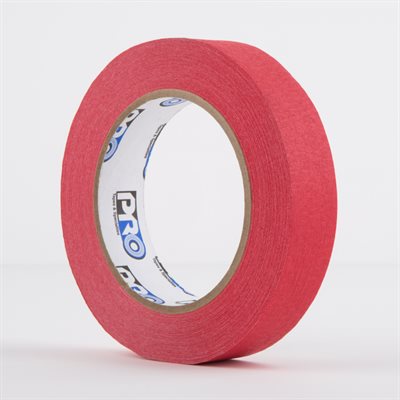
Your answer is here:

PER.1RED-B.jpg


Paper camera tape.

RED paper camera tape.

As soon as any kind of card or media comes out of a camera or recorder. You tape over the contacts with RED paper camera tape, and label it as needed.

That tape does not budge from said card until the moment before it's inserted into a card reader for ingest.

An even better system is to keep GREEN paper camera tape by the computer/laptop, and then the moment an ingested card is ejected, you cover it in GREEN paper camera tape so that you never have to fret about whether said card has been offloaded or not.

RED mean 'stop'. GREEN means 'go'. It doesn't really get simpler or safer than that.

Paper camera tape uses incredibly gentle adhesive, so it's not going to gum up or damage anything.
 
I jsut disagree with tape. Its all good, until you run out or the director wants the next shot now and you dont have time or you have thick mittens on, or a bit of gum ends up over the contacts etc..

We all have systems that work until they dont. Its developing a system that is doesnt break with the stroppy director down your neck, wool mittens and exhausted expendibles.
 
Only if you are flying a DJI device, but that backup could be used for other cameras.

And if you need support, you are probably out of luck, I won't buy another DJI device due to the support that I didn't get when I owned one (and returned to Newegg as defective). When starting the run-around is the first thing a company does, you know where you stand with them. Been on this Earth too long to not recognize this game quickly.
 
I was only joking.

That's a good enough reason to not purchase from a company, although I'm guessing you owned a consumer product? In my experience DJI's consumer and professional support are two completely different things.
 
Not from what a friend says about support, he makes about 50% of his living by flying a UAS, now having two Inspire 2, both with x7 cameras and full set of lenses. That percentage seems to grow each year.

But we are straying pretty far of course.
 
Back
Top