
Navigation
Install the app
How to install the app on iOS
Follow along with the video below to see how to install our site as a web app on your home screen.
Note: This feature may not be available in some browsers.
More options
You are using an out of date browser. It may not display this or other websites correctly.
You should upgrade or use an alternative browser.
You should upgrade or use an alternative browser.
Fixing under exposed are in in half well exposed shot
- Thread starter Ogrus
- Start date


You can only do so much; this is a camera dynamic range issue. Best thing to have done is get more light in there.
But you can try color curves to bring up the darks without affecting the light too much. You can also use levels to do the same thing (boosting the lows). I prefer curves.
Keep in mind, as you bring up the luminosity, you will be amplifying noise.
But you can try color curves to bring up the darks without affecting the light too much. You can also use levels to do the same thing (boosting the lows). I prefer curves.
Keep in mind, as you bring up the luminosity, you will be amplifying noise.
You can only do so much; this is a camera dynamic range issue. Best thing to have done is get more light in there.
But you can try color curves to bring up the darks without affecting the light too much. You can also use levels to do the same thing (boosting the lows). I prefer curves.
Keep in mind, as you bring up the luminosity, you will be amplifying noise.
Thanks for the reply!
I was wondering if i could isolate that "dark area" somehow and just correct it. Is that possible?
I would also like to ask you if you don't mind, on CS6 the waveform monitor is measured form 0.1 to 1.2 where are it used to be from 0 to 100 much easier to understand over and underexposed images. Is there any way i can change it to the "old" measurement?
Thank you for your help!

AndrewGentle
Well-known member
Thanks for the reply!
I was wondering if i could isolate that "dark area" somehow and just correct it. Is that possible?
Yep, you could try that. People typically refer to that as using a power window to restrict the image area affected by "secondary" grading. You just have to be careful around the edges to make sure it still looks realistic.
The image I've attached I just altered a little in Adobe Camera Raw using the Fill Light slider. It's basically the same as adjusting the levels with the midtone and black points. I didn't use any power windows, the adjustment was applied to the whole image. You start to see a lot of noise but half of it comes from the JPEG compression, you will probably have a slightly better result on the original file but noise reduction is probably a good idea.
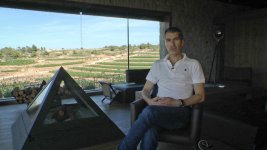

Pickthorne
Active member
Yay all better now.
Will still be full of noise though. But hey, I was bored while a render chunks away.
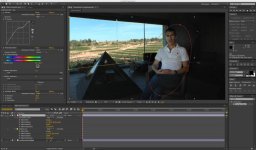
Will still be full of noise though. But hey, I was bored while a render chunks away.
Just in case anyone is wondering about another solution, I found out that importing footage into AE and using the rotoscope tool to isolate the under or over exposed area and repair them separately can be done. That was a solution courtesy of Lynda.com's
fixing over exposed footage lesson.
fixing over exposed footage lesson.
Is there any way i can change it to the "old" measurement?
Yes. Reshoot at NTSC/ATSC frame rates. Seems there you get the preferred IRE measurement. For PAL footage, you only get voltage.