

PegLeg Media
Well-known member
I am a video editor and finally got sick of Apple and their rip off prices. I purchased this ASUS on ebay: Asus K53E 15", i5-2450m, 3.10GHz Turbo, 4GB, 500GB Laptop
I am new to PC's but this has window 7 and turning it on I cant even get online :x
With my mac, Kindle and Phone I just turned them on and a list of wireless networks popped up and I connected. With my ASUS it doesnt have networks popup and Im not sure how to connect. Can anyone walk me through the steps? I dont know the information for any of my wireless/internet settings, its all just been click and connect before. Someone said a PC might not even have a wireless card? could this be the case? any help? Thanks and sorry for being so new to the PC/Windows world.
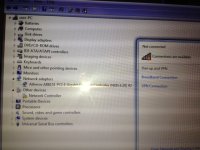
Here is a screen shot of what may show some problems:
I am new to PC's but this has window 7 and turning it on I cant even get online :x
With my mac, Kindle and Phone I just turned them on and a list of wireless networks popped up and I connected. With my ASUS it doesnt have networks popup and Im not sure how to connect. Can anyone walk me through the steps? I dont know the information for any of my wireless/internet settings, its all just been click and connect before. Someone said a PC might not even have a wireless card? could this be the case? any help? Thanks and sorry for being so new to the PC/Windows world.
Here is a screen shot of what may show some problems:


