First Destructive Photoshop Edit :)

Robbie Comeau

Como's back. back again
My first edit for something like.

Just started off wanted to make a crashing look a like scene in a building, then I got carried away.

What can I can do better for next time? All made in photoshop. Images grabbed off the internet.


Before:
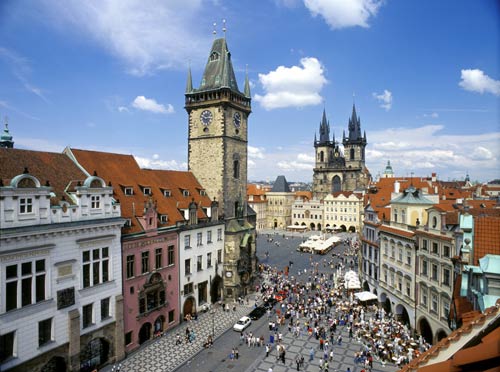
oldtownsquare_v.jpg


After:
1230331672.jpg


I'm new at this, so tips and advice would be great! :)

Thanks,

Robbie
 
Holy, that was incredible.

Did you create that environment? Or take pictures?

And in the final output, was it just a still image with noise added? Or was it actual video taped footage you got your self?

Not sure if it's Prag. Just found it on google :) Wanted to try something new in photoshop...

Nice job,

Robbie
 
Frank: that was really good.

Robbie: You could maybe use the burn tool around the windows of the destroyed buildings to simulate where flames may have scorched those areas.

You could find a picture of rubble to use as a source for cloning patches on the tops of the building and maybe some small piles on the ground.

Here's a link to a tutorial that may also help. There's a PDF link at the bottom of page 2.

http://www.cgarena.com/freestuff/tutorials/photoshop/chaos/index.html
 
Lighting, lighting, lighting.

It may be just me but it definitely doesn't look like a real city. I'd shudder to see it in motion.

colooorr graaade
 
Also if your in a pinch, like if it was for an entry in our cgifest or something, you could always hide the rough bits with extra smoke, blur and crop out other areas. I'm not saying you should do that, just saying it might be enough to get something in on time if that was the case. Cut your losses so to speak.

Personally, you probably could, with a bit of tweaking. I did this touchup really quick so if I had to get something in and was stuck, I might do something like that. Fun. It's also very similar to what I did for VFXfest #2, so, there ya go. :)

robbies.jpg
 
Back
Top