finally got a chance to use fcp

Over all my years of NLediting, I have always used a pc with sony vegas. I recently got a mac and have the chance to use final cut pro, but now my question is how can i speed my editing process? well in fcp, i am doing some editing and i find that it is a real hard transition.

For instance, capturing video is a little different for me since in sony vegas or premiere, there was scene detect. So basically when i was capturing on a PC i was able to just capture and let the computer do the work. I would like to find out how do you guys capture video the fastest way on FCP?

Also, some 3rd party filters such as Natress film effects take a real long time to render. why is that? besides the fact that i have a single g4 powerbook processor. If its my hardware that is a problem i guess i have answered that question.

Also, do you guys recommend editing my audio in FCP or exporting it to soundtrack? I just want to speed my editing process overall. Maybe i guess FCP takes some hands on learning and time.

But thanks for your guys/gals help in advanced.

Peace.
 
"batch capture" for the capturing... set your in and out points and let the "batch capture mode" do all the work. and if you're not planning on mixing surround sound... FCP will do the trick... and unlike PCs the Mac isn't too friendly with 3rd party software... the mac is picky... but give it what it wants and it will work like a camel... usually when crossing over... you'll find mac will force an upgrade from time to time... yeah it sucks.
 
As with anything, practice makes perfect. If you're looking to speed up your abilities with FCP I highly recommend the KBcovers for FCP. This gives you all of the keyboard commands right on your keyboard for much less than a custom keyboard and it looks cool too:

FC-K-BC_Full.gif


http://www.kbcovers.com/servlet/Categories?category=Final+Cut

-Noah
 
Also, some 3rd party filters such as Natress film effects take a real long time to render. why is that? besides the fact that i have a single g4 powerbook processor. If its my hardware that is a problem i guess i have answered that question.

YES.

you mean Nattress?

Invest in some learning materials. dvds, books. learn every keyboard short cut made and make some on your own. you will be flying in no time. the joy is yours to find.
 
Under the Edit menu there is a "Start/Stop DV detect" which I think is what you are looking for. Personally I tend to want to look at all my footage and do a batch capture instead of letting the software decide for me, (saves space) but workflows may vary. With P2 HD, scene changes are basically already done so it's a moot point for me at least.

I have not had problems with 3rd party filters for FCP (Magic Bullet and some other handy filters)...the hardware you have is 3 to 4 years old so that may be a problem (as it would on the PC side.)

I tend to do a rough audio edit in FCP and if necessary, bring it into ST for finishing, but if the audio is good to begin with, FCP can generally handle it with no problem.

I would try to stick with it in FCP though because like any software, as Noah points out, practice makes things go a lot smoother and the software had progressed rather well over the past decade. I started in Premier, went to FCP on version 1.5 and have not looked back (although I've been miffed about the lack of native MXF support).

Good luck!
 
in final cut pro, are there ways to preview your files that you have imported in the browser? for instance, i have imported some mp3 files and they aren't all labeled correctly so i would have to listen to each one to find the right one for my project. I export to soundtrack because i find that soundtrack allows you to preview the files on the bottom left hand corner.

how would you guys do this? if you were in my situation?
 
Last edited:
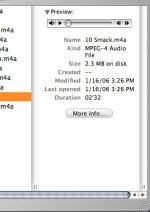
The best way that I have found for previewing music that you want to use in a project is to just use the Finder. I have my stock music setup by folder then I just use column view in the Finder and click play in the little quicktime player when you click on the actual audio file.
Picture%201.png
When you find the one you want just drag it into FCP. (check out screen grab. It isn't my actual set up on the work comp, but you can get the idea.)
 

Attachments

  • Picture 1.jpg
    Picture 1.jpg
    28 KB · Views: 0
Back
Top