Final Cut So "what" HD

ShamrockFilms

Well-known member
Okay, all the 'big guns' use FCP HD and that is my reason for not wanting to use it too. Screw the system! (unless I have no other choice)

We are shooting a feature on the HVX200 entirely handheld and 80% natural lighting.

The only editing I do now is small promo trailers on Windows Movie Maker. Obviously I would never want to edit an HD feature on Windows Movie Maker, but I wonder if there are programs like it (easy to use with timelines) that can handle HD footage?

The only thing I'd need after editing is complete is the ability to bleach out most of the color. I'm going for the desaturated look in my feature.

Any help is greatly appreciated!
 
msconce said:
I would recommend Premiere Pro 2.0 and Raylight to convert the footage to AVI for editing.

I'd consider myself a professional with Adobe Photoshop. Would it be to my advantage to use Adobe Premiere to edit a HD feature on?

And once it's converted to AVI can I convert it back to HD for DVD or Theatrical screening?

I'll check out the Adobe site. Thank you. I appreciate
 
Last edited:
I'll check that out too. What don't people like about FCP compared to these other programs? Is all the fancy color correction tools the reason everyone seems to want to use FCP?

Also... I'm working on a DELL that needs some upgrading. If I am going to use FCP, I'll need a Mac G5 or something, they should just call it the Mac G$5,000.

I figure if I can upgrade my dell to 4GM of ram, I'll be okay running a PC editing program.
 
Common misconception about Macs are that they are too expensive, now adays especially, there have been a few articles comparing similar priced Dells vs Macs, and similar spec Dells vs Macs, and the Mac almost always wins. Plus the Macs are the only Systems that can run both Windows and Mac OS X. G5 are the old chips from IBM, Intel Core Duos and Core 2 Duos are the newer chips able to run both OS's and both chips SCREAM!

What are the specs of your current computer? Adding more ram could help, but if its not very new in the first place, you wont notice that big of a difference
 
I looked around on the net trying to find a computer spec generator. I'm not sure how to find my specs on my computer. I do know that I have 512mb of ram.

Okay so the G5 is outdated? I should look into the Intel Core Duos and Core 2 Duos?
 
Yes, a Macbook Pro, would be more than suitable for your feature. It runs FCP, Motion, DVDSP and all the other works at blazing fast speeds. It for sure beats my Dual 2.0ghz G5 at work.

If you need MAD power, a Mac Pro is a great buy, but not configuring it with more ram, and some extra HD space means you just get the stock system, which is a waste of a Mac Pro. A Mac Pro + 1080p monitor and a good set of upgrades too it could run upwards of 3800-4000 bucks. Thats if you want to use it to its potential with RAM and Video card upgrades.

Im recieving my iMac 24" tomorrow and will be doing some simple benchmarks in FCP and will compare to something else if someone else would like any other type of benchmark, it is the perfect middle ground system, IN MY OPINION, for editing HD and what not. It has the Core 2 Duo chip, the only Mac right now that has that chip are the iMacs. Its suspected that the Macbook Pros will get them soon, but im thinking they wont get the new chip until Janurary.

How soon are you looking to buy?
 
okay, so the Macbook Pro, but upgrade it with more ram and extra HD space?

I'll most likely be hunting down for a used computer on craigslist, but im trying to figure out what i need to edit HD from the HVX200.

I should look into the IMac 24" computer too or is that a monitor?

Im a big dummy with computers. I just buy them and hope they can handle what I'm doing on them. Now that I'm editing, I need to reboot every 15 minutes to refresh my 512mb of memory. I paid $3,000 for this dell in 2001. Of course when you call them you think you're buying a computer thats advertised for $900, but then they tell you to get the best of everything, $500 graphics cards and what not.
 
Wow. 2001 huh. As far as the Macbook Pro goes, youll want 2gb of ram, but you dont need to pay extra for the 120gb HD drive. It comes with the 100gb which is enough, the extra 20 gigs doesnt make too much a difference, youll want to get external hard drives anyways.

The iMac 24" is a computer as well as a 1080p Monitor. Its Base system is 1999.99 US for:

Intel Core 2 Duo 2.16ghz
1Gb Ram
250gb Hard Drive
NVIDIA 7300 GT video card with 128mb Video Ram
Firewire 400/800
USB 2.0
24" 1920 x 1200 LCD Monitor

Id recommend for this system getting 2gb ram, and upgrading the video card to NVIDIA 7600 with 256mb video ram. And maybe getting the 500 GB Hard drive, but i dont think its worth the money. i like to keep my important stuff off the system drive.

Back to the Macbook Pro, they have my system in the Specials Refurb section for only 1999.99.

Its a Macbook Pro with

2.0ghz Core Duo
1GB Ram
100gb Hard drive
x1600 ATI video card with 256mb memory
Firewire 400
USB 2.0
15" 1440 x 900 LCD Screen

Thatd be about 2000 then youd want another full 1080p display in my opinion to monitor the video on, and one from dell or cragislit or something shouldnt be more than 400 to 500, an apple 1080p display is 1000. (but thats built into the iMac 24", and the iMac also has a DVI output so you can connect a second monitor)
 
That Macbook Pro is VERY sweet looking. But, my workstation is dual monitor and desktop. The IMac sound reasonable for $2,000. This MacPro looks good too:
http://www.apple.com/macpro/


I also need to buy an external harddrive that I can dump the P2 card footage into on the field (the camera is not mine) and also hook the harddrive up to my computer for editing.

This is great help. I really appreciate this. Thankyou. When everyone is talking about how traumatized they are by my movie (we are going to make that wood chipper scene in Fargo look like Seasame Street), you can say "hey! I helped that guy pick out a computer." haha.
 

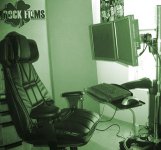
Attachments

  • shamrock-films-office.jpg
    shamrock-films-office.jpg
    23.4 KB · Views: 0
LOL, nice!

That setup looks like a gaming rig! :) awesome.

The Mac Pro is the way to go if you keep that setup, and can afford it. The iMac 24" is VESA MOUNT COMPATIBLE, so you can mount it on the standard VESA thing if you need to!

You already got the monitors there, but id recommend a 1080p monitor upgrade , atleast 1 of them.

I would not get the Ram from APPLE in the Mac Pro upgrade , it is simply too expensive to upgrade through them. heres my quick setup of what i personally think would be a good base system

Specifications

Two 2.66GHz Dual-Core Intel Xeon
1GB (2 x 512MB)
250GB 7200-rpm Serial ATA 3Gb/s
ATI Radeon X1900 XT 512MB (2 x dual-link DVI)
One 16x SuperDrive
Both Bluetooth 2.0+EDR and AirPort Extreme
Apple Wireless Keyboard and Apple wireless Mighty Mouse - U.S. English
Mac OS X - U.S. English

that comes to 2888.00 $

Then you can get internal Hard drives sATA drives at like 400gb for 120 bucks online , i get them at frys, but there isnt a frys in your neck of the woods.

Same with the Ram, get that online for 100-120 bucks per gig STICK, not like apples crazy prices.

The Final Cut Pro software is gunna be 1300 bucks, it comes with the whole shabang now though. Motion, Final Cut Pro, DVD Studio Pro, Soundtrack Pro, Compressor.

Everything youll need to get going from start to finish with the flick!

So it can get expensive, its up to you really, i can only help educate you about the products on the Mac side and give my opinion of each of them, decision is up to you, but im always up for answering questions, its my favorite past time here, especially with people doin something with movies!
 
Pricewatch.com for all your computer needs. Otherworld computing is also a good one for Mac stuff (drives and processors).

-Nate
 
Cynic, thanks for everything. I have taken your info and used it to get myself in the right direction. So far it looks like I'm going with the MacPro with a budget of $5,000. I'll need two monitors as well. I was thinking of getting a monitor with RCA outputs to plug into a wide screen plasma for viewing edited video? Or would I be better off with just a larger monitor?

Thanks for the suggestion Nathyn.
 
You mean you want one monitor to have inputs from the computer, then output that signal to a bigger screen? you wouldnt want RCA cables to do that, youd want component or VGA or DVI/HDMI. But im not sure if a monitor will accept a dvi input from the mac pro, then a dvi output from the monitor relayed somewhere...watching it with just the SD signal will look atrocious

Youd be better off using the plasma as your second monitor, but thats probably not the workflow you are looking for...
 
30" Cinema Display looks good for everything!

I dont know if the Mac Pro will support 3 monitors though if you wanted to go for that..
 
You are right, you do want a main monitor for your desktop and another to monitor footage on and i recommend a screen with a resolution of 1920 x 1080 for sure, you want to able to monitor that resolution nativley ya know. But you dont need a TV, and the cinema display may be gorgeous, it is a little expensive. Dell has some 1080p capabale monitors for cheaper for sure, you can even get 2 of those,
 
Back
Top