Filters help

ameade19

Member
Hey guys

So this is my situation. I am new to using filters in my films and need some help.


DVX100a with 4x4 mattebox.

I am shooting out in the desert during the day, so sun is only light source. I want to get a few filters to help make the sky really stick out and make the blue real vivid but not loosing much on the characters. The scene calls for 2 characters alone in the desert, no trees, some mountains far in the distance.

2nd question, I am also shooting at a campfire at night. For this, using the fire as a source, i think a 650 and a 1k or higher acting as the moon. I dont even know if filters make sense for it but any ideas to help make the flames real rich and the characters faces real warm? There will be plenty of close ups and want it to be rich and warm.


any advice or past experience would be rad.

thanks
 
To prevent blue faces go with ND grad filters for the sky.

Use blue gel for the 1K. The difference between the "Moon" and your fire lit characters will make them warm and rich as you want.
There is a "enhancing" filter from Tiffen that makes warm colors realy pop, but your talents would look like sunburn.
Belive me the fire is more than enough - you always can finetune in post.

Frank
 
I am shooting out in the desert during the day, so sun is only light source. I want to get a few filters to help make the sky really stick out and make the blue real vivid but not loosing much on the characters. The scene calls for 2 characters alone in the desert, no trees, some mountains far in the distance.

The previous suggestion of a graduated ND filter is a wonderful idea.

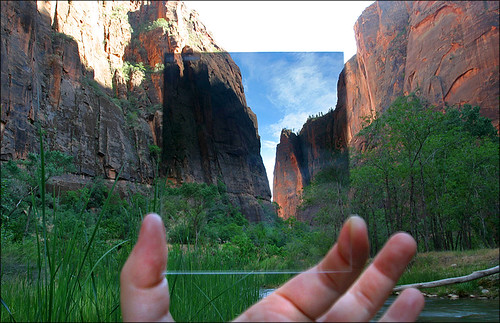
51300446_3108f93cb5.jpg


Graduated ND's can come in different strengths, so try and figure out which is necessary for you. Go to your location and take reflected spot readings of the sky and the ground. Figure out how much you wish to reduce the sky in comparison to the ground. Grad ND's also can be purchased with different color hues. See if any help you achieve the look you want.

A word of caution, Graduated ND's work WONDERS on landscapes, but if any distinguishable objects in the foreground extend past the horizon and into the sky, will run the risk of revealing your camera trick. NOTICE: The mountains from the example look good at this exposure, but they reach too far up the ND filter causing them to go dark.

This can generally be avoidable by carefully framing characters, or shooting from above their eye level, effectively raising the horizon. If your characters must cross the horizon and extend very far into the Grad ND realm, my only suggestion is to shoot lots of soft light fill light towards them gradually decreasing as the ND decreases, which *should* offset the ND filter on just the actors. It's crazy but just might work.

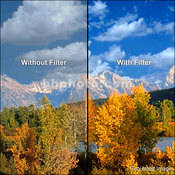
I would also recommend an Ultra Polarizer. This filter will help bring the blues and clouds out of the glaring sky. B&H example:
235542.jpg


Grad ND's will help you bring the sky's exposure down allowing for it and the ground to be properly photographed, while the Polorizer will filter out all that reflected and bouncing stray light, which will make the sky more blue and clouds more defined.

​
2nd question, I am also shooting at a campfire at night. For this, using the fire as a source, i think a 650 and a 1k or higher acting as the moon. I dont even know if filters make sense for it but any ideas to help make the flames real rich and the characters faces real warm? There will be plenty of close ups and want it to be rich and warm.

Postmaster got it! I would also get a large light, (CTB'ed or HMI) and diffuse it slightly to create a soft moonlight for the surrounding area. The moonlight rim will look great, but if it's all happening in a black void, I'd notice. If you don't like the moonlight idea, you can use the same light for the background but use a dimmer to extend the fire's cast light further onto the scene. (Not more light on actors, they should be fine)

Laszlo Kovacs did a great job on Easy Rider, although it's either youtubes compression, or I'd still like to see little less black void at times.
http://www.youtube.com/watch?v=FYznOrMGkhU
 
Last edited:
Back
Top