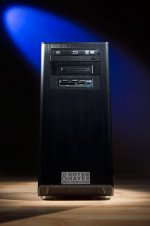
Filling the PC Desktop - Workstation Void.

Nick Royer

Well-known member
Hi, I'm Nick Royer - I've been around on the forums for a couple of years, contributing every now and then. Lately I have been away for a while as my business has been extremely busy. When my business started to take off, I realized that I needed to purchase a new workstation, as my laptop wasn't cutting it anymore. With DSLR footage here to stay and uncompressed on the way, I wanted something that could support hardware acceleration - but I kept finding that the workstations on the market today from HP, Dell, Lenovo, ect. weren't fitting my needs well. I am a small-scale video producer and student filmmaker, and I couldn't drop $5000+ on a tower, yet I still wanted that class of performance. I ended up turning to a friend who has spent the last few years building PC's for clients in the area - mostly home and office computers. We were able to put together a killer workstation using lower-cost components (i.e. Quad Core i7 vs. Xeon and high-end GeForce cards instead of Quadro), while keeping the performance very high. I've found that there really is a void in the PC market between consumer/business oriented desktops and professional workstations - and the PC we were able to build has filled that void for me by providing a cost-effective yet high-powered solution.

Thank you!
 
Last edited:
Thank you all for your responses so far - they have been invaluable. We are definitely pursuing the idea now and will be sure to keep you updated on our progress.
 
As promised I am back with an update. We have fully pursued this idea and will be launching our first commercial workstation offering in the coming week or two. I'd like to share some of the details with you guys and get some feedback as we lead up to launching out first product.

We are targeting the $2500-$4000 void between consumer desktops and high-end workstations with our first offering, the RH100.

Here are the specs:
- Intel Ivy Bridge 3.4 or 3.5Ghz Quad-Core i7
- 16GB or 32GB of 1600Mhz RAM
- 3TB HDD, Optional 128GB or 256GB SSD in Addition
- GeForce GTX 570 Classified or 580 Classified
- USB 3.0 ports, Optional Firewire Card, and ability to add Thunderbolt
- Memory Card Reader Option and 2.5" SSD Hot-Swap Bay Option

What This Means:
Even our base model fully supports hardware acceleration in CS6, and has enough RAM to handle After Effects and enough storage space to hold lots of footage.


Thoughts?
 
You probably have quite a bit of expertise already, certainly more than I do.

But, FWIW, one place I like to look for specific architecture references for running Adobe software is:

ppbm5.com

if you aren't familar with the site. They have about 900+ end user machines benchmarked on their same Premiere Pro and Media Encoder test suite, along with the results on each test and the detailed specs for each machine in their database.

You can review and sort on CPU, CPU speed, Overclocked, RAM, video card, OS drive, Project drive, Export drive (number, RAID type, SSD, speed), etc. It can be fascinating to browse the database and review variations in speed for same CPU, for example, by video card, or on how close a dual Xeon was to an i7-980 in their tests.

They are rebuilding the tests and making them a bit more complex for CS6, including adding Red footage, 4-4-2 encoding, etc.,,but there are no entries to the CS6 database yet.

Really a fascinating site with real world statistics, which I love.

I have an older i7-920 with 27GB of RAM that runs fairly well. I am going to bench it before and after diferent configurations with a GTX 560 2GB, 2x Seagate Barracuda 2TB in RAID, and an OCZ 120 GB SSD which has good benchmark specs elsewhere.

Good luck! There have been a few "Which PC" type threads in the NLE forum if you would like to help others build & tune their machines, without selling there of course. But if people appeciate your help and are looking for a machine, and are not the build-it-yourself type ...

Cheers!
Michael
 
one place I like to look for specific architecture references for running Adobe software is:

ppbm5.com
l

Thanks for the heads-up Michael - I hadn't heard of this benchmark before, but we ran the test today and were surprised at how well we performed. Our RH100 prototype came in with an overall score of 295 without overclocking - that puts us above many workstations that are much more expensive. In fact, the only commercial offerings that outperformed us were priced upwards of 10 grand. We were very excited by the results and are going to keep working on it and see what we can do to boost our performance even more.

2.jpg
 
Last edited:
Fantastic!

They are setting up a more complex suite for CS6. For a high end machine, those suites might better show the spread in performance over the lower end machines.

You might contact them and get the suite and be an early adopter. Then you can get your machine in the database early on too. There is a ppbm6.com site with more info on the new tools, but the database isn't active yet.

I really believe in looking at data when making decisons like this. That might be a good way to distinguish your machines out of the chute.

I am thinking about testing with the Seagate Barracuda 2TB in RAID, then an SSD in RAID, etc. But that is just small scale stuff. (The Barracuda were only slower than the Velociraptor at Tom's Hardware, but the older Seagate seemed to have some quality issues. The SSD is the OCZ 120GB, that seems to have really good specs.)

I don't know much about the PPBM folks, but it is a great concept and great service. I think they are active in the Adobe forums, I've seen it linked from there often.

Good luck!
Michael
 
Back
Top