FCX import quality

John Foundas

Well-known member
Looking for some insight here...

I shoot with the AVCHD codec. When I open up the SD card on my iMac the preview images look stunning. When I bring it into Final Cut X it looks degraded and muddy. Not sharp. Is this an internal compression issue that's applied on top of the already compressed AVCHD file?

I am importing it as "optimized media". Just curious if this is a known issue or perhaps a setting on my end?

Thanks in advance
 
As shown in the screen shot above - in the Quality category set to Better Quality. if you have Better Performance selected then you are not seeing the full resolution of the clips.
 
Looking for some insight here...

I shoot with the AVCHD codec. When I open up the SD card on my iMac the preview images look stunning. When I bring it into Final Cut X it looks degraded and muddy. Not sharp. Is this an internal compression issue that's applied on top of the already compressed AVCHD file?

I am importing it as "optimized media". Just curious if this is a known issue or perhaps a setting on my end?

Thanks in advance
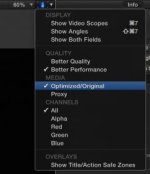
BTW: You should be able to use the AVCHD files without Optimization with a recent Mac.
This saves heaps of drive space.

Al
 
TY. I use a 4TB raid as a scratch disc so the extra optimized footage is fine. Unless it imparts some kind of secondary compression?
 
If you have a recent Mac with enough CPU/GPU processing power there's no need to transcode (optimize) AVCHD footage. If you find that things are bogging down too much, then optimizing will help that. Optimizing will not degrade the footage at all, but will make the clip sizes larger. It makes the footage easier for your computer to handle, but that's only a concern (for AVCHD) on slower Macs.
 
Looking for some insight here...

I shoot with the AVCHD codec. When I open up the SD card on my iMac the preview images look stunning. When I bring it into Final Cut X it looks degraded and muddy. Not sharp. Is this an internal compression issue that's applied on top of the already compressed AVCHD file?

I am importing it as "optimized media". Just curious if this is a known issue or perhaps a setting on my end?

Thanks in advance


Check your Project Properties and ensure they match the clip properties shot.

Al
 
Back
Top