FARGO lighting breakdown. Help a brotha

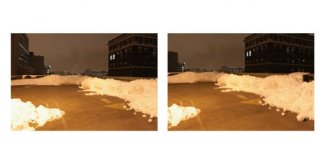
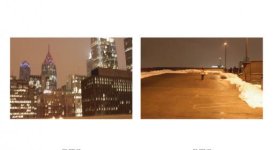
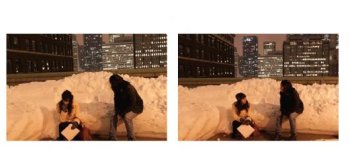
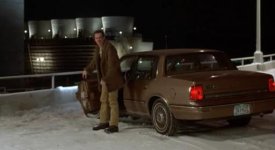
Seeing if anyone here could enlighten me with some knowledge on the lighting in Fargo. I'm interested in the parking garage scene only. I have to replicate a scene from a movie for a class of mine, and i want to try and match the lighting in Fargo as best as i possibly can. So if anyone has any recommendations on what they would do given a wide array of equipment. Or if you can look at the images below, and try and figure out where they placed the lights, among other helpful tips. Below are frame grabs from the film, and then the parking garage location i am going to be shooting in.
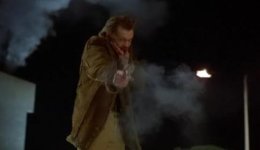
Screen shot 2011-03-09 at 12.45.28 PM.jpgScreen shot 2011-03-09 at 12.46.07 PM.jpgScreen shot 2011-03-09 at 12.45.04 PM.jpg
Screen shot 2011-03-01 at 3.49.59 PM.jpgScreen shot 2011-03-01 at 3.50.47 PM.jpgScreen shot 2011-03-01 at 3.50.11 PM.jpg

Thanks in advance, and any help is appeciated.
 
Seems somewhat easy just to reduce your exposure, seems the most noticeable difference. The lamps and buildings in your shots are a good 2 if not more stops brighter than the fargo shots. Then light the talent as needed. Also get your color temperature more balanced and if need be gel the talent lights to match.
 
Last edited:
Seeing if anyone here could enlighten me with some knowledge on the lighting in Fargo. I'm interested in the parking garage scene only. I have to replicate a scene from a movie for a class of mine, and i want to try and match the lighting in Fargo as best as i possibly can. So if anyone has any recommendations on what they would do given a wide array of equipment. Or if you can look at the images below, and try and figure out where they placed the lights, among other helpful tips. Below are frame grabs from the film, and then the parking garage location i am going to be shooting in.
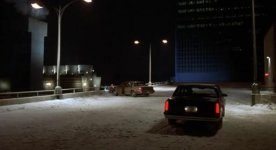
View attachment 31161View attachment 31162View attachment 31163
View attachment 31164View attachment 31165View attachment 31166

Thanks in advance, and any help is appeciated.


If you look at the Fargo frame grabs, you will not they have a combination of 'soft light' coming from almost at the same level of as the camera (look at the shadow cast by the figure in the first shot, doesn't quite match the 'high hard' like that makes it look like it's just the parking garage light), punctuated with some hard lights to simulate the parking garage lighting that 'exists'. I suspect they replaced all the actual parking garage lights, frequently some sort of 'sodium' light with something that has a better spectral output for movie making.

In your examples it looks like you are just getting the existing lights, and as such, has a 'underexposed/yellow' cast to i.

Since you don't have the resources to replace the existing lighting, about the best you can do is get the color temperature setting on your camera to give a cleaner 'white' on the snow, reduce the exposer to have the pavement more 'dark', and get
some additional lighting to light the talent and car if you get one in the shot. My guestimate is that there was a soft lighting in combo with some hard lights to give the specular effects seen on the car.


The wide shot of the car approach, appears to be just using the parking lot lighting, although I suspect there's more big-soft light going on to get some detail in the car as seen from this angle.

So, I would use the existing light, find a 'balance' on the white that gives a clean snow look, knock the sexposure down so that the city/sky in the back ground is almost 'black', and the parking lot pavement is almost black, and bring in light to assist the existing light to boost on the talent/car in the shot. You would also probably have to gel the additional light to match better the existing light, so that the color differences are not so obvious.
 
Thanks alot guys! All the input is Really Appreciated. Any suggestions on what gel to use that would best match that underexposed yellow casted lighitng that the exisiting lights are giving off?
 
Back
Top