faking long exposures in motion?

colfaxrev

Member
203-Long-Exposure-Photography.jpg

I've seen people do this type of effect in video/film, but I have no idea how to achieve it, since you can't expose longer than each frame of video/film.

Is there some way to achieve this with after effects? like duplicating the movie over itsefl a bunch of times, offsetting by 1 frame and using some type of blending mode to get this to work?

any help would be greatly appreciated!
 
fairly certain what you are looking for is achieved with a still's camera and a time lapse using long exposures. Just would take a bit of testing to figure out the proper settings for any specific shot, but it would work. Though getting it to look like smooth natural motion while writing with light streaks for example could be difficult. It's pretty much like the shots of traffic where the tail lights and headlights turn into moving laser streaks across the road.
 
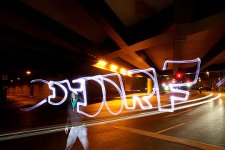
In the still photo example you gave, the subject was standing in darkness while moving a small light. The camera's shutter was open during the whole time in which the subject was moving the light. At some point during this long exposure, the photographer triggered a flash, which was aimed at the subject, so that the subject is only exposed for a brief instant of time.

It seems to me that the only way to do this in a movie is to "fake" it. Take a movie of your subject going through the motions of writing something in the air. Then in post, superimpose an animated "light-writing". It would probably be difficult to match the light-writing with the subject's motion of writing.

-- Ken
 
I remember seeing a different but related effect in the scifi series "Babylon 5". They wanted a unique look to a creature that was partially in another dimension. They had the creature leaving light trails as it moved. I don't think this could have been done in camera. I thing they built up trails in post by adding several frames together, the latest frame getting full strength, and earlier frames getting progressively less strength. They further added to the uniqueness by separating out red, blue and green components of the video, giving each a slightly different delay. Must have been a lot of work! :shocked:

-- Ken
 
https://vimeo.com/49222355

this is a good example starting at 0:56 about. ppl are guessing in the comments, saying time echo effect, but idk how he separates the lights from the person (unless he did insane amoutn of rotoscope work). I think he's doing something simpler than a crap load of rotoscoping
 
OK, here's my attempt to say how it's done:
The light he's carrying is very bright. In post, he uses a vidikey plugin to create masks for each frame. The mask only allow the bright light to show through. In post, he does a composite, starting with the footage of the guy walking along, doing his thing with the light. Starting with the first frame, he adds to that the masked bright light for the first light position, extended that masked bright light for the entire shot. Then he goes a few frames later, to where the next light position is, and composites the masked bright light for that position, extending it for the rest of the shot. Then he goes a few frames later, to where the third light position is ..... etc. It would be a bit of work, but no where near as bad as rotoscoping. By the time you get to the end of the video, there would be many, many video tracks composited. But using a vidikey-type plugin to create masks would keep the rest of the area in the frame from being over-exposed.

-- Ken
 
Best way to achieve this in post is trapcode particular in after effects. Its much easier to manipulate. The basics would be

Track movement if youre creating it to follow an object with Mocha to create a planar track.
Create a light, name it Emitter and copy the track info to the light position.
Create a particle system with particular and then set the emitter to the light.
 
Back
Top