Export is also rendering Zebra

JChang

Active member
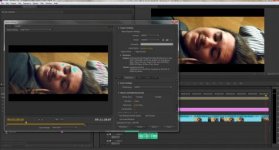
I have been working on a project and for some reason the latest export I did exported with the zebra.

(This is assuming that zebra means the highlight of overexposed areas)


Does anyone know a fix for this?

I some how got it to display in my timeline. (Blue,red,yellow,etc highlights in overexposed area)
But never got it to display in my main monitor. Have no clue how to turn it on or off, or why it is rendering with it. Tried googling it but nothing came up.

Fix.jpg
 
This is a bug in Premiere Pro I've seen a few times and the only way I could fix it was to go back to the original footage and lower the exposure in that area further (well below 100% IRE).

It showed particularly badly in DNxHD and used to drive me absolutely nuts.
 
This is a bug in Premiere Pro I've seen a few times and the only way I could fix it was to go back to the original footage and lower the exposure in that area further (well below 100% IRE).

Does this mean you reshot it? ( I doubt it)

So what did you actually do to "lower the exposure" in the original; footage?

If you are talking about a grade to bring the highlight IREs to inside 100%.. that is a normal requirement and can not be described as a "bug".

Best option is expose it correctly in the first instance of course.

@ the OP What effects are you running in that "adjustment layer" ?
 
@Shooter - I am not running any effects at all. Just straight MOV files.

@Exact - Thanks for the tip but it isn't actually over exposed. It's Premiere's rendering of MOV files that is blowing out the highlights and crushing all the blacks.

The export method I am using was working and then just one day, this started happening.
 
Didnt look over exposed to me either.

I have never seen that before.

Is it actually rendering into the export. You only show a small screen grab in AME that displays the effect.

that is blowing out the highlights and crushing all the blacks.
Looks the other way round to me. ( Maybe "the" QT gamma issue)

Tried any other export settings?
Tried a test with Color Bars or othjer clips?
Tried viewing your export in a different 'puter or display?
Updated your Graphic Display Drivers?
Cant see your settings.
 
Back
Top