
Navigation
Install the app
How to install the app on iOS
Follow along with the video below to see how to install our site as a web app on your home screen.
Note: This feature may not be available in some browsers.
More options
You are using an out of date browser. It may not display this or other websites correctly.
You should upgrade or use an alternative browser.
You should upgrade or use an alternative browser.
Explosion, burning building, flames and smoke FX
- Thread starter Duke M.
- Start date
Jackson Miller
Well-known member
Smoke looks the realest. The beginning looks fake. Make it slower maybe and darker flames. It looks very good but not completely real yet.
Try adding some reflections on all the glass you have in that shot(windows, cars), also glass falling from the window.
The tree in front is too sharp, add a tiny feather to the mask for a light wrap effect.
Maybe make it so you cant see the window behind the first birst of flames, add a bit of a glow to the fire when it comes out to make it look like its a bright flash.
Maybe make the smoke a bit more dull, its too white, nothing in your shot is that well lit to look that white.
around 5 seconds in you have a second blast, and the smoke looks orange, thats good, but maybe have a littel orange tint the the smoke at all times as well, as the fire is giving off orange light.
The tree in front is too sharp, add a tiny feather to the mask for a light wrap effect.
Maybe make it so you cant see the window behind the first birst of flames, add a bit of a glow to the fire when it comes out to make it look like its a bright flash.
Maybe make the smoke a bit more dull, its too white, nothing in your shot is that well lit to look that white.
around 5 seconds in you have a second blast, and the smoke looks orange, thats good, but maybe have a littel orange tint the the smoke at all times as well, as the fire is giving off orange light.

J.R. Hudson
Spirit Animal
These are just bad
No dis intended
But really; these are horrible
No dis intended
But really; these are horrible
Also, if your going to have a locked down shot of a building with trees in front (or added in afterwards), you could take several takes with different exposures so you can remove shadows/add detail, and have everything looking brighter.
This website has all ranges of skill, I'm not 100% that those criticism are constructive.
These are just bad
No dis intended
But really; these are horrible
This website has all ranges of skill, I'm not 100% that those criticism are constructive.

Duke M.
Veteran
Criticism without specifics isn't helpful. However, this is just a test of flame and smoke compositing, so I should have been more specific too.
The building image isn't the one I'll be using. I wouldn't do day for night with a big shadow like that. Also, the real shot will have actors in it.
As a result I didn't spend a lot of time on the rotoscoping and none on reflections as those will not transfer to the movie footage. I'm just trying to get the flames and smoke to look real enough for a few seconds of background.
In the actual footage, if I keep the explosion (which is my least favorite part) I'll add some camera shake. On the test its not worth it to adjust the movement for all those layers to make them match up.
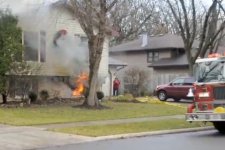
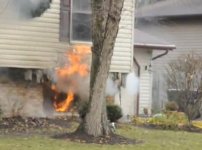
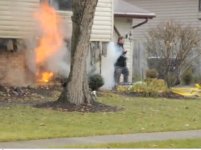
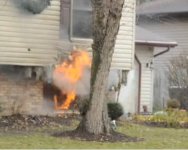
Here's a real house fire as reference shots.
The building image isn't the one I'll be using. I wouldn't do day for night with a big shadow like that. Also, the real shot will have actors in it.
As a result I didn't spend a lot of time on the rotoscoping and none on reflections as those will not transfer to the movie footage. I'm just trying to get the flames and smoke to look real enough for a few seconds of background.
In the actual footage, if I keep the explosion (which is my least favorite part) I'll add some camera shake. On the test its not worth it to adjust the movement for all those layers to make them match up.
Here's a real house fire as reference shots.
Attachments
David W. Richardson
Chapelgrove Films
Only suggestion I have is make the smoke less thick, more transparent, maybe less white and more greyish. And make it not come from the base of the fire. That's just based on these pics.
Jackson Miller
Well-known member
Try making the fire SLOWER. Maybe play back the whole clip at 50 to 75 percent speed. Even the smoke. But mainly the flames. They just look too fast. Also everything just looks too clean and perfect. Add a thin haze across everything maybe. And this is very hard work guys. Slowly it will get better and better.

rafikiwilliams
Well-known member
definetly slow things down a bit. almost looks like an fire bomb went off.
The explosion and smoke are definitely too fast. Slow them both down.
I'd take a plate shot into Photoshop and paint out the window with a more jagged look. At the very least get rid of the sharp edges of the window. Black them up with soot, etc.
You might want to add a heat haze layer. While it may or may not be 100% realistic, it's very good at tricking the viewer into seeing everything as a whole. If your using After Effects I recommend this Heat Wave tutorial. http://creativemac.digitalmedianet.com/articles/viewarticle.jsp?id=34773
As a bunch of users pointed out on my house explosion, debris is pretty important. Something needs to blast out of the window. Glass at the least, maybe something else.
A little bit of camera shake at the moment of explosion can also help sell it. To do this for my house explosion I took the main comp and actually stuck it in a completely new comp in AE, did the camera shake there. That way you don't have to mess with shaking the layers/etc. So it's pretty easy. Motion Tile effect can help you extend the edges so that when the frame shakes it doesn't expose the background.
The base plate is kind of blurry but the explosion elements are all pretty sharp. Adjust them with some blur to better match the plate. You might also need to better color correct the explosion to match the plate lighting.
Your explosion needs to have some additive layers, it needs to brighten the area behind it. You might try duplicating the explosion layer behind, blurring it out a fair bit and changing the transfermode to additive.
The smoke is kind of thick, you might want to lower it's opacity as well.
Try adding a single frame (or maybe 2-3 frame) flash. Not at 100% but a fairly low number, say 3-5%. A full frame yellow/orange solid addatively comped.
Sound is also important, even bad sound can help sell the effect.
I'd take a plate shot into Photoshop and paint out the window with a more jagged look. At the very least get rid of the sharp edges of the window. Black them up with soot, etc.
You might want to add a heat haze layer. While it may or may not be 100% realistic, it's very good at tricking the viewer into seeing everything as a whole. If your using After Effects I recommend this Heat Wave tutorial. http://creativemac.digitalmedianet.com/articles/viewarticle.jsp?id=34773
As a bunch of users pointed out on my house explosion, debris is pretty important. Something needs to blast out of the window. Glass at the least, maybe something else.
A little bit of camera shake at the moment of explosion can also help sell it. To do this for my house explosion I took the main comp and actually stuck it in a completely new comp in AE, did the camera shake there. That way you don't have to mess with shaking the layers/etc. So it's pretty easy. Motion Tile effect can help you extend the edges so that when the frame shakes it doesn't expose the background.
The base plate is kind of blurry but the explosion elements are all pretty sharp. Adjust them with some blur to better match the plate. You might also need to better color correct the explosion to match the plate lighting.
Your explosion needs to have some additive layers, it needs to brighten the area behind it. You might try duplicating the explosion layer behind, blurring it out a fair bit and changing the transfermode to additive.
The smoke is kind of thick, you might want to lower it's opacity as well.
Try adding a single frame (or maybe 2-3 frame) flash. Not at 100% but a fairly low number, say 3-5%. A full frame yellow/orange solid addatively comped.
Sound is also important, even bad sound can help sell the effect.