
Navigation
Install the app
How to install the app on iOS
Follow along with the video below to see how to install our site as a web app on your home screen.
Note: This feature may not be available in some browsers.
More options
You are using an out of date browser. It may not display this or other websites correctly.
You should upgrade or use an alternative browser.
You should upgrade or use an alternative browser.
every 4th frame
- Thread starter Nick Nick
- Start date
Scottdvx100
Veteran
Are you looking at the sequence or just the clip? Is the clip 23.98? (widen out bin to see all info)

PopcornFlix
Well-known member
24p-a
24p-a
Are you sure you shot in 24p-a?
This seems like what would happen if you imported regular 24p into FCP using the 24p-a setting.
When you import 24p-a, FCP removes one frame out of five. If the footage was shot in 24p-a, FCP is discarding the "mixed" frame, so you end up with 24 clean frames per second.
Here's Adam Wilt's chart:
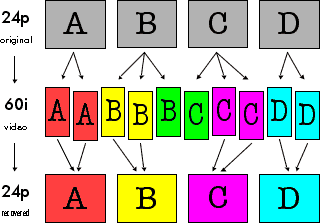
If the footage had 3:2 pulldown instead of 24p-a's 2:3:3:2 pulldown, FCP would still discard one frame in five, but every fourth frame would have interlace jaggies.
Check your settings, and make sure everything's set up the way it should be. You might also try capturing at 60i (29.97) and looking at the footage frame by frame in FCP to determine if it is 24p-a or 24p.
My best guess -- good luck! :thumbsup:
24p-a
Are you sure you shot in 24p-a?
This seems like what would happen if you imported regular 24p into FCP using the 24p-a setting.
When you import 24p-a, FCP removes one frame out of five. If the footage was shot in 24p-a, FCP is discarding the "mixed" frame, so you end up with 24 clean frames per second.
Here's Adam Wilt's chart:
If the footage had 3:2 pulldown instead of 24p-a's 2:3:3:2 pulldown, FCP would still discard one frame in five, but every fourth frame would have interlace jaggies.
Check your settings, and make sure everything's set up the way it should be. You might also try capturing at 60i (29.97) and looking at the footage frame by frame in FCP to determine if it is 24p-a or 24p.
My best guess -- good luck! :thumbsup:
Scottdvx100
Veteran
FCP doesn't always show the true quality of images.
Save a QT of the clip, open it in QT Player and set quality to high.
Set through that. If that's fien and you don't have to re-render then the end results shoudl be fine.
Save a QT of the clip, open it in QT Player and set quality to high.
Set through that. If that's fien and you don't have to re-render then the end results shoudl be fine.