

kingsly
Member
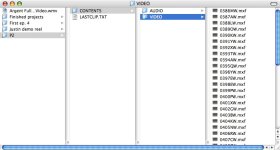
I just finished a shoot. We used a Panasonic P2 Camera running 1080pA24 to a firestore drive. I then dumped the files from "CONTENTS" to my HDD. I then went into FCP and chose P2 import and, to my delight, it tells me that the directory structure is invalid. I have the "LASTCLIP.TXT" file and it appears to be in the right place.
I need a fix before the firestore gets erased!
Also... we shot with 35mm lenses and all the footage is upside-down. Is there an easy way to flip the images over without having to render every clip in the timeline?
EDIT: I added a "CLIPS" and "ICON" folder to "CONTENTS". It no longer tells me about a bad directory, but nothing shows up in my P2 import menu... Help?
I need a fix before the firestore gets erased!
Also... we shot with 35mm lenses and all the footage is upside-down. Is there an easy way to flip the images over without having to render every clip in the timeline?
EDIT: I added a "CLIPS" and "ICON" folder to "CONTENTS". It no longer tells me about a bad directory, but nothing shows up in my P2 import menu... Help?
Attachments
Last edited: