Effect in Vegas for equipment reflection?

Lynos

Well-known member
Hi all

I'm in post-production on my short and editing on Vegas Pro 10. I have a long dinner scene with big windows in the background. After shooting, I found out that some of the lighting stands are reflected in the window. It's not in focus, but it's definitely there. I don't know if it can be identified as filming equipment by an audience, but I'm not gonna take that chance. In either case, it looks out of place in the scene. Re-shoot is not an option.
I was wondering if there's any kind of effect/plug-in in Vegas that can take care of this problem. Maybe something to darken the windows? I would appreciate any kind of feedback on this. I will also add that the scene is static, no camera movements.

Please see below a screen capture.

Thanks.
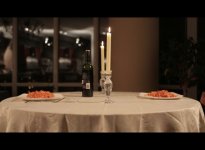
Image1.jpg
 
If that's literally the reflection you're worried about, relax - I've seen far stranger lighting in real restaurants.

If you desperately want to hide it, yes there are ways, but they require some (or much) manual work, there's no magic 'darken window reflections' effect :) The simplest option is to repeat the video track (i.e. both holding the identical video events), add an effect to darken the upper track, but with a mask so that only the small area you care about is darkened. The bad news is that I'm guessing the actors occasionally move in front of the area in question? So you'll need to manually edit the effect to switch it on and off on the appropriate frames, and that can be very tedious.
 
Thanks, guys.
I suspected it would require some kind of masking, but it sounds tedious indeed, since the actors are very much moving in the scene.
The reason I'm worried is because this is a long scene. It's sustained on screen for 20-30 seconds, and I return several times to the same set-up in the edit. If it was a quick cut I wouldn't worry about it that much.
But nobody is moving in front of the lights.
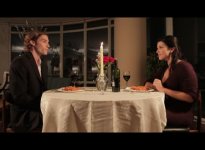
Here's another screen capture, this time with the actors in it, and slightly zoomed out.
Do you really think it passes scrutiny?
By the way, the scene doesn't take place in a restaurant, but in an apartment, if it makes any difference.
Thanks.

Image2.jpg
 
Ok, if the audience knows it's an apartment, then the reflections are a little less believable (as they represent the other side of the apartment's presumably small dining room), but still not terrible, especially if there's no visible movement etc to draw the audience's eye to those background windows. The window behind the candle isn't a problem, as it's obscured, it's only the window to the left which I'd even consider fixing.

I would recommend you try the masking technique anyway, even if only to confirm how hard/easy it will be, and to know how to do it in future - it can be a real life saver. But yes, if your actor spends the whole scene waving his arms around in front of that window, adding a mask 'behind' him may be quite a tedious job.

oh, as well as a 'darken' mask, you may also wish to consider a 'blur' mask. Does equally well in terms of disguising things, but can be preferable to creating a dark spot in the frame.
 
Thank you very much, Clang. I'll give it a try.
The actor isn't flailing his arms, but his head moves back and forth, sometimes partially covering the window.

Cheers
 
Yup, sounds like you'll need to do some mask animation to move (or simply remove) the mask when his head gets in front of it. Still, try first with a mask limited to just the area of the window he never overlaps - you may get lucky and it will be sufficient to disguise the reflections throughout the shot (after all, you just want a vague blob that won't draw the viewer's attention) without needing to animate the mask.
 
As Chang says, it can be done. I did a shoot some time ago where the interviewee was about 18 inches away from a large LCD screen with programming playing on it. It was in clear focus and consequently too distracting so I made a mask around the set and blurred out the background. Fortunately he sat still for most of the interview but, when he did move, I simply adjusted the mask to compensate.
You can see the result at Errol Da-Re, 2010 Alumni of Distinction Honouree
edit: i had nothing to do with the poor quality of the YouTube version.

Mike
 
My issue is that it's not just a square, limited area like a TV screen, it's a long object from top to bottom in an open space. I'll have to blur the surroundings as well as the object and I'm concerned it'll look very unnatural. I really don't know if I'm skilled enough with this to make it work seamlessly. But as I said, I'll try it if there's no other choice.

I'm now coloring the project and playing with the contrast made the windows even darker. So they're now semi-dark and out of focus... Maybe I'll just manage to crush it enough without needing to mask it at all. Here's hoping.

Thanks.
 
Back
Top