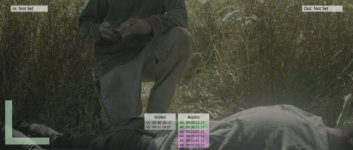
Depends a lot on the shot and how much the actor moves but you should be able to roto the area moving, blend in footage from non-moving sections. If the camera moves a lot it's a bit harder but not much. If the camera moves you have to track it and distort the still frame(s) into the moved frames, mocha+AE does this kind of work fairly easily. Lots of tutorials on the net. If you don't have AE (which comes with a light version of mocha that would be fine for this) some video editors have compositing features that might be good enough, all you need is a simple mask with a feather and layers.
Presuming this was shot with a locked tripod, and your "live" actor stays behind the "corpse" throughout, and the "corpse" is supposed to stay absolutely still throughout, then it should be fairly easy to grab a suitable single frame from when the "corpse"'s back is at its highest (due to breathing in), mask out everything behind the "corpse", then composite that frame on top of the whole shot. At least, that's how I'd do it in Vegas.
Much harder with a moving camera, as you'd have to track that movement, and somehow create a "corpse" mask wider than the screen. Good advice from Matt above re something like Mocha.