Editing EX3 footage in Final cut

I am shooting 1080p25 on an EX3 but am confused as to what my work flow should be, in terms of FCP import, export, rendering, and sequence settings etc should be to export the best quality footage from FCP.

At the moment i import using XDcam transfer but after that become very confused as to what my best options are. and then either want to export as a file for the internet or to compressor and eventually to DVD studio pro.

At the moment when i finish the edit and export the footage is such bad quality.

I am shooting in Europe so PAL.

Can anyone help?! Pleeease!
 
XDCam import works? That's surprising. The EX3 is not an XDCam camera. Curious to hear from FCP users. I am not one.
 
I am shooting 1080p25 on an EX3 but am confused as to what my work flow should be, in terms of FCP import, export, rendering, and sequence settings etc should be to export the best quality footage from FCP.

At the moment i import using XDcam transfer but after that become very confused as to what my best options are. and then either want to export as a file for the internet or to compressor and eventually to DVD studio pro.

At the moment when i finish the edit and export the footage is such bad quality.

I am shooting in Europe so PAL.

Can anyone help?! Pleeease!
Without knowing what your exact workflow is (including things like export settings) it's hard to suggest what you could be doing better.


XDCam import works? That's surprising. The EX3 is not an XDCam camera. Curious to hear from FCP users. I am not one.
The XDCAM Transfer software from Sony is for all of their tapeless media so XDCAM, XDCAM HD, XDCAM EX, XDCAM HD 4:2:2, etc., are all brought into FCP this way because the files have to be re-wrapped into the QT container to work w/FCP.


-Andrew
 
after importing i do all editing within FCP including titles and use only simple cuts, i then either export as a quick time file to be able to play direct from my computer or to DVD studio pro.

I realize there is probably more than one way to go about it but was hoping someone could suggest a way that gets the highest quality footage exported.

The footage is HQ 1080p25 shot on a sony EX3, but the footage i export after editing seems to be such low quality.

I think where i might be going wrong is in the sequence settings options and the render options.

Any advice would be so so appreciated,

Paddy
 
The XDCAM Transfer software from Sony is for all of their tapeless media so XDCAM, XDCAM HD, XDCAM EX, XDCAM HD 4:2:2, etc., are all brought into FCP this way because the files have to be re-wrapped into the QT container to work w/FCP.


-Andrew

Much obliged for this. I am not an FCP user, but every piece of knowledge like this helps me learn, and I am sure others as well.
 
after importing i do all editing within FCP including titles and use only simple cuts, i then either export as a quick time file to be able to play direct from my computer or to DVD studio pro.
QT is just a container that can hold everything from low quality files designed for streaming across dial-up internet connections to 4k files that would look stunning on a 40ft movie screen.

If you want the highest possible quality footage you'd want to export as 10-bit Uncompressed, but good luck playing that back on anything not connected to a fast RAID. Exporting as ProRes 422 still requires a pretty speedy HDD (an FW800 drive or the eSATA drives in a Mac Pro should be fine for a single stream of playback) but the files should be visually identical to those exported using Uncompressed. If you want to playback ProRes on a machine that *does not* have FCP installed you need to download a read-only version of the codec from Apple.

For creating your DVD's, try giving this Ken Stone guide a shot as a starting point. I know it's for HDV, but it should still work well.


I think where i might be going wrong is in the sequence settings options and the render options.
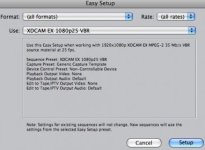
Using the Easy Setup that matches your footage will make sure you have the right sequence settings and you also have the option of rendering in the timeline in the native XDCAM format or rendering in ProRes. Rendering in ProRes will be faster and provide higher quality renders, but it will eat up much more disk space.


-Andrew
 
Andrew,

That is really helpful, thank you.

I have taken your advice and the footage looks much better however as FCP canvas the screen is tiny and the same after exporting it as a QT file there is a huge black border around a tiny screen?

In the sequence settings i have used

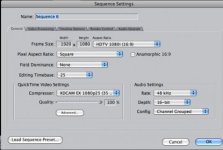
Frame Size 1920 x 1080 HDTV 720p (16:9)

Pixel aspect ratio: Square

In Quick time video settings:

Compressor: Apple ProRes 422 (HQ)

And Render control:

Codec: Apple ProRes 422 (HDV, XDCAM, HDEX only)

Quality: Best

Do you know how i can stop the screen shrinking as it does?

THank you again for your help.

Paddy
 
Never, ever, ever, ever make your own custom Sequence settings unless you know exactly what you are doing and why because it's a sure fire way to screw things up.

You should be using this Easy Setup:
Picture 5.jpg
After you choose that Easy Setup make a new sequence and it will have the proper settings which will look like this:
Picture 6.jpg

Under Render Control it's fine to set that to Apple ProRes.


Put a new cilp in there and it should look good. I'd suggest redoing the edit from scratch in the new sequence. If you've already done a lot of cutting you could copy and paste the clips from your current sequence into this new sequence, select them all, right click, select Remove Attributes, and check all the boxes under the Video Attributes heading.


-Andrew
 
Back
Top