Edirol R4 Pro with 23.98 timecode

I'm shooting a video at 23.98fps. I want to jam sync the Edirol R4 Pro, but it doesn't stay in sync. The Edirol TC seems to move fast, gaining about 10 frames every minute. I've read that this recorder doesn't support 23.98fps, but I see it right there in the menu as an option.
Can anyone with experience tell me how to make 23.98fps work on this recorder?
 
Did some fast searches and there seems to be an early ersion of the R-4 pro that doesn't do 23.98 (I don't know how this would work with later softwares).

My suggestion is to contact the support at Edirol - this is the kind of thing it's there for.

Good luck!
 
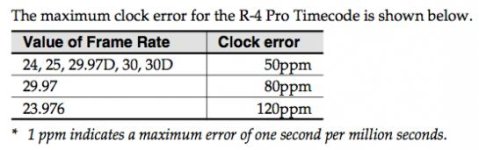
I found out there is a firmware update from 2009 that adds the 23.98 option. But I was shocked to read the tolerances in the release notes. It's allowed to drift 120 seconds per million. That means 1 frame every 6 minutes. My issue is still much worse than that (10 frames every minute), but the allowed drift seems very high! The Denecke TS-3 on the other hand, specs 1ppm.
I looked up a Sound Devices 788T and it specs 0.2ppm. I'm not really a sound guy, so I'm not familiar with this stuff, but is this Edirol considered like a joke among recorders?
Edirol engineers will respond in a couple days.

Screen Shot 2013-03-04 at 10.54.31 AM.jpg
 
I've never used it's timecode capabilities, so I can't really comment on that. Otherwise it's a good value with four channels and pretty quiet preamps, but the layout of the buttons isn't very bag-friendly and it lacks analogue filters and limiters.
 
120ppm is a really high tolerance number for a timecode device, and is not considered accurate enough for timecode sync in a pro environment (.01ppm-.02ppm is the norm), but 10 frames per minute sounds more like the difference between 24fps and 23.98fps. If one device is at 24fps and the other at 23.98, you might be able to jam one from the other, but they will drift apart rapidly in the manner you're describing.

The only way to have accurate TC on an Edirol is to feed it constant timecode hardwired from something like a Denecke or sound Devices clock
 
Wouldn't the difference between 23.98 and 24 be 0.02 frames/second? That equates to 1.2 frames/minute. What I have is 10 frames/minute drift.
But anyway, I understand now that the Edirol's internal clock is useless. Thanks.
 
The only way to have accurate TC on an Edirol is to feed it constant timecode hardwired from something like a Denecke or sound Devices clock

This was going to be my suggestion. Feed it external TC and have it continuously jam from that source. It's the only way for it to be accurate. I always prefer to have a master timecode generator anyway that isn't the camera or audio recorder, and then jam everything from that and put TC devices where they are needed, like on cameras and unstable audio recorders.
 
Alright so yeah I'm just going to have an external clock.

On a similar note, I noticed that when bringing WAV files from this Edirol into DaVinci Resolve or FCP 7, the 'fps' field is blank, and the start timecode is wrong. I can fix this by opening every file in Wave Agent and setting the TC to 23.98 (it was blank before). I know this is an older recorder, but is there any way to have it set that metadata automatically? Or a faster way than Wave Agent? Because all the filenames are the same, Wave Agent will only open one set at a time.

P.S. I realized I was mistaken earlier when I said it drifted 10 frames/minute. It's actually more like 1 frame every 6 minutes, which is about what Edirol specs.
 
If the FPS Metafdata is not written to the BEXT chunk (basically a bunch of data in a Broadcast Wave File that tells an application like FCP about what is in the file), or if it is in the wrong place, or if it is written incorrectly, then the application cannot calculate timecode correctly. There isn't actually a timecode number stamped somewhere in the file. What there is, is a set of numbers (Frame Rate, Sample Rate, Number of samples since midnight) that applications use to calculate the timecode start number of the file.

Since FCP and DaVinci don't see any FPS rate in the BEXT, it probably defaults to something else, and basically guesses, which is why your TC numbers don't match.

There's no way to make the Edirol put that info in there short of having Edirol write new software, so it's Wave Agent for you.

The Edirol should not be creating duplicate file names for every take. there should be some kind of differentiating character between them. If you are using Wave Agent to rename the files based on Scene and Take metadata, and all of that data is identical, then you'll get duplicates.

then again, I don't have a whole lot of experience with the Edirol....
 
Thanks Mike, that's good information to have.
The sound guy on set is making a new folder (aka "project") on the Edirol for each shot (e.g. '10F'), and inside that folder the Edirol automatically names files ACM_001.wav, ACM_002.wav, etc. for each take. So I have 100 files all called ACM_001.wav - one for each shot. I think the best plan is just to rename all the WAV files before syncing so they are unique.
 
Try creating a new folder for every day, not for each shot. Then, change the file prefix (the "ACM" part) for every scene change if the Edirol allows. You'll have more files in a single folder, but they'll all have different names
 
The sound guy on set is making a new folder (aka "project") on the Edirol for each shot (e.g. '10F'), and inside that folder the Edirol automatically names files ACM_001.wav, ACM_002.wav, etc. for each take. So I have 100 files all called ACM_001.wav - one for each shot. I think the best plan is just to rename all the WAV files before syncing so they are unique.
Choose to record as a 4ch polyfile (4x1 in the recording menu) and then every file will be given a specific name. In post, just delete the tracks you didn't use.
 
Back
Top