
Barry_Green
Moderator
External Recorders for the DVX200
As part of the research I am doing for The DVX200 Book, I arranged to borrow a couple of external recorders from some of the manufacturers for evaluation. Sound Devices sent a PIX-E5H, and Convergent Design sent an Odyssey 7Q+. These products represent two very different approaches towards the same job, so I thought I'd take the opportunity to describe the experience.
First, my goal here was specifically and solely related to evaluating recorders for use with a DVX200. I was not examining raw 240fps recording from an FS7 or any other similar, exotic usage. If you plan on using the recorders in a different way than I was, then your conclusions may be different – and if so, more power to you; your own research is the only way you'll be able to know for sure which product is more appropriate for your own uses. I'm detailing my results, from my intended use, and this article should be read with that perspective in mind.
Hardware:
Convergent Design supplied their Odyssey 7Q+, and right out of the box I was instantly in love with it. The hardware is magnificent. The screen is gigantic – well, I mean, as gigantic as a 7” screen can be, obviously it's not large in terms of a production monitor, but for an on-camera monitor it is quite large, definitely much larger than the DVX200's onboard LCD or the PIX-E5H's 5” display.
Not only is the display screen large, but it is luscious. The color and contrast are both gorgeous. Viewing the image at a pixel-to-pixel display is extremely satisfying. This is a great screen.
In addition, the 7Q+ is brimming with input and output ports. Seven BNC connectors, two audio connectors, an HDMI in and out, a port for a remote control, and a USB port (that is not currently active) round out a full slate of connectors.
The 7Q+ also has two slots for SSD recording drives, and you can attach a Nebtek plate to mount a battery for powering the monitor. Interestingly, even though the DVX200 uses a relatively new type of battery, the existing Convergent Design Panasonic CGP-series battery plate worked fine with the DVX200's new battery.
In the other corner, Sound Devices supplied their PIX-E5H, which represents a very different approach. Whereas the Odyssey 7Q+ hardware is bristling with ports and connectors and jacks and slots, The PIX-E5H's approach is more minimalist in design. The PIX-E5H is much smaller, really living up to the pun in its name (PIX-E, “pixie”). The only connectors on this model are an HDMI in and an HDMI out, a headphone port, a power port, and a 2-channel audio input port. There is also a USB, an SD card slot, and provision for one SSD drive and two batteries. There are no SDI BNC connectors on the PIX-E5H, although Sound Devices does offer SDI input on a different model, the PIX-E5. I specifically requested a PIX-E5H for testing with the DVX200 since, even though the DVX200 does have an SDI output, the SDI output doesn't support 4K or UHD, and so I felt that the HDMI-only version was entirely suitable to the DVX200, and was a couple hundred dollars less expensive.
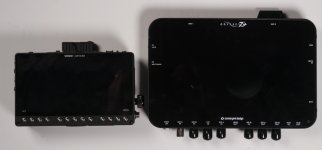
When I first got the PIX-E5H, I was, in a word, delighted. It feels like it's built from a solid block of quality, carved into a nice compact size, with an additional layer of quality fused in, and powder-coated with a finishing coat of quality. My second impression was: wow, this thing is small. Really small. It's diminuitive compared to the Odyssey. In fact, it really isn't much bigger than the DVX200's built-in LCD panel. If it wasn't for the excellent magnified display during recording, you might be hard-pressed to justify getting the PIX-E5 or E5H and using its 5” display as an external monitor, when the DVX200 already has a 4.3” display. The PIX-E5H's display is gorgeous, yes, but it's not all that much bigger. Then again, therein lies much of its appeal – it's a compact unit that easily works well as an onboard monitor. The screen isn't much bigger, but when combined with its magnified mode, it lets you see everything you need to.
While both monitor/recorders are operated via touch-screen, the PIX-E5H also includes a number of physical controls too. There are 13 physical buttons as well as a general menu wheel/button. You can choose to operate the unit via button or via touch-screen; the exact functioning of each button changes depending on the current circumstances. The Odyssey 7Q+ is only operated by touchscreen. Fortunately, the touch-screen works fine even with gloves on.
One hardware observation: the PIX gets a lot warmer than the Odyssey does. After it's been on a while, the PIX is notably warm. Not “hot”, still quite easy to hold, just … warm.
Here's a size comparison between the two:
Beware: rant ahead. One point where the PIX-E5H is substantially superior to the Odyssey 7Q+ is in the HDMI port. The PIX-E5H uses a full-size HDMI port, and the cable snaps in tightly and confidently. The Odyssey uses the mini-HDMI port. I have to confess – I HATE the mini-HDMI port. In my mind, it's one of the least-secure, least-confidence-inspiring, least-professional connectors ever devised. I know Convergent Design will have their reasons for choosing the mini-HDMI, but – I disagree. It's awful. I've used the Odyssey with a mini-to-full-size HDMI adapter (supplied by Convergent Design) and it dangles and flops around; I can just see it falling out or disconnecting. I've also used the Odyssey with a Convergent Design-supplied full-size to mini HDMI cable, and that was definitely better; the mini-HDMI connector is much happer with a mini-HDMI cable than it is with an adapter. Even so, it doesn't grab and hold the cable like the PIX-E5H does. With the PIX-E5H, the cable snaps in securely. With the Odyssey's mini-HDMI, it slides in, but – there's just no confidence. I have encountered repeated issues with the Odyssey's HDMI input, many resolved by firmware, but – ain't nothin' firmware can do to fix a fundamentally “iffy” hardware connection. You can, however, fix it with hardware; in googling I found a company offering an HDMI locking device: http://thextender.com/shop/xtender-odyssey-7q-hdmi-lock/ If I was going to use the Odyssey on paying jobs as an HDMI recorder, I would absolutely consider the use of something like The Xtender mandatory to overcome the inherent design shortcomings of the mini-HDMI. I do hope Convergent Design considers including a full-size, securely-fitting HDMI 2.0 port for the next generation of Odyssey hardware. Rant off, now returning to the regularly-scheduled review.
Software
Both products offer an extremely good and comprehensive set of tools for monitoring, recording, and playing back video. Both offer vectorscopes, waveform monitors, false color, zebras, histograms, RGB parades, magnification for focus, colored peaking (aka “focus-in-red”), and user-loadable Look Up Table (LUT) support.
Both products are extremely useful and their toolsets definitely enhance the experience of using the DVX200. Some of the shortcomings of the DVX200 (such as not being able to have other displays enabled when its waveform is on, and not being able to use magnified focus assist during recording) are completely resolved by using the external recorder, and both products provide superb focus and monitoring tools.
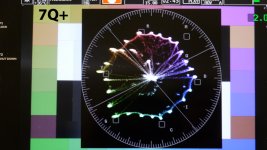
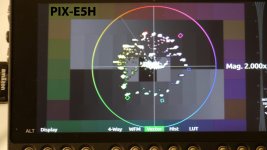
That said, there's an edge, and it's a rather significant edge in my opinion, towards the Odyssey. The Odyssey's vectorscope is a thing of beauty; the display is crisp, high-res, full-color, detailed, and – well, okay, you get to learn just how much of a video geek I am – it's breathtaking. The waveform monitor is large and detailed. The PIX-E's scopes are good and certainly functional and serviceable, but the Odyssey's are a master class in how it should be done.
Here's how their vectorscopes look:
As for magnified focus assist, again the two products take different approaches. The PIX offers a simple 2x or 4x focus assist, and it's eminently usable: touch the screen, you're magnified; touch it again, and you see the full field of view. Touch the physical button to change between 2x and 4x. It literally could not be simpler. The Odyssey, on the other hand, is more powerful and more complex. It offers 1:1 and 2:1 zoom, and then goes quite a bit further by offering a windowed zoom that provides 4:1, 6:1, 8:1, 10:1, and 12:1 “Hyper Zoom”. In Hyper Zoom, the screen itself stays at the full-frame field of view, but a small window comes up with shows the magnified portion, and you can touch the screen to select the portion of the screen you want magnified. While it's generally true that many options are better than fewer options, truth be told, there's not a whole lot of value to anything much beyond the 4x Hyper Zoom. The 6X, 8X, 10X and 12X all look digitally scaled. I like the concept of being able to zoom in further, but in actual practice, it doesn't really show you any more detail than the 4x, which both products offer.
Mounting:
The PIX-E5H is the absolutely perfect size for a compact on-camera recorder/monitor. It is small, lightweight, and easily fits on a Noga-style articulated arm; the DVX200's handle has four mounting holes (two 1/4-20's and two 3/8”) that are perfect for the job, and the PIX-E5H has a 1/4-20 socket on the bottom and another on the top. It fits perfectly, like it belongs up there, and frankly I haven't removed it since I got it. I love having that monitor/recorder up there.
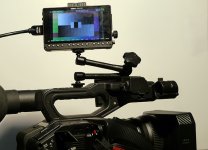
The Odyssey is a different story. It's much bigger; I'd say it's pushing the limit (or perhaps even too big) to be considered an on-camera monitor for a handheld camera like the DVX200. The Odyssey belongs on a stand or on a desk; in my opinion it's a bit big to be mounting on a handheld camera. I'm not saying you couldn't mount it on the camera; I'm sure there are plenty of people who do it all the time, I'm just saying – it's quite a bit bigger, and seems like it would be ungainly to use it as an on-camera monitor for a handheld camera. Then again, I've seen pictures on the web of people mounting the Odyssey on a DSLR rig; hey, whatever floats your boat, like I say it can be done, but to me it's obvious the PIX is more suitable for on-camera work from a simple physical weight and size perspective. If you're working in a strictly tripod environment, of course the Odyssey becomes more practical to mount on the camera in that case.
Furthermore, the Odyssey doesn't have a 1/4-20 socket on the bottom to provide easy mounting like that anyway; it does have one on the back, and some on the sides, but none on the bottom. I imagine with a sturdy arm it'd work fine, but I prefer the weight distribution of having it actually on the bottom. You can buy mounting racks for the Odyssey to give you a wide variety of mounting points which would alleviate any concerns about how to mount it.
Recording
Both units offer ProRes 422 HQ 10-bit (and lesser profiles too; both have ProRes 422 10-bit and 422LT 8-bit, and the PIX-E5H offers 422Proxy 8-bit). For my use, I kept the switch glued on 422 HQ 10-bit. That takes up the most bandwidth (about 880 megabits per second) and provides the highest quality; while the other recording modes trade off quality for additional recording time, frankly the internal camera recording serves that purpose just fine at 100 megabits, so I didn't bother using the lower-quality recording modes that these recorders offer.
Both units can be configured to work with the record flag on the DVX200, so you can start and stop the recordings by the camera's record button (in HDMI). The DVX200 also sends a start/stop record flag in its SDI output, but I couldn't get the Odyssey to recognize that flag in the current firmware (2015.8). I'm certain that this is simply a software issue and I fully expect Convergent Design to get it working in a future firmware update.
As far as the quality of the recordings, there's really nothing to say – both are certified by Apple as ProRes recorders, and the visual quality and bandwidth should be identical between them, unless there's a bug. As Dan Keaton pointed out, I did encounter a bug in the Odyssey when I first recorded 4K/24.00P; the Odyssey somehow chose an extremely low bitrate for its recordings and the results were blocky, banded recordings. They promptly fixed that bug and it's been performing well since.
The DVX200 is capable of sending a 4:2:2 10-bit signal out of its SDI and HDMI ports in 1080 up to 60P, and from its HDMI port it can send 4K at 24P and UHD at up to 29.97P; in addition it can output UHD from its HDMI port at 50P or 60P in 4:2:0 8-bit. The DVX200 uses an HDMI 2.0 port to support up to UHD 50/60P. Both the Odyssey and the PIX-E5H use HDMI 1.4 ports, which support 4K/24P and UHD up to 29.97P. As such, both recorders can handle almost everything the DVX200 can throw at them, but only almost. Neither recorder supports UHD at 50P or 60P, due to hardware limitations; HDMI 1.4 just doesn't support UHD 50/60P. If you really need to externally record UHD 50/60P, you'll have to wait for a newer generation of recorder.
The quality of the external recordings were basically identical, as you'd expect since both systems are certified by Apple to have been properly implemented. 10-bit 4:2:2 recording definitely provides a more robust signal for recording, which results in greater ability to manipulate the footage in post, and comes in especially handy when using the DVX200's VLOG-L mode. There is not a marked improvement in simple visual inspection between an in-camera and external recordings; the benefits of the external recording are generally recognized when manipulating the footage in post (grading or greenscreen work, etc) or if you're shooting something for a client who requires 4:2:2 at a certain bitrate, or even one who requires 10-bit.
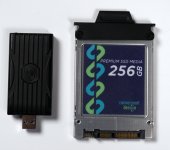
There is a big difference in terms of recording media. While both units record to SSD drives, the PIX-E5H provides for a single SSD “SpeedDrive”; the Odyssey provides slots for two SSD drives. The PIX SpeedDrive is an enclosure for mSATA drives with a USB port on it; the result looks like a large-sized USB thumb drive. The Odyssey, on the other hand, mounts larger bare SSD drives to a caddy, which snaps into the Odyssey unit. And there's two of them. That gives you the potential for recording on one while offloading the other, for example; the PIX-E5H simply can't do that. If you need extended record times with the PIX-E5H, you may need to get a larger SSD drive; currently the PIX supports up to 1 terabyte mSATA SSD drives, which would give you over 2 hours of recording UHD or 4K in ProRes 422 HQ 10-bit; you can extend that to around three hours by using ProRes 422. The Odyssey can double those recording times, by virtue of its two drive slots, when using 1TB drives.
Additional Features
As far as software capability goes, the Odyssey has many capabilities beyond what the PIX-E5H can do. Perhaps the most obvious is the raw recording option; the Odyssey supports recording raw from an Alexa, Canon C500, or Sony FS7/FS700, even at high frame rates. The PIX-E5H just doesn't do that; it records video signals, not raw. If you're an FS7/FS700 user, or intend to use a recorder for raw from an Alexa or C500, then this capability alone might make the choice obvious for you. As stated in the opening paragraphs, I am evaluating these products from the perspective of a DVX200 user, which cannot output raw, and therefore am not factoring in these additional capabilities. But as a prospective buyer, you should know the differences, in case it might become a material issue for you. Other things the Odyssey does that the PIX doesn't is a dual record mode where it can record two different cameras (in 1080) simultaneously, or a four-camera monitoring mode.
The PIX-E5H does offer an additional hardware option, the PIX-LR (or should it be PIXLR? Or PIX-XLR?) It's a bolt-on accessory that provides two XLR inputs and two XLR outputs, and (as the marketing says) “hyper-accurate LED metering” and “Sound Devices-caliber mic preamps.” Not gonna lie, that's a major selling factor to me. The ability to turn the PIX into a four-channel device (two XLRs on-camera, two additional XLRs on the PIX-LR), with legendary Sound Devices quality mic preamps, is definitely a consideration. I personally value that aspect quite highly. I spent $2,500 on my Sound Devices 442 mixer years ago; that isn't even a recorder, it's just a mixer. To add the fundamentals (two channels, meters, separate gain controls) and a recorder, for $350? That's a steal, any way you slice it.
Screen Quality
Both have absolutely wonderful screens. The PIX uses an IPS LCD, the Odyssey uses an OLED. The PIX-E5H is actually the higher-resolution monitor; it's a full 1920x1080, whereas the Odyssey is a 1280x800. Truth be told, the resolution difference made no difference to me in my evaluation; both screens look outstanding. It may make more of a difference with a PIX-E7, where the screen sizes are the same you may be able to gain a benefit from the higher resolution of the PIX, but when using the smaller 5” monitor, it was too small to really show a significant difference in resolved detail vs. the larger Odyssey.
The DVX200's LCD is quite reflective, and can get washed out and be somewhat difficult to see in bright daylight. It is with eager anticipation that I tried out the Odyssey and PIX to see how much they improved the situation. And the result is: not at all. They're pretty much all equally reflective. If you want to use these types of monitors in daylight, you're probably going to need a hood to shade off the reflections.
Price
The Odyssey carries a B&H price of $2,295, and includes two 256GB SSDs. The PIX-E5H carries a B&H price of $1,195, but doesn't include any storage; a 240GB drive is $249. How do you compare those apples? Well, if you already have your own mSATA drives, then you can get into the PIX-E5H for less money, sure. Or, if a single 240GB drive does all you need, the PIX comes in at about $1,444. If you need two drives, the PIX-E5H is at $1693. Neither unit includes batteries, or a lens hood, or mounting hardware. As discussed prior, the functionality is probably going to be more of a determining factor than the price will be, but if price is a major consideration, you can get into a PIX-E5H for less money than an Odyssey 7Q+. The 7Q+ has more features, but if you don't need them and the PIX-E5H does what you need, it can cost less. Both units include AC adapters; batteries are additional for each. The Odyssey includes a number of battery plates so you can use your existing camera batteries. The PIX uses only Sony L-mount batteries; if you don't have any of those, you'll likely want to pick up a couple and a charger.
The PIX has an accessory package for $1100 that includes two SpeedDrives, a hard case, sunshade, mounting arm, batteries & charger, and other assorted niceties. While nice, this is strictly optional; the only things you really need to add to a PIX to get it running would be an HDMI cable and a SpeedDrive. The Odyssey includes drives in its package price.
Usability
So here's where we get down to it. We know what the features are, we know what the additional capabilities are, so – what's it like to actually just USE them?
The PIX is intuitive. Its operation is largely invisible. There are no complicated several-level menus to navigate; its interface is simple and easy to use. It is effortless.
The Odyssey, on the other hand, comes off as comparatively unpolished. The menus are more complex, there's more layers of them, and they're just – look, they're easy enough to get into and out of, but they're just not as friendly or ergonomic. Using the Odyssey is more work. You have to manually intervene more often. And it lays multiple menus all over the screen. It begins to resemble the desk I have (piles of stuff I have to get to eventually), whereas the PIX more looks like the desk I wish I had (clean as a whistle, only what you need open).
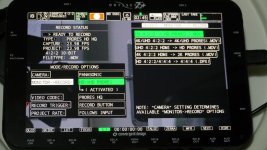
Here's an example of the two different menu systems. On each unit, I'm attempting to set the recording codec to ProRes 422 HQ. First, this is what the Odyssey looks like to get to that menu:
Now here's what the PIX-E5H looks like:
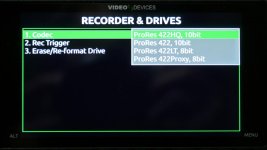
Is it a huge, important difference? Of course not. But one is clearly easier, cleaner, and simpler to get to, and this section is about usability, so I felt it warranted mentioning.
Of more concern to me is the general day to day operational tasks. When considering this, it just seemed like the PIX was friendlier. Here's an example: the DVX200 has a wide variety of recording modes (4K, UHD, 1080P, 720P). When switching between those modes (which I did constantly), the PIX would auto-detect and configure itself properly. With the Odyssey, I lost monitoring several times. Why? Well, it could be the dreaded mini-HDMI connector, so I'd unplug and re-plug that in. Sometimes that would fix it, sometimes it wouldn't. When it didn't, I'd then have to remember “oh yeah, I have to change the recording mode because the Odyssey doesn't auto-switch”. It's no big deal to do so, of course, but – the PIX had already done it. The Odyssey just sat there with a blank screen saying “no input”, waiting for me to figure it out. Sure, it's my fault; I should have just known, but – the PIX was like having a competent assistant working with me, anticipating what I'd need and taking care of it. The Odyssey was more of a do-it-yourself scenario. Which is fine, but after a couple of weeks of exposure to each, I really began to prefer the PIX way of doing things.
My journey with the PIX has been flawless. It has worked every time. There is, pretty much, literally nothing to report about it – it does exactly what I'd want, each and every time.
With the Odyssey, the road has been bumpier. I've encountered a number of bugs, all of which have been reported to Convergent Design and all of which were promptly fixed with firmware updates. Convergent Design has been very proactive in issuing firmware updates and new features, which is something that I've seen owners praise highly; heck, everyone loves getting something new, especially when they don't have to pay more for it. I've been a Convergent Design user for several years with the NanoFlash, and their customer service is absolutely top notch. Dan Keaton and Mitch Gross are accessible, knowledgeable, and dedicated, and at DVXUser.com we really appreciate their presence and support. But – while I'm happy that they've fixed the bugs I found, I will express a little disappointment that I found them in the first place. Shouldn't the product that reaches the end customer be bug-free, or at least as bug-free as possible? Especially in a product as vital in the production chain as a recorder? The good news is that this situation is entirely resolvable; Convergent Design can (and, I believe, will) exercise tighter quality control to ensure that the situation is improved.
On the other hand, the PIX has been operationally flawless; the only bug I encountered was that it was reporting the UHD stream as “8-bit” when it should have read “10-bit.” When I contacted Paul Isaacs of Sound Devices about that, he told me that they'd already fixed it and the new firmware was already on their site for download. That is the only firmware update I've applied to the PIX, and the process was effortless (as it was on the Odyssey when I updated its firmware). Note: Like Mitch Gross and Dan Keaton of Convergent Design, Paul Isaacs of Sound Designs has been highly accessible on DVXUser.com. Both manufacturers are maintaining a presence and interacting with the users and answering questions, and it's highly appreciated!
Note that while both units operate via touch-screen, the Odyssey is solely touch-screen operated. The PIX can be operated via either touch-screen, or by the buttons and menu wheel. As you can well imagine, after heavy usage, both units have a whole lotta fingerprints all over their screens. Technically that could be avoided (or minimized) on the PIX, if you operated solely by the physical controls. I usually find myself doing about half-and-half with the PIX. With the Odyssey, you have no choice, it's all touch-screen, which is fine, but there's been an issue with the Odyssey where sometimes the screen loses responsiveness. The fix is simple enough (just press and hold the F1 button for a couple of seconds) but it's still something you have to be aware of. Like all the issues that have been brought up, this one might easily be solved via firmware (I don't know, I'm just saying it might be) and if so, this concern might disappear totally with the next issued firmware update.
The Choice Between Them
So how does someone choose between these products? If I were to buy one, which one would it be?
Well, first things first – there are some easy choices to make. If you use an FS7 or FS700 and want to record high-speed RAW, then your decision is already made: get the Odyssey. If you need to record HD-SDI or 3G-SDI, get the Odyssey. If your major interest is in high-quality sound, get the PIX-E5H with the PIX-LR.
If none of those initial situations apply to you, and you're still considering which to go for, I'd offer the following analogy (and hey, at least it's not a car analogy!) Think about it like Windows and MacOS. Certain users prefer the Windows way of open-hardware options, configuring their own computer, and being able to run the much wider library of software that's available for Windows. On the other hand, there are users who love the Apple approach: simpler, even minimalist in some cases, with controlled hardware and a tightly integrated OS.
To me, the Odyssey is more like the Windows approach. More complex menus, a less-polished interface, and more hardware options. And, at least in my experience, a few more bugs and issues to work around.
On the other hand, the PIX seems more like the Apple approach. Sleek, polished, friendly, with (almost) all the power and functionality that (almost) anyone would need. If you do need SDI, they have a model for that (PIX-E5). If you need a 7” screen, they have a model for that (PIX-E7).
One simple example might illustrate this best: look at the SSD drives. On the Odyssey, they're bare drives. On the PIX, they're encased in a full enclosure. I think this difference sums up the differences in philosophy behind the two products. The bare drive is certainly functional, it does work well, and you can plug in a docking device to turn it into a USB3 reader for direct connection to a computer... but the other one is already a USB 3 connection. There's no bare drive connectors. There's no prospect of, oh, I don't know, shocking it with static electricity or getting crud on the connectors or anything like that.
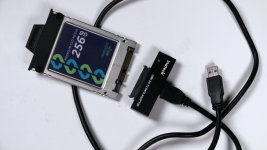
The Odyssey seems rougher; frankly, it seems more like a Windows computer. The PIX seems more polished, more “complete”; it feels more Mac-ish.
Generally, I'm a Windows user. I don't like being locked into one supplier, one manufacturer, who only offers a couple of models, no (or limited) user upgradeability, and a more limited selection of software. So you'd think that naturally I'd gravitate towards the Odyssey. And I do love the Odyssey. I love the potential, I really like the idea of harnessing two SSDs to be able to write high-speed raw footage, I like multiple inputs and outputs, and I love the scopes. Love the scopes. Might buy one just for the scopes.
But – after evaluating these products for the last several weeks, I'd say that if I was spending my money, for a companion recorder for a DVX200, hands down I'd buy the PIX-E5H. It does everything I need, and it does it flawlessly, smoothly, easily. It offers me something that I would definitely take advantage of (the PIX-LR audio accessory) which is more important, to me, than something that I may or may not ever use (high-speed raw recording on an FS7). The PIX-E5H handles everything that the DVX200 can throw at it (except SDI, which on the DVX200 is limited to HD; again, if you need SDI, you can get a PIX-E5). It's less expensive. But more than anything, it comes down to the user experience. I never had to try to figure out why the PIX wasn't working, because it was always working. With the Odyssey, I'd occasionally have to jump through menus until I figured out the missing piece or the secret sauce necessary to get things back on track, or plug and unplug the cable, etc; with the PIX it was always working, always ready, always waiting for the next command. As a hobbyist, I really prefer the Windows or Odyssey approach. But when I'm on a job where my reputation is riding on the line (as well as my paycheck), I greatly appreciate the effortless simplicity and reliability of the PIX-E5H.
Last edited:


